Delete Customer
- Kalpana Malladi
- Gouri Bhagchandani (Deactivated)
In this article
Overview
You can use this Snap to delete existing customer records from the Shopify store.
Prerequisites
None.
Support for Ultra Pipelines
- Works in Ultra Pipelines.
Limitations
- API versions: Shopify releases new API versions every quarter. Each stable version is supported only for a minimum of 12 months. Part of a Shopify API is deprecated if it becomes unnecessary, unsafe, or outdated. The API’s are marked as deprecated when they are removed in a newer version of the API. The deprecation is then retroactively applied to previous stable versions of the API.
API Rate Limit: All Shopify APIs are rate-limited. Shopify uses various strategies to enforce rate limits, such as Calculated query cost, Request-based limit, and Time-based limit.
Shopify Snap Pack uses admin APIs, which are applicable for Request-based limit. If the APIs cross the rate limit, the Snap fails.
Known Issues
None.
Snap Input and Output
| Input/Output | Type of View | Number of Views | Examples of Upstream and Downstream Snaps | Description |
|---|---|---|---|---|
| Input | Document |
|
| The ID of the customer to delete. Upstream Snap is optional. |
| Output | Document |
|
| The ID of the deleted customer. |
Snap Settings
Field Name | Field Dependency | Description |
|---|---|---|
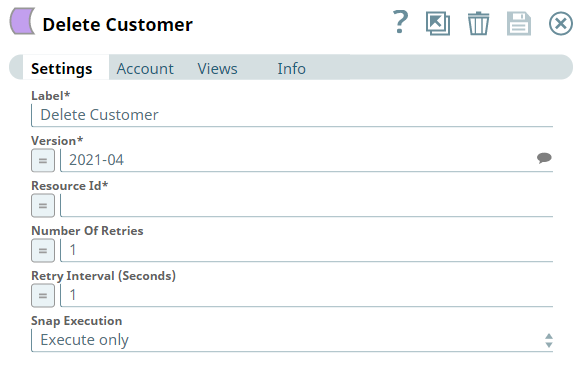
| Label* | N/A | Specify the name for the Snap. You can modify the default name to be specific and meaningful, especially if you have more than one of the same Snaps in your pipeline. Default Value: N/A |
| Version* | N/A | Specify the Shopify API version. Alternatively, click the Suggestion Default Value: 2021-07 |
| Resource Id* | N/A | Specify a unique identifier of the customer to delete a specific record. Default Value: N/A |
| Number Of Retries | N/A | Specify an integer value to set the maximum number of reconnection attempts that the Snap must perform, in case of connection failure or timeout. Default Value: 1 |
| Retry Interval (Seconds) | N/A | Specify the duration in seconds for which the Snap must wait between two reconnection attempts, until the number of retries is reached. Default Value: 1 |
| Snap Execution | N/A | Select one of the three modes in which the Snap executes. Available options are:
Default Value: Execute only |

Troubleshooting
| Error | Reason | Resolution |
|---|---|---|
"402 Payment Required" | The requested shop is currently frozen. | You need to log in as admin user and pay the outstanding balance to unfreeze the shop. |
"404 Not Found" | The requested resource is not found. | The resource could be available again in the future. |
| The requested resource is only capable of generating content, but not acceptable according to the Accept headers sent in the request. | N/A |
"409 error" | This is an intermittent error that you can encounter when there is a conflict in your orders, products, or customer data. For example, when you use unsupported characters. | Check for the conflicts in your metadata and rerun the Pipeline. |
"422 Unprocessable Entity" | The request body was well-formed but contains semantic errors. You can encounter a
| The response body provides details in the errors or error parameters. Fix the error parameters as given in the error description. |
"422 empty entity error" | You might be sending null or empty or unsupported data. | Check the data and fix the null or empty data. |
| The requested shop is currently locked. Shops are locked if they repeatedly exceed their API request limit, or if there is an issue with the account, such as a detected compromise or fraud risk. | Wait for Shopify to unlock your account after the specified amount of time, after which you should be able to continue working on your Pipeline, or contact support if your shop is locked. |
"429 Too Many Requests" | Shopify APIs use different API rate-limiting methods. If the APIs exceeds the rate limit, the Snap fails. | See the API Call Limit documentation for a breakdown of Shopify's rate-limiting mechanism. |
"500 Internal Server Error" | An internal error in Shopify application causes this error. | Post the error details to the API and Technology forum so that Shopify staff can investigate the issue. |
| The requested endpoint is not available on that particular shop, for example, requesting access to a Plus-specific API on a non-Plus shop. This response may also indicate that this endpoint is reserved for future use. | N/A |
"504 Gateway Timeout" | The request could not complete in time. Shopify waits up to 10 seconds for a response. | Break down the request in multiple smaller requests. |
Snap Pack History
See Also
Have feedback? Email documentation@snaplogic.com | Ask a question in the SnapLogic Community
© 2017-2025 SnapLogic, Inc.