
Transcoder
Kalpana Malladi
Aparna Tayi (Unlicensed)
Lakshmi Manda (Deactivated)
On this Page
Snap type: | Transform | |||||||
|---|---|---|---|---|---|---|---|---|
Description: | This Snap transcodes a binary stream from a selected character set to another character set. For example, it can be used to convert an "ISO Latin 1" text file into an "UTF-8" text file.
| |||||||
| Prerequisites: | The input binary data should be a text of a known character set. The Snap cannot automatically detect the character set of the input data. | |||||||
| Support and limitations: | Works in Ultra Tasks. | |||||||
| Account: | Accounts are not used with this Snap. | |||||||
| Views: |
| |||||||
Settings | ||||||||
Label | Required. The name for the Snap. You can modify this to be more specific, especially if you have more than one of the same Snap in your pipeline. | |||||||
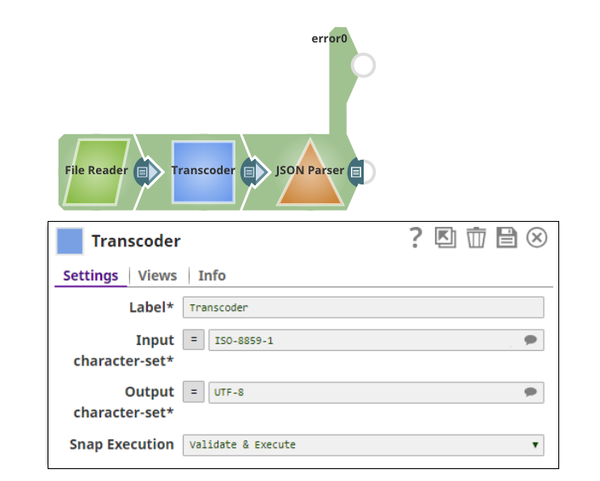
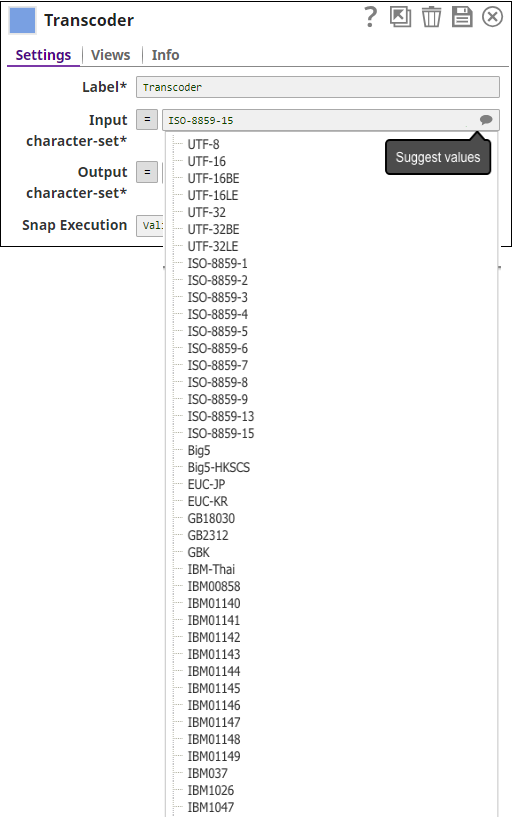
Input character-set | Required. The character set to convert from. Click the 'Suggest' bubble for available character sets. Example: ISO-8859-1 Default value: UTF-8 | |||||||
Output character-set | Required. The character set to convert to. Click the 'Suggest' bubble for available character sets. Example: UTF-8 Default value: UTF-8 | |||||||
Snap Execution | Select one of the following three modes in which the Snap executes:
Default Value: Execute only | |||||||
Example
February 2025 main29887 Stable Updated and certified against the current SnapLogic Platform release. Improved Join Snap’s resource management to detect output stream closure failures, throwing an exception at the debug log level for better diagnostics. Minimized the possibility of Fixed an issue with the CSV Parser Snap that introduced unexpected characters into the records and output data because of incorrect handling of the delimiter. Fixed an issue with the JSON Generator and XML Generator Snaps that caused unexpected output displaying '__at__' and '__h__' instead of '@' and '-' respectively because the Snap could not update them to their original values after the Velocity library upgrade. Fixed an issue with the Sort where the Snap could not sort files larger than 52 MB. This fix applies to Join Snap also. Added expression support to the Skip lines field in the CSV Parser Snap to enable passing pipeline parameters and upstream values. Fixed an issue with the XML Parser Snap that caused an error when using the Splitter option in the Snap settings. Enhanced the JSON Splitter Snap to capture metadata and lineage information from the input document. Fixed an issue with the JSON Formatter Snap that generated incorrect schema. Fixed an If the input documents are unsorted and GROUP-BY fields are used, you must use the Sort Snap upstream of the Aggregate Snap to presort the input document stream and set the Sorted stream field Ascending or Descending to prevent the Learn more about presorting unsorted input documents to be processed by the Aggregate Snap. Fixed an issue with the Aggregate Snap where the Snap was unable to produce the desired number of output documents when the input was unsorted and the GROUP-BY fields field set was used. Fixed a deserialization issue for a unique function in the Aggregate Snap. Fixed an issue with the JSON Splitter Snap that caused the pipeline to terminate with excessive memory usage on the Snaplex node after the 4.33 GA upgrade. The Snap now consumes less memory. GeoJSON Parser: Parses geospatial data from binary data input and outputs the contents as a GeoJSON document downstream. WKT Parser: Parses geospatial data from binary data input and outputs the contents as a WKT (Well Known Text) document downstream. The Decrypt Field and Encrypt Field Snaps now support CTR (Counter mode) for the AES (Advanced Encryption Standard) block cipher algorithm. The Decrypt Field Snap now supports the decryption of various encrypted fields on providing a valid decryption key. The following Transform Snaps include new fields to improve memory management: Aggregate, Group By Fields, Group By N, Join, Sort, Unique. Fixed an issue with the AutoPrep Snap where dates could potentially be rendered in a currency format because currency format options were displayed for the DOB column. Enhanced the In-Memory Lookup Snap with the following new fields to improve memory management and help reduce the possibility of out-of-memory failures: Minimum memory (MB) Out-of-memory timeout (minutes) These new fields replace the Maximum memory % field. Fixed an issue with the Encrypt Field Snap, where the Snap failed to support an RSA public key to encrypt a message or field. Now the Snap supports the RSA public key to encrypt the message. The Join Snap is enhanced with the following: The Pipeline Execution Statistics of the Join Snap now has a status message that displays the parameters - Free disk space, Available memory, and Average document size. The internal sort buffer size is reduced to a minimum of 10MB when the available memory in the node becomes lower than 500MB to avoid the out-of-memory crash. The internal sort buffer size is restored to its original size when the available memory becomes larger than 2GB. We have improved the readability of the error message for the 432patches20250 The Sort Snap includes the following improvements: The Maximum memory % field is revised to Maximum memory. The Maximum memory unit (new dropdown list) enables you to choose a unit, percentage (%), or MB for better memory control. Fixed an issue that occurred with the JSON Splitter Snap when used in an Ultra pipeline. The request was acknowledged before it was processed by the downstream Snaps, which caused a 400 Bad Request response. Fixed the Review your pipelines where this error occurred to check your assumptions about the input to the JSON Splitter and whether the value referenced by the JSON Path to Split field will always be a list. If the input is provided by an XML-based or SOAP-based Snap like the Workday or NetSuite Snaps, a result set or child collection that’s an array when there's more than one result or child will be an object when there's only one result or child. In these cases, we recommend using a Mapper Snap and the Fixed an issue with the CSV Formatter Snap where the Unicode character delimiters using [0-9a-f] did not work. Fixed an issue with the JSON Splitter Snap that was generating null values for empty input data. The Encrypt Field Snap supports decryption of encrypted output in Snowflake Snaps. The Transform Join Snap now doesn’t fail with the The Mapper Snap now has a Sorted checkbox in the Input Schema and Target Schema panels, which allows you to sort the input and target schemas. When unchecked, the Snap unsorts the input and the target schema. The CSV Formatter and CSV Parser Snaps now support shorter values of Unicode characters. The CSV Parser Snap now parses data with empty values in the columns when using a multi-character delimiter. The Transcoder Snap used in a low-latency feed Ultra Pipeline now acknowledges the requests correctly. The Avro Parser Snap now displays the decimal number correctly in the output view if the column’s logical type is defined as a decimal. The CSV Formatter Snap does not hang when running in specific situations involving multibyte characters in a long field. If you notice the CSV Formatter Snap is hung, we recommend that you update to the 430patches17589 version and restart your Snaplex. New Snap Application: The Auto Prep Snap provides a data preparation application where you can flatten structured data, include and exclude data fields, and change data types before forwarding the data for further processing. The Hide whitespace option in the CSV Generator and JSON Generator Snaps allows you to hide the rendering of whitespace as symbols (dot or underscore) in the output that you may have in the CSV or JSON input documents. The Render whitespace checkbox in the Mapper Snap enables or disables the rendering of whitespace in the input document. When a value in the Expression field has blank spaces (leading, trailing, or spaces in the middle of a string), the spaces are rendered as symbols (dot “.” or underscore “_”) in the output on selecting this checkbox. The Excel Parser Snap includes the Custom Locale dropdown list that allows selecting a user-defined locale for formatting numbers.. The Selected fields in the Pivot Snap allow you to define fields to be unpivoted so that the remaining fields are automatically pivoted. The XML Generator Snap includes examples on how to escape single (') and double quotes (“) when used with elements or attributes. Enhanced the Pivot Snap with the Treat selected fields as static checkbox that enables the Snap to treat the selected fields as static to preserve the structure of the selected fields while all other fields are pivoted. Fixed an issue with the Join Snap where the Snap displayed an incorrect error if the Left path or Right path fields were expression-enabled or if you have specified properties other than the field name and irrespective of whether the Sorted streams field is Unsorted or not. For example, "$first + '2' . Now, the Snap runs properly if the Left path or Right path was expression enabled and you have specified properties other than the field name and the Sorted streams field is Sorted or Unsorted. The Snap now displays a proper error that is more informative, in case there is a problem while executing this Snap. Fixed an issue with CSV Parser Snap where the Snap failed when more than six characters are used as delimiters. Now, the Snap executes properly when you use more than six characters as delimiters. Fixed an issue with CSV Formatter and CSV Generator Snaps that displayed an incorrect error when one or more header values in the CSV file were missing. This error is now routed to the error view. Fixed an issue with the CSV Parser Snap, where the Snap stopped indefinitely while processing certain inputs. Fixed an issue with the CSV Formatter Snap, where the escape character selected was not used. Updated the CSV library used in the CSV Generator, CSV Parser, and CSV Formatter Snaps. This library update enforces values for each column in a parsed CSV header. Enhanced the XML Formatter Snap with the Output Character Set field. You can select the character set you want for your binary output. For example, UTF-8 or ISO860. Fixed an issue with the XML Generator Snap, where the Snap failed with an invalid UTF-8 sequence error when running on the Windows Snaplex. Fixed an issue in the Group by Fields Snap that caused the Snap to abort with an error when executed with zero input documents. Added dynamic memory management to the Group By Fields Snap, which can activate with the following settings: Memory Sensitivity: The Snap's response to the memory changes. Min Part Size: The minimum part size that you want the Snap to split larger groups into multiple parts. Added the following checkboxes in the Excel Multi Sheet Formatter Snap: Convert numeric string to number: Sets the behavior of the Snap when a value in the input document is a numeric string. This checkbox supports the conversion of numeric values to string values. Translate date and time types: Sets the behavior of the Snap when a value in the input document is a date and datetime type. This checkbox supports translating date and time types to Excel date numeric type with date format style. Fixed an issue in the XML Formatter Snap, where the Map input to first repeating element in XSD checkbox is selected, while no XSD is specified for mapping the input. Fixed an issue in the CSV Formatter Snap, where even if the Ignore empty stream checkbox is not enabled, the Snap did not produce an empty binary stream output in case there is no input document. Replaced the Strict XSD output field with Map input to first repeating element in XSD field in the XML Formatter Snap. If selected, the Snap ignores the root element from the XSD file. Fixed a Enhanced XML Parser Snap to recognize input headers when defining inbound schema. Reverts the Join Snap to the 4.24 release behavior. This is in response to an issue encountered in the Join Snap in the 4.25 release version (main9554), which can result in incorrect outputs from all Join Types. 425patches9638 is the default version for both stable and latest Transform Snap Pack versions for orgs that are on the 4.25 release version. No action is required by customers to receive this update and no impact is anticipated. Enhanced the Group By N Snap with the following settings: Fixed the timestamp issue in the JSON Formatter Snap that changed the time zone offset to include colon by default after upgrading to 4.24. Fixes an issue in the JSON Splitter Snap by logging an error when the matcher does not find a pattern. Fixes an issue in the In-Memory Lookup Snap to correctly handle the Join path in the format like $['join path']. Fixes an issue in the XML Formatter Snap when it fails to convert input JSON data, with JSON property having a special character as its prefix, to XML format by sorting the elements. Fixes an issue with the JSON Splitter Snap's behavior in Ultra Pipelines that prevents processed requests to be acknowledged and removed from the FeedMaster queue, resulting in retries of requests that are already processed successfully. Enhances the JSON Formatter Snap to render groups output from upstream (Group by) Snaps with one document per group and a new line per group element. You can now select the Format each document and JSON lines check boxes simultaneously. Fixes the JSON Splitter Snap data corruption issue by copying the data in JSON Splitter Snap before sending it to other downstream Snaps. Fixes the XML Generator Snap issue reflecting empty tags and extra space by removing the extra space in the XML output. Enhances the JSON Generator Snap to include pass-through functionality where the Snap embeds the upstream input document under the Adds support in the Mapper Snap to display schemas with complex nesting. For example, if Snaps downstream from the Resolves the Resolves the NullPointerException in the Join Snap on Windows Snaplex instances. Fixes the JSON Formatter Snap to filter the input data based on the value specified in the Content field in the Snap settings when the JSON lines field is also selected. Previously, the Snap was writing the entire input data to the output file. The JSON Formatter Snap output now includes only those fields from the input file that are specified in the Content field under Settings. If your Pipelines use the JSON Formatter Snap with the JSON lines field selected, they may fail to execute correctly if the Content field mentions a specific object or field but the downstream Snap is expecting the entire data. Hence, for backward compatibility, you must review the entries in the Content field based on the desired output, as follows: The behavior of the Snap when the JSON lines field is not selected is correct and remains unchanged. The Example: Filtering Output Data Using the JSON Formatter Snap's Content Setting further illustrates the corrected vs the old behavior. XML Generator Snap behavior might break existing Pipelines The XML Generator Snap now gives precedence to any custom XML data that is provided over data coming from upstream Snaps, to generate the output. Existing Pipelines using the XML Generator Snap may fail in the following scenarios. Use the resolution provided to update the Snap settings based on the XML data you want to pass to downstream Snaps. Breaking Scenario Downstream Snaps expect XML output from upstream Snaps, but custom XML data exists in the XML Generator Snap. Fixed an issue with the Excel Parser Snap wherein the Snap incorrectly outputs Unformatted General Number format. The output of the AVG function in the Aggregate Snap now rounds up all numeric values that have more than 16 digits. Fixed an issue with the Excel Multi Sheet Formatter Snap wherein the Snap fails to create sheets in the expected order. Added a field, Round dates, to the Excel Parser Snap which enables you to round numeric excel data values to the closest second. Fixed an issue with the Sort and Join Snaps wherein the platform removes all temp files at the end of Pipeline execution. Fixed an issue with the XML Parser Snap wherein a class cast exception occurs when the Snap is configured with a Splitter and Namespace Context. Added a new field, Ignore empty stream, to the Avro Formatter Snap that writes an empty array in the output in case of no input documents. Added a new field, Format as canonical XML, to the XSLT Snap that enables canonical XML formatting. Pushed automatic rebuild of the latest version of each Snap Pack to SnapLogic UAT and Elastic servers. Fixed an issue with the XSLT Snap failure by enhancing the Saxon version. Fixed an issue with the XML Parser Snap wherein XSD with annotations were incorrectly interpreted. Fixed an issue wherein the XML Generator Snap was unable to escape some of the special characters. Fixed an issue with the Excel Parser Snap wherein headers were not parsed properly and header columns were also maintained in an incorrect order. Fixed an issue with an object type in the Fixed Width Formatter Snap. Fixed an issue with the Fixed Width Parser Snap wherein Turkish characters caused incorrect parsing of data on Windows plex. Fixed an issue with the XML Parser Snap wherein the Snap failed to get data types from XSD. Fixed an issue with the XML Parser wherein XML validation was failing if the XSD contained Added a new property, Binary header properties, to the Document to binary Snap that enables you to specify the properties to add to the binary document's header. Fixed an issue wherein the XML Parser Snap was not maintaining the datatype mentioned in the XSD file. Fixed an issue with the Avro Formatter Snap wherein the Snap was failing for a complex JSON input. Fixed an issue with S3 file reads getting aborted intermittently because of incomplete consumption of input stream. Fixed the JSON Parser Snap that causes the File Reader Snap to fail to read S3 file intermittently with an Fixed an issue in the CSV Formatter Snap where the output showed extra values that were not provided in the input. Fixed an issue with the Excel Parser Snap that drops columns when the value is null at the end of the row. Fixed an issue in the Excel Formatter Snap, wherein opening an output stream prematurely causes the Box Write Snap to fail. Excel Formatter now awaits the first input document, before opening an output stream. Fixed an issue that caused the Join Snap to go out of memory. Improved performance for both Aggregate and Join Snaps. Added Select All and Deselect All buttons to the Mapper table Enforced UTF-8 character encoding for the Fixed Width Formatter Snap. Enhanced enum labels on the Binary to Document and the Document to Binary Snaps for the Encode or Decode property with DOCUMENT and NONE options. Fixed a sorting issue with the Join and Sort Snaps where the end of the file was not detected correctly. Added support on the Kryo serialization for UUID and other types to the Sort, Join and In-Memory Lookup Snaps. Addressed an issue with the Excel Parser Snap that failed with out of memory when using large input Data (eg. 191 MB). Conditional Snap: fixed an issue with the "Null-safe access" Snap Setting not being respected for return values. Join Snap - All input documents from all input views should be consumed before the end of Snap execution. Made all four output views in Diff snap as mandatory. Made all four output views in Diff snap as mandatory. CSV Parser Snap - A new Snap property Ignore empty data with true default is added Addressed an issue with the transform2989 build. Addressed an issue with Excel Parser not displaying the most recent cached value for vlookups containing missing external references. Introduced Encrypt Field and Decrypt Field Snaps. [CSVParser] Fixed an issue where an empty Quote Character config field was defaulting to the unicode quote character U+0000 (null). This caused issues if the input CSV had U+0000 characters in it. Addressed an issue with CSV Parser causing a spike in CPU usage. Addressed an issue with Excel Formatter dropping the first record when Ignore empty stream is selected. Addressed an issue with Excel Formatter altering decimal numbers to text. Resolved an issue with validation of pipelines taking more time than executing a pipeline when a large amount of data is used. Resolved an issue with XML Parser failing with error: 'Maximum attribute size (524288) exceeded'. Resolved an issue with JSON Generator failing with an "Invalid UTF-8 middle byte 0x70" error on Windows. Resolved an issue where Excel Parser did not reliably set header row when "contains headers" is checked Resolved an issue in Sort Snap where buffer size should not be fixed for optimal performance Resolved a performance issue in Excel Multi Sheet Formatter. December 20, 2014 Aggregate now provides 2 new functions: concat and unique_concat CSV Parser with empty skip lines field leads to null pointer exception during validation CSV Formatter does not parse headers with space XML Formatter: Snap fails converting document into XML JSON Splitter: The JSON Splitter Snap splits a list of values into separate documents. Release Snap Pack Version Date Type Updates February 2025 440patches29909 Latest Updated the Apache POI (Poor Obfuscation Implementation) library from 4.1.2v to 5.2.5v in the Excel Parser Snap to fix the null pointer exception issue. November 2024 439patches29700 Latest November 2024 439patches29416 Latest out-of-memory errors and the memory leak issue in the Join Snap.November 2024 439patches29078 Latest November 2024 main29029 Stable Updated and certified against the current SnapLogic Platform release. August 2024 438patches28073 Latest August 2024 438patches27959 Latest August 2024 main27765 Stable Upgraded the org.json.json library from v20090211 to v20240303, which is fully backward compatible.May 2024 437patches26643 Latest May 2024 437patches26453 Latest May 2024 main26341 Stable February 2024 436patches25564 Latest February 2024 436patches25292 Latest out-of-memory error issue with the Aggregate Snap. This Snap no longer performs the presort for the input documents.out-of-memory error. However, if the total size of input documents is expected to be relatively small compared to the available memory, then Sort Snap is not required upstream.February 2024 main25112 Stable Updated and certified against the current SnapLogic Platform release. November 2023 435patches24802 Latest Fixed an issue with the Excel Parser Snap that caused a null pointer exception when the input data was an Excel file that did not contain a StylesTable.November 2023 435patches24481 Latest November 2023 435patches24094 Latest November 2023 main23721 Stable Updated and certified against the current SnapLogic Platform release. August 2023 434patches23076 Latest Fixed an issue with the Binary to Document Snap where an empty input document with Ignore Empty Stream selected caused the Snap to stop executing. August 2023 434patches23034 Latest August 2023 434patches22705 Latest August 2023 main22460 Stable Updated and certified against the current SnapLogic Platform release. May 2023 433patches22431 Latest May 2023 433patches21779 Latest May 2023 433patches21586 Latest May 2023 433patches21461 Latest May 2023 433patches21336 Latest May 2023 433patches21196 Latest May 2023 main21015 Stable Upgraded with the latest SnapLogic Platform release. February 2023 432patches20535 Latest February 2023 432patches20446 Latest out of disk space on node error. The updated error message now provides clearer information and guidance for users, as shown below:
Reason: Insufficient free disk space available to stage sort data into temporary files.
Resolution: Increase the amount of free disk space and try again.February 2023 Latest February 2023 432patches20151 Stable/Latest February 2023 432patches20062 Stable/Latest Fixed the behavior of the JSON Splitter Snap for some use cases where its behavior was not backward compatible with the 4.31 GA version. These cases involved certain uses of either the Include scalar parents feature or the Include Paths feature. February 2023 432patches19974 Stable/Latest "Json Splitter expects a list" error by restoring the JSON Splitter Snap's previous behavior of handling the case where the document element referenced by the JSON Path to Split field is an object instead of a list or array.sl.ensureArray() function to ensure that the value being split by the JSON Splitter is always an array (even for the single element cases).February 2023 432patches19918 Stable/Latest February 2023 main19844 Stable Upgraded with the latest SnapLogic Platform release. November 2022 431patches19441 Stable November 2022 431patches19385 Latest Null Pointer Exception when you configure the Sorted streams field with Ascending.November 2022 431patches19359 Latest The JSON Splitter Snap includes memory improvements and a new Exclude List from Output Documents checkbox. This checkbox enables you to prevent the list that is split from getting included in output documents, and this also improves memory usage. November 2022 main18944 Stable October 2022 430patches18800 Latest The Sort and Join Snaps now have improved memory management, allowing used memory to be released when the Snap stops processing. October 2022 430patches18610 Latest October 2022 430patches18454 Latest September 2022 430patches18119 Latest September 2022 430patches17802 Latest September 2022 430patches17737 Stable/Latest AutoPrep now enables you to handle empty or null values. September 2022 430patches17643 Latest The CSV Parser and CSV Formatter Snaps now support either \ or \\ for a single backslash delimiter which were failing earlier. September 2022 430patches17589 Latest August 2022 main17386 Stable 4.29 Patch 429patches16990 Latest 4.29 Patch 429patches16923 Latest 4.29 Patch 429patches16521 Latest 4.29 Patch 429patches16026 Latest Enhanced the Excel Parser Snap with the Custom Locale dropdown list that allows you to select a user-defined locale to format numbers as per the selected locale. 4.29 main15993 Stable 4.28 patch 428patches14370 Latest 4.28 main14627 Stable Upgraded with the latest SnapLogic Platform release. 4.27 Patch 427patches12966 Latest Enhanced the Avro Formatter Snap to display meaningful error message while processing invalid and null values from the input. 4.27 main12989 Stable and Latest 4.27 main12833 Stable 4.26 Patch 426patches12086 Latest Fixed an issue with the Join Snap, where it exhausted the memory while buffering millions of objects. 4.26 Patch 426patches11780 Latest 4.26 Patch 426patches11725 Latest Fixed an issue with the Join Snap where the upstream document flow of the right view is blocked by the left view, which hung the Join Snap. 4.26 main11181 Stable 4.25 Patch 425patches10663 Latest 4.25 Patch 425patches10152 Latest 4.25 Patch 425patches9815 Latest ClassCastException error in the Avro Parser Snap and handling of the map, fixed, enum, and bytes data types in the Avro Formatter and Avro Parser Snaps.4.25 Patch 425patches9749 Latest 4.25 Patch 425patches9638 - Latest 4.25 main9554 Stable 4.24 Patch 424patches8938 Latest 4.24 main8556 Stable Upgraded with the latest SnapLogic Platform release. 4.23 Patch 423patches7958 Latest 4.23 Patch 423patches7898 Latest 4.23 Patch 423patches7792 Latest 4.23 Patch 423patches7753 Latest 4.23 main7430 Stable 4.22 Patch 422patches6395 Latest 4.22 Patch 422patches6505 Latest 4.22 main6403 Latest Upgraded with the latest SnapLogic Platform release. 4.21 Patch 421patches5901 Latest original field of the output document along with other records.4.21 Patch 421patches5848 Latest NoClassDefFoundError. 4.21 snapsmrc542 - Stable 4.20 Patch transform8792 - Latest NoClassDefFoundError in the Join Snap on Windows Snaplex instances.4.20 Patch transform8788 - Latest 4.20 Patch transform8760 - Latest
ORPremature end of file" error was displayed. Resolution In the XML Generator Snap settings, the XML root element and Inbound schema are specified but no custom XML data is provided. This will generate a validation error. In the XML Generator Snap settings, custom XML data is provided and Validate XML checkbox is selected, but XML root element and Inbound schema are not specified. This will generate a validation error. 4.20 Patch transform8738 - Latest 4.20 snapsmrc535 - Stable Upgraded with the latest SnapLogic Platform release. 4.19 Patch transform8280 - Latest 4.19 snaprsmrc528 - Stable 4.18 Patch transform8199 - Latest 4.18 Patch transform7994 - Latest 4.18 Patch transform7780 - Latest 4.18 Patch transform7741 - Latest 4.18 Patch transform7711 - Latest 4.18 snapsmrc523 - Stable 4.17 Patch Transform7431 - Latest 4.17 Patch Transform7417 - Latest 4.17 Patch ALL7402 - Latest 4.17 snapsmrc515 - Stable 4.16 Patch transform7093 - Latest 4.16 Patch transform6962 - Latest 4.16 Patch transform6869 - Latest 4.16 snapsmrc508 - Stable Upgraded with the latest SnapLogic Platform release. 4.15 Patch transform6736 - Latest 4.15 Patch transform6680 - Latest 4.15 Patch transform6402 - Latest 4.15 Patch transform6386 - Latest 4.15 Patch transform6321 - Latest 4.15 Patch transform6265 - Latest xsd:include.4.15 snapsmrc500 - Stable 4.14 Patch transform6098 - Latest 4.14 Patch transform6080 - Latest 4.14 Patch MULTIPLE5732 - Latest 4.14 Patch transform5684 - Latest AbortException error.4.14 snapsmrc490 - Stable Upgraded with the latest SnapLogic Platform release. 4.13 Patch transform5411 - Latest 4.13 snapsmrc486 - Stable Upgraded with the latest SnapLogic Platform release. 4.12 Patch transform5005 - Latest 4.12 Patch transform4913 - Latest 4.12 Patch transform4747 - Latest 4.12 snapsmrc480 - Stable 4.11 Patch transform4558 - Latest 4.11 Patch transform4343 - Latest 4.11 Patch transform4361 - Latest 4.11 Patch transform4281 - Latest 4.11 snapsmrc465 - - 4.10 Patch transform4058 - - 4.10 Patch transform3956 - - 4.10 snapsmrc414 - - 4.9.0 Patch transform3343 - - 4.9.0 Patch transform3281 - - 4.9.0 Patch transform3264 - - 4.9.0 Patch transform3220 - - 4.9.0 Patch transform3019 - - 4.9.0 Patch transform2989 - - 4.9.0 - - 4.8.0 Patch transform2956 - - 4.8.0 Patch transform2848 - - 4.8.0 Patch transform2768 - - 4.8.0 Patch transform2736 - - 4.8.0 - - 4.7.0 Patch transform2549 - - 4.7.0 Patch transform2344 - - 4.7.0 Patch transform2335 - - 4.7.0 Patch transform2206 - - 4.7.0 - - 4.6.0 Patch transform2018 4.6.0 Patch transform1905 4.6.0 Patch transform1901 4.6.0 Patch transform1871 4.6.0 4.5.1 4.5.0 4.4.1 4.4 4.3.2 4.3.1 4.3.0 4.2.2 August 7, 2015 (2015.25/4.2.1) June 27, 2015 (2015.22) June 6, 2015 (2015.20) May 2, 2015 March 2015 January 2015 November 2014 October 18, 2014 Fall 2014 August 2014 July/Summer 2014 June 30, 2014 May 2014 April 2014 March 2014 January 2014 December 2013 November 2013 August 2013 July 2013 Initial release
Have feedback? Email documentation@snaplogic.com | Ask a question in the SnapLogic Community
© 2017-2025 SnapLogic, Inc.