REST NTLM Account
Kalpana Malladi
Rakesh Chaudhary
Subhajit Sengupta
On this page
Overview
You can use this account type to connect to data sources that use REST NTLM accounts.
Prerequisites
None.
Limitations
None.
Account Settings
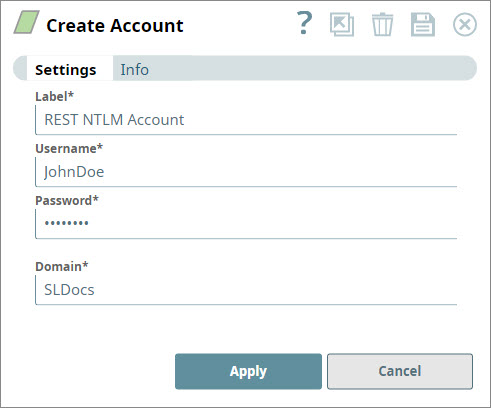
All fields are required.
| Field Name | Field Type | Description |
|---|---|---|
| Label | String | Specify a name for the account. We recommend that you update the account name if there is more than one account of the same account type in your project. Default Value: N/A |
| Username | String | Specify the user name that you want to use to log into NTLM. Default Value: N/A |
| Password | String | Specify the password associated with the user name listed in the field above. Default Value: N/A |
| Domain | String | Specify the name of the NETBIOS domain in which the account is configured. Default Value: N/A |
Troubleshooting
| Error | Reason | Resolution |
|---|---|---|
| One or more required field is blank. | You click Apply in the account dialog window, but one or more of the following fields is blank:
| Insert valid details into the following fields and click Apply.
|
Release Snap Pack Version Type Updates May 2025 main31019 Stable Updated and certified against the current SnapLogic Platform release. Updated the REST Snaps label in SnapLogic Designer to "Not Recommended” from “Deprecated.” SnapLogic recommends you to use the HTTP Client Snap in your pipelines. February 2025 main29887 Stable Updated and certified against the current SnapLogic Platform release. August 2024 main27765 Stable Upgraded the Enhanced the REST OAuth2 Account with Snaplex support for executing OAuth2 operations. May 2024 main26341 Stable Updated and certified against the current SnapLogic Platform release. August 2023 main22460 Stable Updated and certified against the current SnapLogic Platform release. For Snaps using AWS Signature V4 accounts, DNS canonical names are now supported for S3 buckets. The REST AWS Sig v4 Account is now enhanced with the AWS Region and Service Name fields that enable the Snap to support Virtual Private Cloud (VPC) endpoint. You can set cookie policy specifications using the Cookie Policy dropdown list in REST Snaps . Support for auto-retries where the REST Snaps automatically retry when they encounter 429 HTTP status code - The REST AWS Sig v4 Account supports: Passing AWS Security Token Service (STS) temporary credentials in the Security Token field. Expression values for Access-key ID and Secret Key fields. Improved the performance of REST Snaps when the Snaps encounter Unauthorized (401) or Forbidden (403) errors even when the user credentials are available in the organization and the account type is OAuth2. 429patches17084 Enhanced the following REST Snaps with Cookie Policy dropdown list to set the cookie policy specifications. This field is case-insensitive: Cookie Policy: The Cookie Policy to select from the following options: BROWSER COMPATIBILITY: This policy is compatible with different servers even if they are not completely standards-compliant. If you are facing issues while parsing cookies, you should try using this policy. IGNORE COOKIES: This cookie policy ignores all cookies. You should use this policy to prevent HTTP Client from accepting and sending cookies. RFC STRICT: All servers that handle version 1 cookies should use this policy. RFC LAX: The original cookie specification which formed the basis for RFC2109. Added a new field Security Token in the REST AWS Sig v4 Account to support AWS Security Token Service (STS) for using temporary credentials. Enhanced the REST AWS Sig v4 Account to support expression values for Access-key ID and Secret Key fields. Added the REST In-memory OAuth2 Account type with Client Credentials Grant Type that supports and stores the access token in memory for reuse until it expires. When the Snap encounters Fixed an issue that caused REST SSL accounts to fail when the username in the REST SSL Account was null and the Enhanced Encryption level was low, medium, or high. Enhanced the REST Post, REST Put, and REST Patch Snaps with the Multipart Type list to support multipart (files and text) upload. Renamed the following fields: Upload File(s) field set to Form Upload Upload-file key to Multipart Key Upload file to Multipart Value 4.27 main12833 Stable Fixed an issue with the REST Post Snap, where the Snap delayed the fetching of documents, when the batch size is greater than or equal to one. Enhanced the REST Post Snap to display all cookies ( snapsmrc542 4.20 snapsmrc535 Stable Critical fix If your current or new Pipelines with REST Snaps use the retry functionality, then we recommend you to use this latest patch version as subsequent GA releases may result in Pipeline executions failing. Else, you can continue using your existing Snap Pack version (stable distribution – snapsmrc528). Fixed a regression issue wherein REST Snaps are unable to handle empty XML responses when Show All Headers is enabled. 4.18 Fixed an issue with the NLTM Rest account connection hanging infinitely. 4.14 Patch rest5782 Fixed an issue wherein the REST POST Snap was not accepting any blank values from upstream Mapper Snap. Fixed an issue where the Ultra task was not producing a valid response while acknowledging documents. 4.14 snapsmrc490 4.13 Patch REST POST Snap: New properties: Multipart Content-Type, and Filename to be used added. Fixed an encoding issue with the REST Get Snap so that it uses the same encoding format (UTF-8) by default on all machines instead of using a different encoding format based on the machine's Operating System. Fixed an issue that caused the REST OAuth accounts to fail when running in orgs with Enhanced encryption in Medium or higher level. Enhanced REST Post Snap to prevent it from encoding file names. Added Upload body type property to the REST Post Snap for processing the specified content type. Added support for the Binary File Uploads with the REST POST Snap. Updated support of NTLM Account Authentication to the REST Snap Pack. Resolved an issue with the REST GET Snap that often fails to exit properly. This should reduce or eliminate that problem. Addressed an issue with REST Get displaying the authorization header in plain text Added Connection timeout property to specify the number of seconds to wait before terminating a connection. The Timeout property has been renamed to Read timeout. Resolved an issue with REST Get not handling multiple response cookies. Added a new "Follow redirects" setting to toggle whether redirects should be followed (default behavior is to follow redirects) Updated Snaps in the REST Snap Pack with Response entity type field(The DEFAULT option under this property allows the backward compatibility. The addition of the property will not affect the existing production pipelines and allows them to run as before). Updated Snaps in the REST Snap Pack with Maximum request attempts and Retry request interval Upload fields. Updated the RESTPost Snap with Upload transfer request type field. Resolved an issue where Rest Snaps failed to process the received response that is encoded in charsets such as Windows-1252. This fix will process the response purely based on the charset provided in the Content-Type header. A new property was added to the REST Get Snap to specify the iteration interval for pagination. All Snaps now have at most one input and one output view. Resolved an issue with REST SSL Accounts with Username not send the Authorization header with the HTTP request. REST Get now supports using parameters from an input document in the Next URL Setting. Addressed a defect where REST GET Snap fails saying 'Scheme "http" not registered' Two-way SSL support was added to the REST account. REST Get Now has support for iterating over additional result pages. Header variables are now being updated for each input REST Post Improved error handling messages. Resolved an issue with the Snap failing with "Failed to execute HTTP request" error. Maximum retries and Retry interval support added. Resolved an issue with using a REST Dynamic OAuth2 account with Facebook Graph API. REST Account: REST SSL account added. June 27, 2015 (2015.22) REST Get now allows you to have no output views. Previously, there was exactly one output view. Rest Post Snap now supports posting a file. May 2, 2015 REST: Output views made optional January 2015 Optional Raw data property added to all REST Snaps. If selected, the HTTP response content is written to the output view as is. If not selected, it is parsed according to the content type specified in the response header. October 18, 2014 NEW! REST Patch Snap introduced in this release. Addressed an issue where REST GET (and perhaps REST Snaps) error view does not include response body. Fall 2014 REST Get: support added for gzip format. June 30, 2014 Addressed an issue with RestRequestExecutor class writing data into error views even on successful requests status code 201, 204. May 2014 July 2013 NEW! REST Delete Snap introduced in this release. NEW! REST Get Snap introduced in this release. NEW! REST Post Snap introduced in this release. NEW! REST Put Snap introduced in this release.Snap Pack History
Date February 2025 440patches30408 Latest November 2024 main29029 Stable Updated and certified against the current SnapLogic Platform release. org.json.json library from v20090211 to v20240303, which is fully backward compatible.May 2024 437patches26522 Latest February 2024 main25112 Stable Updated and certified against the current SnapLogic Platform release. November 2023 main23721 Stable Updated and certified against the current SnapLogic Platform release. February 2023 main21015 Stable Upgraded with the latest SnapLogic Platform release. February 2023 432patches20054 Latest February 2023 main19844 Stable Upgraded with the latest SnapLogic Platform release. November 2022 main18944 Stable Upgraded with the latest SnapLogic Platform release. September 2022 430patches17851 Latest The REST Post Snap now works without displaying any errors when the Show all headers checkbox is selected and the Content-type is text/xml or application/xml. August 2022 430patches17684 Latest August 2022 main17386 Stable Too Many Requests error.4.29 Patch Latest 4.29 Patch 429patches16076 Latest 4.29 main15993 Stable 401 or 403 errors, this account generates a new token after refreshing the cache.4.28 Patch 428patches15172 Latest 4.28 main14627 Stable 4.27 Patch 427patches12750 Latest Enhanced the REST Put Snap with the Upload Transfer Request Type field to support encoding of chunked transfer and calculating content length. 4.27 main12989 Stable and Latest Fixed an issue in the REST OAuth2 account that caused a new feature, OAuth Password Grant Type to be excluded from the GA version. The latest deployed build includes this feature. Enhanced REST OAuth2 accounts with a new option password for Grant Type to obtain an access token through user credentials. On selecting password, the Snap populates the Username and Password fields to enter the credentials. 4.26 426patches12749 Latest 4.26 426patches11746 Latest securedauth cookies and httponly cookies) from the CookieStore along with headers when you select the Show all headers checkbox.4.26 main11181 Stable Upgraded with the latest SnapLogic Platform release. 4.25 Patch 425patches10419 Latest Fixed a memory leak issue in the REST Snap Pack 4.25 Patch 425patches9929 Latest Enhanced the REST Snap Pack to support Proxy Authentication. 4.25 Patch 425patches9684 Latest 4.25 main9554 Stable Upgraded with the latest SnapLogic Platform release. 4.24 main8556 Stable Upgraded with the latest SnapLogic Platform release. 4.23 main7430 Stable Improved the handling of expired access tokens in REST Snaps that use OAuth2 accounts (REST OAuth2 Account and REST OAuth2 SSL Account). The Snaps can refresh expired access tokens on-demand, through a request to the platform. The Snap reloads the account with the updated/fresh access token before attempting the next retry. 4.22 Patch 422patches7103 Stable Enhances the Snaps in REST Snap Pack [Not Recommended] by separating the retry logic for OAuth account from that of the Snap. 4.22 main6403 Stable 4.21 Patch rest8858 - Latest Fixed the REST Get and REST Post Snaps that does not parse Content-Encoding and Content-Type headers for gzipped responses. 4.21 - Stable Upgraded with the latest SnapLogic Platform release. 4.20 Patch rest8798 - Latest Fixed the REST POST Snap that fails when a single file is uploaded in multi-part form using the Single file upload Snap settings. - 4.19 Patch rest8374 - Latest 4.19 snapsmrc528 - Stable snapsmrc523 - Stable Upgraded with the latest SnapLogic Platform release. 4.15 Patch rest6310 - Latest 4.15 snapsmrc500 - Stable Upgraded with the latest SnapLogic Platform release. rest6159 - Latest Fixed an issue wherein the REST GET and POST Snaps were infinitely trying to connect to endpoint even after pipeline execution abortion. 4.14 Patch - Latest 4.14 Patch rest5719 - Latest - Stable Upgraded with the latest SnapLogic Platform release. NA - Latest 4.13 snapsmrc486 - Stable Upgraded with the latest SnapLogic Platform release. 4.12 Patch rest4917 - Latest 4.12 Patch rest4816 - Latest 4.12 Patch rest4781 - Latest 4.12 snapsmrc480 - Stable 4.11 Patch rest4333 - Latest 4.11 snapsmrc465 - Stable 4.10 Patch rest4070 - Latest 4.10 snapsmrc414 - Stable Upgraded with the latest SnapLogic Platform release. 4.9 Patch rest3177 - Latest 4.9 Patch rest3126 - Latest 4.9.0 snapsmrc405 - Stable Upgraded with the latest SnapLogic Platform release. 4.8.0 snapsmrc398 - Stable Upgraded with the latest SnapLogic Platform release. 4.7.0 Patch rest2555 - Latest 4.7.0 Patch rest2336 - Latest 4.7.0 Patch rest2260 - Latest 4.7.0 snapsmrc382 - Stable 4.6.0 Patch rest1992 - Latest 4.6.0 snapsmrc362 - Stable Upgraded with the latest SnapLogic Platform release. 4.5.1 rest1566 - Latest 4.5.0 snapsmrc344 - Stable Upgraded with the latest SnapLogic Platform release. 4.4.1 NA - Latest 4.4.0 NA - Stable 4.3.1 NA - Latest Fall Release 2015 (4.3.0) NA - Stable September 5, 2015 (4.2.2) NA - Latest NA - Latest June 6, 2015 (2015.20) NA - Latest NA - Stable NA - Stable NA - Stable NA - Stable NA - Stable NA - Stable REST Get, REST Post all updated to support input parameters in HTTP headers NA - Stable
Have feedback? Email documentation@snaplogic.com | Ask a question in the SnapLogic Community
© 2017-2025 SnapLogic, Inc.