Atlassian uses cookies to improve your browsing experience, perform analytics and research, and conduct advertising. Accept all cookies to indicate that you agree to our use of cookies on your device. Atlassian cookies and tracking notice, (opens new window)
Use this Snap to route documents to output views based on the incoming HTTP request method. This Snap is primarily meant for use in Pipelines executed through Triggered Tasks. The Snap matches the HTTP request method used in the Triggered Task and routes the document to the corresponding output view as configured for the request method.
The input data must contain the correct content-type header based on your use case, else your pipeline fails.
Snap Type
HTTP Routers Snap is a Flow-type Snap that executes HTTP requests.
A document containing the data to be processed based on the incoming HTTP request.
Output
Document
Min: 1
Max: ∞
Mapper Snap
Union Snap
JSON Formatter
If the input document is routed to more than one output views, they are all instances of the same input document. The Pipeline may fail if any downstream Snap attempts to modify the same document without copying it.
Error
Error handling is a generic way to handle errors without losing data or failing the Snap execution. You can handle the errors that the Snap might encounter while running the Pipeline by choosing one of the following options from the When errors occur list under the Views tab. The available options are:
Stop Pipeline Execution: Stops the current pipeline execution when the Snap encounters an error.
Discard Error Data and Continue: Ignores the error, discards that record, and continues with the rest of the records.
Route Error Data to Error View: Routes the error data to an error view without stopping the Snap execution.
Suggestion icon (): Indicates a list that is dynamically populated based on the configuration.
Expression icon (): Indicates whether the value is an expression (if enabled) or static (if disabled). Learn more about Using Expressions in SnapLogic.
Add icon ( ): Indicates that you can add fields in the field set.
Remove icon (): Indicates that you can remove fields from the field set.
Field Name
Type
Description
Label
String
Specify a name for the Snap. You can modify this to be more specific, especially if you have more than one of the same Snap in your pipeline.
DefaultValue: N/A Example: HTTP Router
Routes*
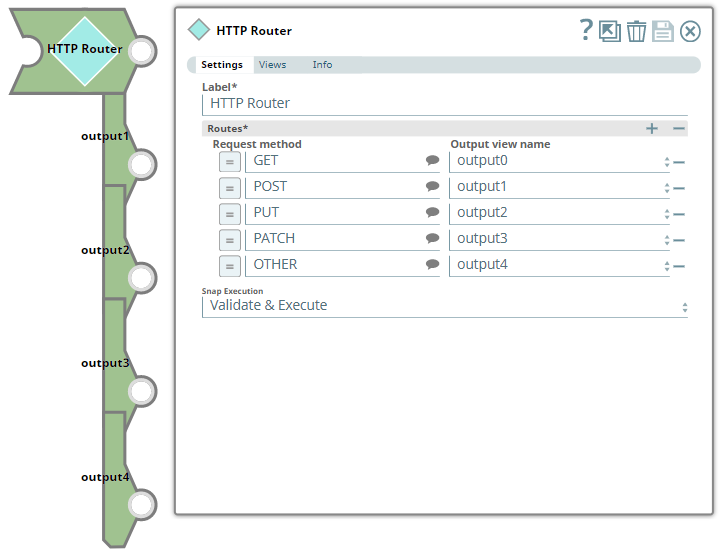
Use this field set to define/map one output view each to one or more of the request methods supported. Click to add a new row and define the values accordingly.
Request method
String/Expression/Suggestion
Select or enter one request method per row, depending on the different HTTP requests expected from the Triggered task. The following different request methods are supported:
GET
POST
PUT
PATCH
DELETE
HEAD
This field allows an additional value OTHER to handle request methods coming from the Triggered Task that are not configured in this Snap.
DefaultValue: N/A Example: GET
Output view name
Dropdown list
Select an output view name from this dropdown list list for each Request method selected.
Map the value OTHER to an output view that suits your exception-handling requirements. For example, an incoming request method DELETE or HEAD in the overview image is routed to output4 that corresponds to the value OTHER.
Configure output views beforehand
Ensure that the required number of output views are added for the Snap from the Views tab. These output views will then be listed in this field for you to select.
DefaultValue: N/A Example: output3
Snap Execution
Dropdown list
Select one of the three following modes in which the Snap executes:
Validate & Execute. Performs limited execution of the Snap and generates a data preview during Pipeline validation, then performs full execution of the Snap (unlimited records) during Pipeline runtime.
Execute only. Performs full execution of the Snap during Pipeline executionwithout generating preview data.
Disabled. Disables the Snap and all Snaps downstream from it.
DefaultValue: Validate & Execute Example: Execute only
Troubleshooting
Error
Reason
Resolution
Failed to evaluate expression: _Request_Method.
The expression for the Request Method field contains an invalid pipeline parameter and the Snap cannot process the incoming requests.
Ensure you use the correct spelling for pipeline parameters within the expressions defined in Snap's settings.
If your data contains invalid content-type headers or if you pass an incorrect JSON payload, the Snap aborts the pipeline with an error.
When the Snap receives an invalid content-type header in the input, the error appears at the platform level and therefore is not displayed in the Snap Settings dialogue box.
Ensure to pass valid JSON Payload and content-type headers.
Examples
Using HTTP Router Snap to Process the Request from a Triggered Task
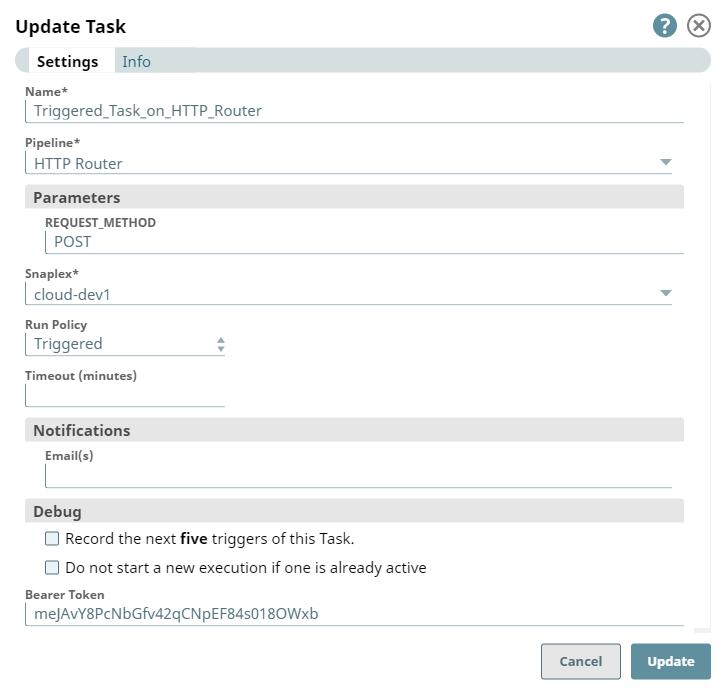
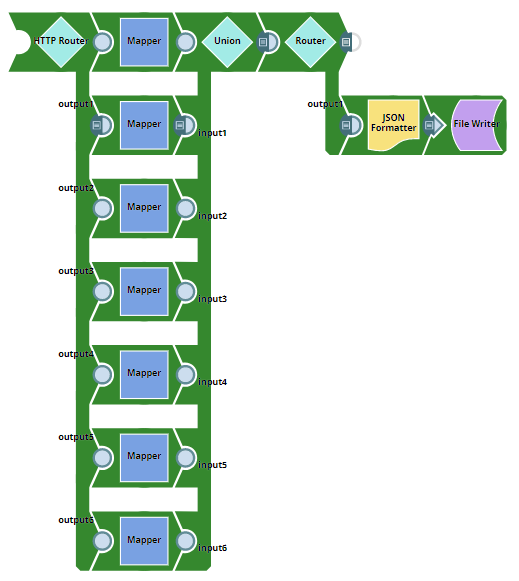
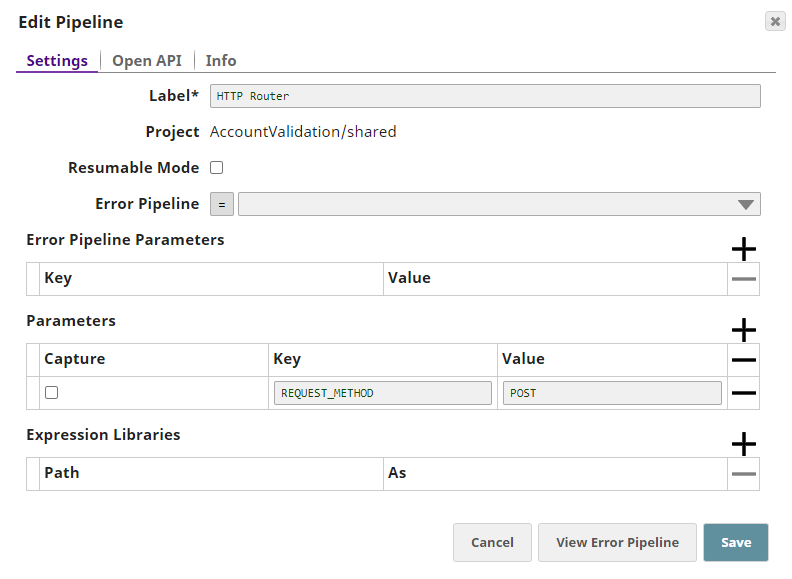
The following example pipeline demonstrates the use of HTTP Router Snap to process an incoming POST request via a Triggered Task. This Pipeline contains the REQUEST_METHOD parameter configured with the value POST.
Triggered Task
Pipeline with HTTP Router Snap
Pipeline Properties
When the Triggered Task - Task_On_HTTP_Router is run from the Task's details page, the corresponding pipeline is executed.
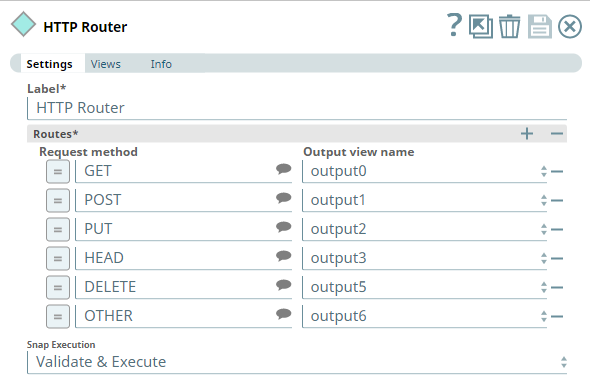
The HTTP Router is configured to route the incoming document to a corresponding output view, matching the Request method value with the REQUEST_METHOD Pipeline parameter.
HTTP Router Snap Settings
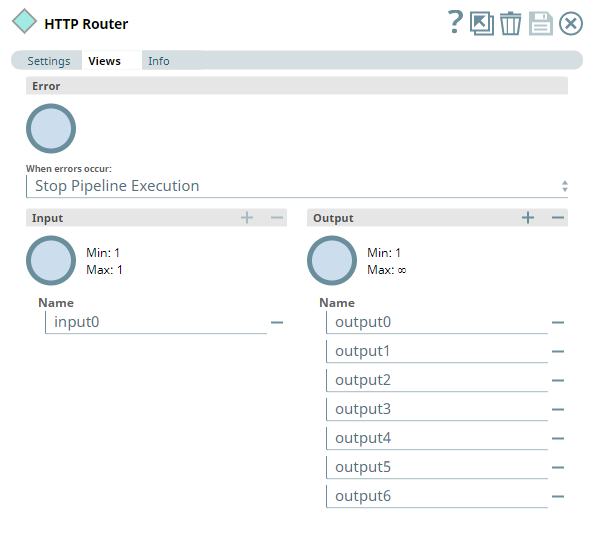
HTTP Router Snap Views
In this example, the HTTP Router uses this JSON document and the REQUEST_METHOD from the Triggered Task as inputs. Based on the incoming value for REQUEST_METHOD (POST in this example), the HTTP Router routes the document to the corresponding output view (output1 in the validated Pipeline above). The Pipeline execution continues further to finally write the formatted JSON output into a JSON file.
The following example pipeline demonstrates how you can use an HTTP Router Snap to process an incoming PATCH request through an Ultra Task.
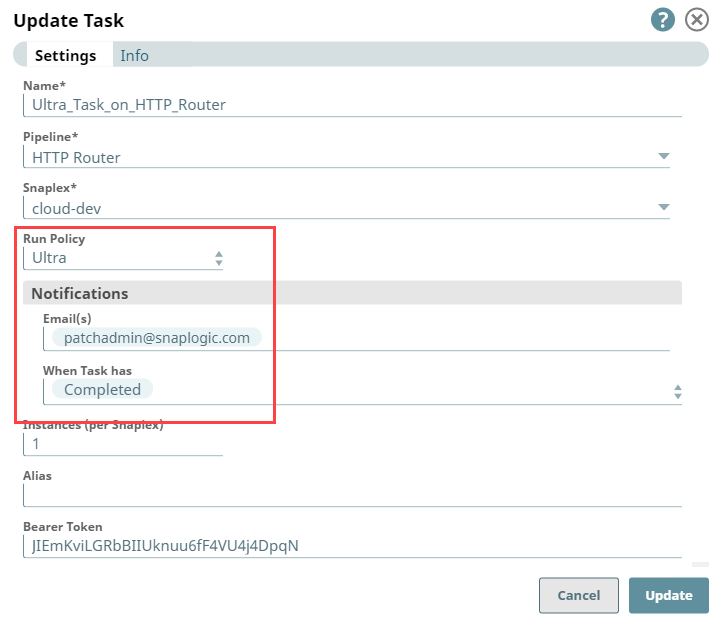
First, we create an Ultra Task for the HTTP Router pipeline with a request to send a notification to thepatchadmin@snaplogic.com whenever a patch iscompleted.
Ultra Task for HTTP Router Snap
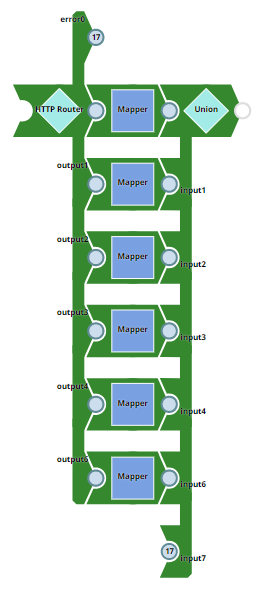
Pipeline with HTTP Router Snap
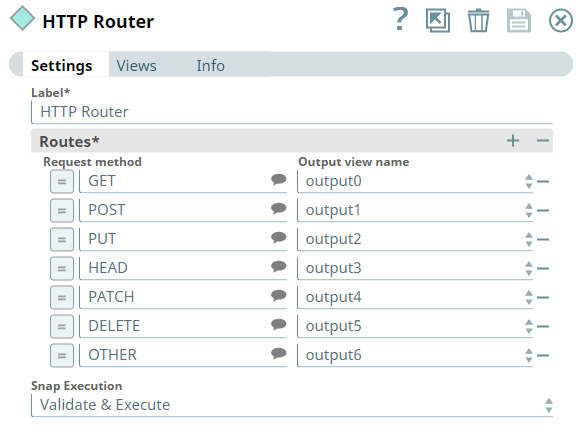
We configure the HTTP Router Snap to route incoming data to the corresponding view.
When the Ultra Task - Ultra_Task_On_HTTP_Router is run, the corresponding Pipeline - HTTP Router is executed. Based on the HTTP method, the HTTP router routes the data to the corresponding output view (in this example, the patch request routes tooutput 4). Using the File Writer Snap, you can further write the formatted JSON output into a JSON file.
Updated and certified against the current SnapLogic Platform release.
November 2024
439patches29533
Latest
The ForEach and the Task Execute Snaps are deprecated and removed from the Snaps Catalog. If your existing pipelines use these Snaps, contact support@snaplogic.com.
November 2024
main29029
Stable
Updated and certified against the current SnapLogic Platform release.
August 2024
438patches28470
Latest
Added the PipeLoop Snap that enables you to loop on pipeline executions based on a stop condition or iteration limit. The execution workflow of this Snap enables the parent pipeline to control and manage iterative processes using the child pipeline, for scenarios where repeated processing is needed until a specific stop condition is met.
August 2024
438patches28047
Latest
Enhanced the Head and Tail Snaps (for the Number of documents and Document offset fields) to support pipeline parameters via expressions that enable you to reuse the pipelines.
August 2024
main27765
Stable
When the Router Snap was the first Snap in a triggered task, the documents were not processed. Previously, the response contained a 200 status code but was empty. Now, it processes one document and provides non-empty output.
Behavior change:
Previously, the Router Snap generated no output without an input document. Now, the Snap generates an empty document when no input document is provided.
May 2024
437patches26857
Latest
Enhanced the Pipeline Execute Snap to support expression values via pipeline parameters for the Batch size field that enables you to use intermediate pipelines for generic use cases.
May 2024
main26341
Stable
Updated and certified against the current SnapLogic Platform release.
March 2024
436patches25576
Latest
Fixed an issue with the Pipeline Execute Snap where a condition resulted in the output documents not being read.
February 2024
main25112
Stable
Updated and certified against the current SnapLogic Platform release.
November 2023
main23721
Stable
Updated and certified against the current SnapLogic Platform release.
August 2023
434patches22576
Latest
Fixed an issue with the Pipeline Execute Snap that caused a null pointer exception during the retry when the input view was a Binary type. Retry is not supported for a Binary input view with this Snap.
August 2023
main22460
Stable
Updated and certified against the current SnapLogic Platform release.
May 2023
433patches22107
Latest
Fixed an issue with the Pipeline Execute Snap that caused it to acknowledge the Ultra pipeline message before the message reached the last Snap in the pipeline. Because of the early acknowledgment, the last Snap in the pipeline failed and the response could not be sent back.
May 2023
433patches21744
Latest
Fixed an issue with the Pipeline Execute Snap where a missing label produced a null pointer exception.
May 2023
433patches21196
Latest
Fixed an issue with the Pipeline Execute Snap where no input view produced a null pointer exception.
May 2023
433patches21040
Latest
Provided a fix to ensure the Data Validator works with "unknown" data types.
May 2023
main21015
Stable
Upgraded with the latest SnapLogic Platform release.
February 2023
432patches20279
Latest
The Pipeline Execute Snap now returns errors from child pipelines with a unique identifier.
February 2023
432patches19695
Latest
Fixed an issue with the Pipeline Execute Snap that was causing Unable to create a deep copy of the object errors.
As of we have discovered an issue with this patch affecting the Pipeline Execute Snap. If you have pipelines leveraging the Pipeline Execute Snap, we recommend you NOT use this patch and instead use patch 432patches20279.
February 2023
main19844
Stable
Upgraded with the latest SnapLogic Platform release.
November 2022
main18944
Stable
Upgraded with the latest SnapLogic Platform release.
September 2022
430patches18070
Latest
The Pipeline Execute Snap with binary output that is used in a low-latency feed Ultra Pipeline now works as expected. The requests are now acknowledged correctly.
August 2022
main17386
Stable
Upgraded with the latest SnapLogic Platform release.
4.29
main15993
Stable
Upgraded with the latest SnapLogic Platform release.
4.28 Patch
428patches15026
Latest
Fixed an issue with HTTP Router Snap where the Snap did not work as intended for a GET request that used a Cloud URL when the HTTP Router was the first Snap in the triggered task Pipeline.
4.28
main14627
Stable
Enhanced the Filter Snap with the Null-safe access checkbox. Select this checkbox toconsider the valid values in the filter expression and remove the missing or empty data instead of treating them as null.
4.27 Patch
427patches13726
Latest
Enhanced the Filter Snap with the Null-safe access checkbox. Select this checkbox toconsider the missing data or empty value as null when accessing the source path.
4.27
main12833
Stable
Enhanced the Gate Snap with theOutput Document Content field that enables you to indicate the count of input documents and thespecific (first or last) document to include in the output.
4.26
main11181
Stable
Added Binary CopySnap to copy a binary stream to the Snap’s output views. You can use this Snap if you want to send the same information to multiple endpoints.
4.25 Patch
425patches10571
Latest
Enhanced the performance of Binary Router Snap via more efficient IO utilization.
Added the Ignore empty stream checkbox to the Gate Snap Settings
4.23
main7430
Stable
Enhances the Data Validator Snap by making the Constraint value field as optional under the Constraints.
4.22
main6403
Stable
Upgraded with the latest SnapLogic Platform release.
4.21 Patch
flow8855
-
Latest
Fixes the Binary Router Snap's failure in Ultra Pipelines by preventing a deep-copy (performing a copy of the original objects recursively) of binary data headers.
4.21
snapsmrc542
-
Stable
Upgraded with the latest SnapLogic Platform release.
4.20
snapsmrc535
-
Latest
Adds a new Snap, Gate, which enables you to consolidate multiple input streams into a single output document where each input stream is displayed as a label containing the list of records that were received by that input view.
The Pipeline Execute Snap now provides the following capabilities:
Specify the Snaplex on which to run child Pipelines.You can now select the Snaplex on which to run the child Pipelines through theExecute OnandSnaplex Pathfields. The default option is executing the child Pipeline on the same Snaplex node as the Parent, but you can also specify a different Snaplex through the drop-down list, which includes the option to manually enter a Snaplex name.
Configure retry logic for child Pipeline executions. You can now configure retry logic for child Pipeline executions though the following fields:Number of Retries,Retry Interval, andTimeoutfields.
4.19
snaprsmrc528
-
Stable
Upgraded with the latest SnapLogic Platform release.
4.18 Patch
flow7743
-
Latest
Added a property Validate full JSON path to the Data Validator Snap to fix an issue wherein a field validation failure against a constraint does not produce an error.
4.18
snapsmrc523
-
Stable
Upgraded with the latest SnapLogic Platform release.
4.17 Patch
flow7637
-
Latest
Fixed an issue with the Data Validator Snap wherein the output fails to report all but one of the violations when there are multiple constraints of the Required type.
4.17 Patch
ALL7402
-
Latest
Pushed automatic rebuild of the latest version of each Snap Pack to SnapLogic UAT and Elastic servers.
4.17
snapsmrc515
-
Latest
Added the Snap Execution field to all Standard-mode Snaps. In some Snaps, this field replaces the existing Execute during preview check box.
4.16
snapsmrc508
-
Latest
Pipeline Execute Snap: Added the capability to select either document (previously supported) or binary data (new) for your input and output Views.
4.15 Patch
flow6263
-
Latest
Improved the error messages to include the source path of the constraint for data validation failures.
4.15
snapsmrc500
-
Stable
Upgraded with the latest SnapLogic Platform release.
4.14
snapsmrc490
-
Stable
Upgraded with the latest SnapLogic Platform release.
4.13
snapsmrc486
-
Stable
Upgraded with the latest SnapLogic Platform release.
4.12 Patch
flow4895
-
Latest
Fixed an issue in the Data Validator Snap that made multiple copies of lineage on the error path.
4.12
snapsmrc480
-
Stable
Resolved an issue with the Union Snap that caused excessive CPU utilization.
4.11 Patch
flow4461
-
Latest
Fixed an issue with the Pipeline Execute Snap that could cause the parent pipeline to freeze when the child pipeline fails.
4.11 Patch
flow4292
-
Latest
Resolved an issue with the Union Snap in Ultra Mode that spikes the CPU utilization to ~30% during startup of 120 instances.
4.11
snapsmrc465
-
Stable
Upgraded with the latest SnapLogic Platform release.
4.10
snapsmrc414
-
Stable
Upgraded with the latest SnapLogic Platform release.
4.9.0 Patch
flow3094
-
Latest
Addressed an issue in Binary Router where the Snap did not wait until all threads were completed to write data to the output views.
4.9.0 Patch
flow3320
-
Latest
Data Validator Snap - fixed Type constraint feature.
4.9
snapsmrc405
-
Stable
Upgraded with the latest SnapLogic Platform release.
4.8.0
snapsmrc398
Stable
Filter: Snap-aware error handling policy enabled for Spark mode. This ensures the error handling specified on the Snap is used.
4.7.0 Patch
flow2598
Latest
Addressed a possible race condition when reusing pipelines with a Pipeline Execute Snap.
4.7.0
flow2297
Stable
Fixed an issue with Ultra pipeline when invoking, using Pipeline Execute, a child pipeline that contains a non-Ultra compatible Snap.
4.7.0
snapsmrc382
Stable
Recommendation: The Pipeline Execute Snap is meant to eventually replace ForEach and Task Execute. It is suggested you use Pipeline Execute for all new pipelines and update existing pipelines at your earliest convenience.
Updated the Pipeline Execute Snap with Execute during preview field.
4.6.0 Patch
flow1909
Latest
Resolved an issue with Union Snap slowing down pipelines.
4.6.0
snapsmrc362
Stable
The following Snaps now support error view in Spark mode: Copy, Union.
ForEach: The value for the Maximum instances property is limited to a maximum of 100. A value higher than 100 will automatically be limited down to 100 during pipeline execution.
Pipeline Execute: Snaplex property added to let you specify the Snaplex on which to run the child pipeline.
Resolved an issue in Task Execute Snap that caused an internal server error (status code: 500).
Resolved an issue in Pipeline Execute Snap that did not show parameter suggestions when the pipeline is selected from another project.
Resolved an issue in Copy Snap that showed errors on the UI while the Javascript was being executed.
Resolved an issue in Filter Snap that failed with "could not filter the document" if upstream data for ServiceNow Query.
4.5.1
flow1574
Latest
Resolved an issue with Pipeline Execute not able to load pipeline selected from the pipeline picker property.
Enhanced error handling in Pipeline Execute for when Reuse is enabled and the pipeline path is an expression whose result is not constant.
Resolved an issue in Pipeline Execute not including the runtime ID and state in error documents.
4.5.0
snapsmrc344
Stable
NEW! Pipeline Execute introduced in this release. This Snap provides a way to flexibly and efficiently execute pipelines and flowing documents into and out of these executions.
Resolved an issue in Task Execute Snap to ensure JAVA 7 and JAVA 8 Snaplex give the same output.
Resolved an issue with the Router Snap routing to the wrong output when used in Spark mode
4.4.0
Stable
Resolved an issue with Exit Snap hanging during validation if threshold is not met.
Spark support added to the Copy, Filter, Router, and Union Snaps.
4.3.2
Latest
Resolved an issue with Task Execute where java.math.BigInteger cannot be cast to java.lang.String exception if input document variable was a numeric type.
Resolved an issue with Task Execute failing with expression enabled.
Resolved an issue with data preview not working in the ForEach Snap.
Resolved an issue with Execute during Preview functionality broken in the ForEach Snap.
Resolved an issue with ForEach Snap not representing the output schema correctly during preview.
4.3.1
Latest
Resolved an issue with the ForEach poll interval being inconsistent.
4.3.0
Stable
In Data Validator, the pattern option now works with partial matches.
Exit Snap
Error handling improved to handle messages that are non-strings.
Exit Snap now supports expressions in the Exit error message property.
ForEach Snap now generates output documents when run. Output documents will also be produced if a child pipeline called by the ForEach is manually stopped.
4.2.2
Latest
Resolved an issue in ForEach where a recursive pipeline in synchronous mode was unable to finish execution.
Resolved an issue in Data Validator not working for partial matches.
August 7, 2015 (2015.25/4.2.1)
NEW! Exit Snap introduced in this release. This Snap forces a pipeline to stop with a failed status if it receives more records than the user-defined threshold.
Resolved error in ForEach Snap where an exposed error view triggered a pipeline failure.
June 27, 2015 (2015.22)
The Router Snap now supports even distribution across all output views if no expressions are defined. With this change, Routes is no longer a required field.
June 6, 2015 (2015.20)
Task Execute should have Execute on preview
Directory Browser Snap did not render output data when running from "Windows" Groundplex.
May 15, 2015
ForEach: Error was not thrown on validation if the child pipeline was not provided.
May 2, 2015
Binary Router: enhanced error handling
Filter: bug fixes
Router: bug fixes
December 20, 2014
Updated Snaps may include new or changed functionality or be otherwise improved.
Data Validator: Type constraint added.
Union Snap: Preserve order was removed.
July/Summer 2014
NEW! Binary Router Snap introduced in this release.
NEW! Task Execute Snap introduced in this release.
June 30, 2014
Data Validator (Beta Release). This Snap validates incoming documents and their attributes against constraints you define.
ForEach: Addressed an issue with parallel execution not working properly.
April 2014
ForEach Snap updated to support Snaplex selection and pipeline parameters.
 ): Indicates a list that is dynamically populated based on the configuration.
 ): Indicates whether the value is an expression (if enabled) or static (if disabled). Learn more about Using Expressions in SnapLogic.
 ): Indicates that you can add fields in the field set.
 ): Indicates that you can remove fields from the field set.