Atlassian uses cookies to improve your browsing experience, perform analytics and research, and conduct advertising. Accept all cookies to indicate that you agree to our use of cookies on your device. Atlassian cookies and tracking notice, (opens new window)
Use this Snap to consolidate multiple input streams into a single output document, where each input stream is displayed as a a label containing the records that were received by that input view.
It is also important to note that this Snap does not complete executing until the execution of all upstream Snaps is done.
650
Prerequisites
This Snap collects multiple input documents into a single output document; hence there are system memory limitations, and it should not be used for massive data propagation. If large amounts of data are required, offload your data before Snap execution. You can also write your data to a file or database; then, after Snap execution completes, you can use a Reader Snap (File Reader, S3 Reader, and so on) to read from the offloaded data source.
Limitations
This Snap does not have error views. If the Snap fails during validation or execution, documents are not passed through, and you receive an error message.
Examples of Compatible Upstream and Downstream Snaps
Description
Input
Document
Min: 1
Max: ∞
Mapper
JSON Parser
Join
One or more documents containing records that must be passed on to downstream Snaps for further processing.
Output
Document
Min: 1
Max: 1
Copy
Join
Common Words
A single document that contains all the records received from the various upstream Snaps.
Error
Error handling is a generic way to handle errors without losing data or failing the Snap execution. You can handle the errors that the Snap might encounter when running the pipeline by choosing one of the following options from the When errors occur list under the Views tab:
Stop Pipeline Execution: Stops the current pipeline execution if the Snap encounters an error.
Discard Error Data and Continue: Ignores the error, discards that record, and continues with the remaining records.
Route Error Data to Error View: Routes the error data to an error view without stopping the Snap execution.
Suggestion icon (): Indicates a list that is dynamically populated based on the configuration.
Expression icon ( ): Indicates the value is an expression (if enabled) or a static value (if disabled). Learn more about Using Expressions in SnapLogic.
Add icon ( ): Indicates that you can add fields in the field set.
Remove icon ( ): Indicates that you can remove fields from the field set.
Select this checkbox if you do not want this Snap to produce any output document.
When you deselect this checkbox, the Snap writes an empty document to the output view.
Output Document Content*
Default Value: All input documents Example: Document count and first document for each input
Dropdown list
Choose one of the following options to determine the content of the output document:
All inputs documents
Document count and first document for each input:
Document count and final document for each input
Snap Execution
Default Value: Validate & Execute Example: Execute only
Dropdown list
Select one of the following three modes in which the Snap executes:
Validate & Execute: Performs limited execution of the Snap, and generates a data preview during pipeline validation. Subsequently, performs full execution of the Snap (unlimited records) during pipeline runtime.
Execute only: Performs full execution of the Snap during pipeline execution without generating preview data.
Disabled: Disables the Snap and all Snaps that are downstream from it.
Examples
Combining Completed Upstream Execution Output Using the Gate Snap
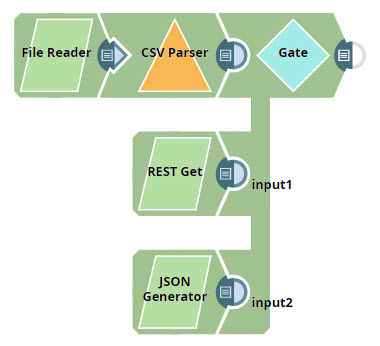
This example demonstrates how you can use the Gate Snap to combine the complete output of multiple upstream Snaps into a single document. This example also shows how the Gate Snap doesn't offer any output until all upstream Snaps are executed.
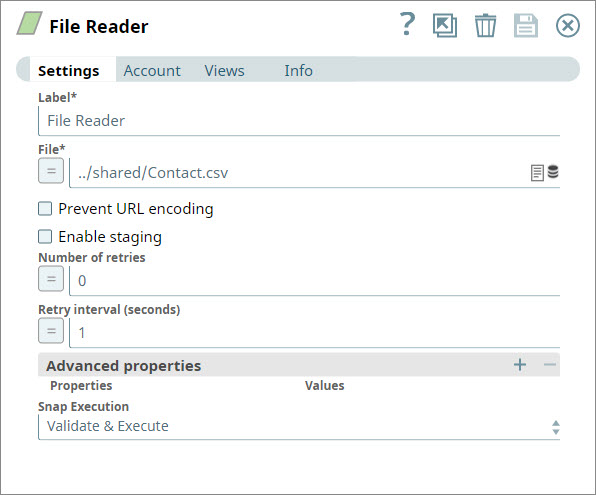
Configure the File Reader Snap to the pipeline and configure it to read a CSV file containing contact information:
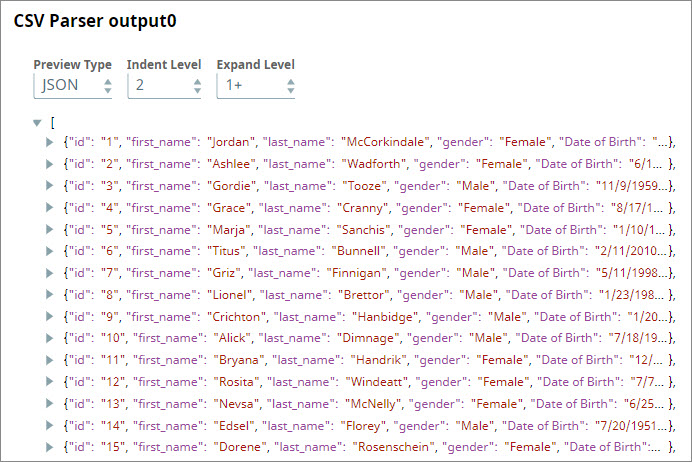
Configure a CSV Parser Snap to read the input binary data as CSV. Once this Snap executes, you can view the contents of the file that the File Reader Snap read:
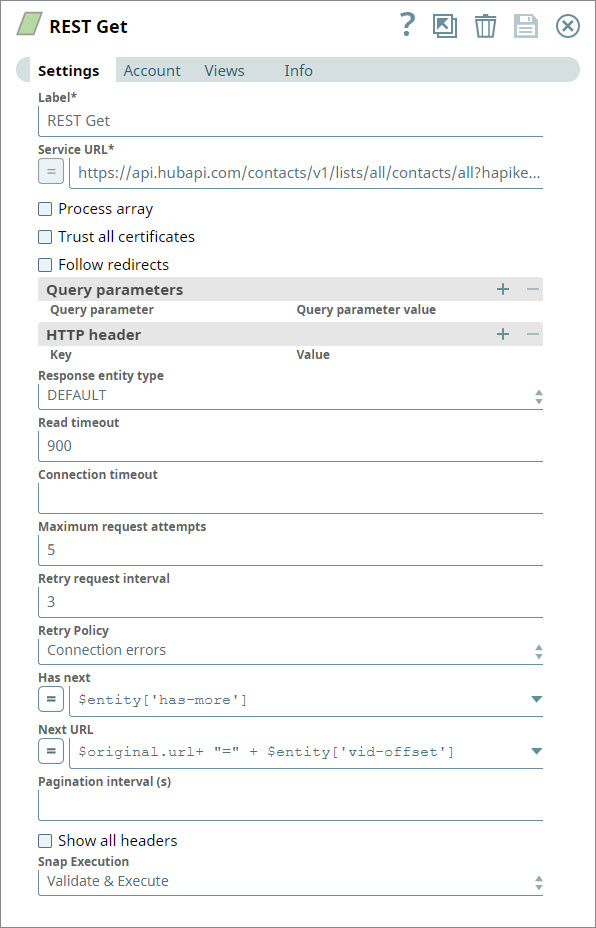
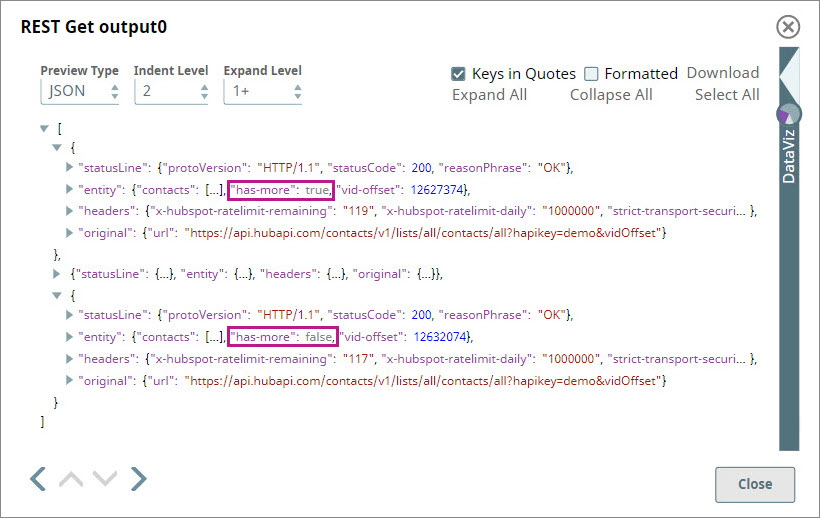
You create a separate branch of the Pipeline by adding an unconnected REST Get Snap. You configure the Snap to retrieve contact data from HubSpot, which typically offers data in pages of 20 records each. You use the Has next and Next URL fields to specify how the Snap can retrieve additional pages of data. For step-by-step information on how to use the REST Get Snap to perform this task, see Retrieving Contact Information from HubSpot.
The REST Get Snap retrieves the data in pages of 20 as requested until the value of the has-more variable changes to false:
Note that until the REST Snap completes executing, the Gate Snap doesn't start reading data from any of its input views.
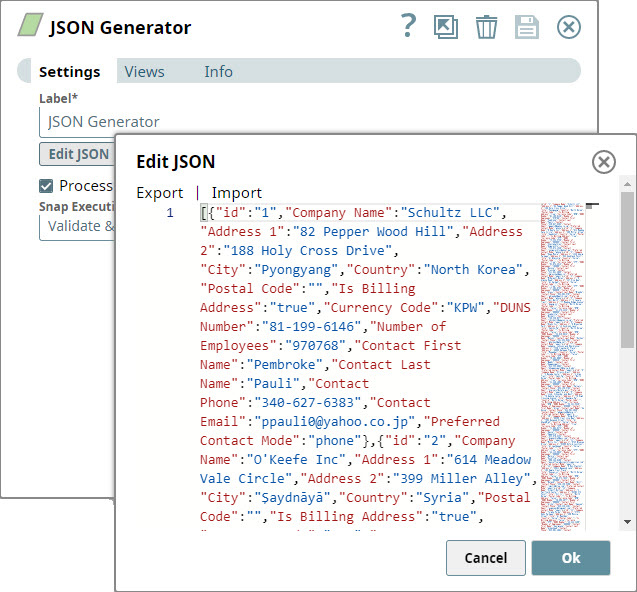
You create another branch of the Pipeline by adding a JSON Generator Snap that provides customer information:
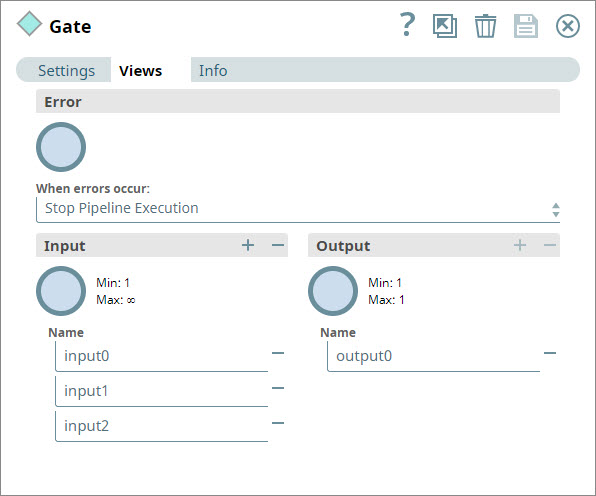
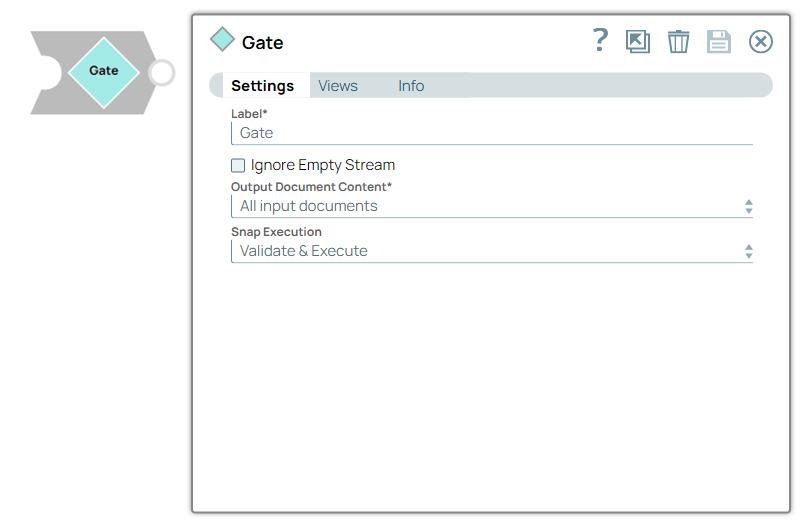
You add a Gate Snap and configure it to have three input views:
Make no further changes to the Gate Snap and connect its three inputs to each branch you created in the steps above.
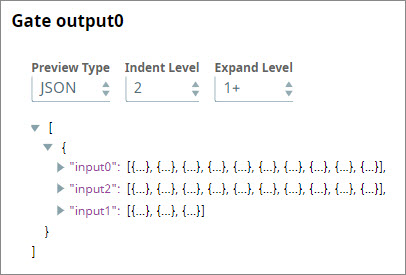
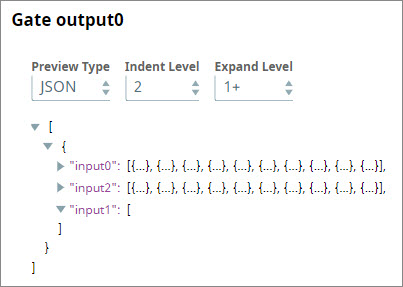
Save and run the Pipeline. The Gate Snap now collects the completed inputs from all upstream branches and offers them all as separate arrays in a single output document:
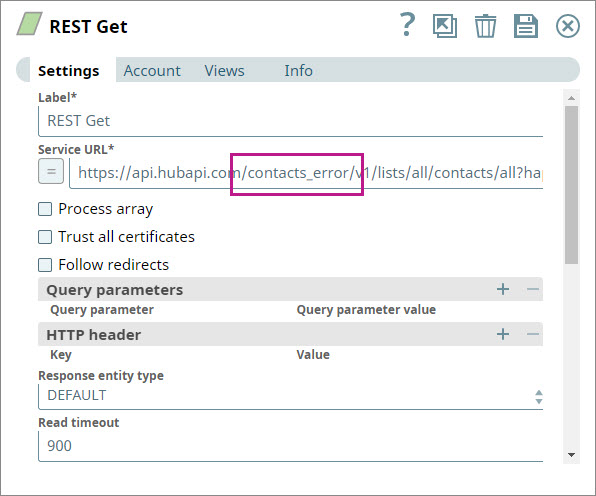
To check how the Gate Snap behaves when one of the Snaps does not offer any output, you introduce an error into the REST Get Snap:
Save and re-execute the Pipeline. The Gate Snap now offers an output that contains all the data received from the File Reader and JSON Generator branches, but in the output associated with the REST Get Snap, it outputs a null record:
Updated and certified against the current SnapLogic Platform release.
November 2024
439patches29533
Latest
The ForEach and the Task Execute Snaps are deprecated and removed from the Snaps Catalog. If your existing pipelines use these Snaps, contact support@snaplogic.com.
November 2024
main29029
Stable
Updated and certified against the current SnapLogic Platform release.
August 2024
438patches28470
Latest
Added the PipeLoop Snap that enables you to loop on pipeline executions based on a stop condition or iteration limit. The execution workflow of this Snap enables the parent pipeline to control and manage iterative processes using the child pipeline, for scenarios where repeated processing is needed until a specific stop condition is met.
August 2024
438patches28047
Latest
Enhanced the Head and Tail Snaps (for the Number of documents and Document offset fields) to support pipeline parameters via expressions that enable you to reuse the pipelines.
August 2024
main27765
Stable
When the Router Snap was the first Snap in a triggered task, the documents were not processed. Previously, the response contained a 200 status code but was empty. Now, it processes one document and provides non-empty output.
Behavior change:
Previously, the Router Snap generated no output without an input document. Now, the Snap generates an empty document when no input document is provided.
May 2024
437patches26857
Latest
Enhanced the Pipeline Execute Snap to support expression values via pipeline parameters for the Batch size field that enables you to use intermediate pipelines for generic use cases.
May 2024
main26341
Stable
Updated and certified against the current SnapLogic Platform release.
March 2024
436patches25576
Latest
Fixed an issue with the Pipeline Execute Snap where a condition resulted in the output documents not being read.
February 2024
main25112
Stable
Updated and certified against the current SnapLogic Platform release.
November 2023
main23721
Stable
Updated and certified against the current SnapLogic Platform release.
August 2023
434patches22576
Latest
Fixed an issue with the Pipeline Execute Snap that caused a null pointer exception during the retry when the input view was a Binary type. Retry is not supported for a Binary input view with this Snap.
August 2023
main22460
Stable
Updated and certified against the current SnapLogic Platform release.
May 2023
433patches22107
Latest
Fixed an issue with the Pipeline Execute Snap that caused it to acknowledge the Ultra pipeline message before the message reached the last Snap in the pipeline. Because of the early acknowledgment, the last Snap in the pipeline failed and the response could not be sent back.
May 2023
433patches21744
Latest
Fixed an issue with the Pipeline Execute Snap where a missing label produced a null pointer exception.
May 2023
433patches21196
Latest
Fixed an issue with the Pipeline Execute Snap where no input view produced a null pointer exception.
May 2023
433patches21040
Latest
Provided a fix to ensure the Data Validator works with "unknown" data types.
May 2023
main21015
Stable
Upgraded with the latest SnapLogic Platform release.
February 2023
432patches20279
Latest
The Pipeline Execute Snap now returns errors from child pipelines with a unique identifier.
February 2023
432patches19695
Latest
Fixed an issue with the Pipeline Execute Snap that was causing Unable to create a deep copy of the object errors.
As of we have discovered an issue with this patch affecting the Pipeline Execute Snap. If you have pipelines leveraging the Pipeline Execute Snap, we recommend you NOT use this patch and instead use patch 432patches20279.
February 2023
main19844
Stable
Upgraded with the latest SnapLogic Platform release.
November 2022
main18944
Stable
Upgraded with the latest SnapLogic Platform release.
September 2022
430patches18070
Latest
The Pipeline Execute Snap with binary output that is used in a low-latency feed Ultra Pipeline now works as expected. The requests are now acknowledged correctly.
August 2022
main17386
Stable
Upgraded with the latest SnapLogic Platform release.
4.29
main15993
Stable
Upgraded with the latest SnapLogic Platform release.
4.28 Patch
428patches15026
Latest
Fixed an issue with HTTP Router Snap where the Snap did not work as intended for a GET request that used a Cloud URL when the HTTP Router was the first Snap in the triggered task Pipeline.
4.28
main14627
Stable
Enhanced the Filter Snap with the Null-safe access checkbox. Select this checkbox toconsider the valid values in the filter expression and remove the missing or empty data instead of treating them as null.
4.27 Patch
427patches13726
Latest
Enhanced the Filter Snap with the Null-safe access checkbox. Select this checkbox toconsider the missing data or empty value as null when accessing the source path.
4.27
main12833
Stable
Enhanced the Gate Snap with theOutput Document Content field that enables you to indicate the count of input documents and thespecific (first or last) document to include in the output.
4.26
main11181
Stable
Added Binary CopySnap to copy a binary stream to the Snap’s output views. You can use this Snap if you want to send the same information to multiple endpoints.
4.25 Patch
425patches10571
Latest
Enhanced the performance of Binary Router Snap via more efficient IO utilization.
Added the Ignore empty stream checkbox to the Gate Snap Settings
4.23
main7430
Stable
Enhances the Data Validator Snap by making the Constraint value field as optional under the Constraints.
4.22
main6403
Stable
Upgraded with the latest SnapLogic Platform release.
4.21 Patch
flow8855
-
Latest
Fixes the Binary Router Snap's failure in Ultra Pipelines by preventing a deep-copy (performing a copy of the original objects recursively) of binary data headers.
4.21
snapsmrc542
-
Stable
Upgraded with the latest SnapLogic Platform release.
4.20
snapsmrc535
-
Latest
Adds a new Snap, Gate, which enables you to consolidate multiple input streams into a single output document where each input stream is displayed as a label containing the list of records that were received by that input view.
The Pipeline Execute Snap now provides the following capabilities:
Specify the Snaplex on which to run child Pipelines.You can now select the Snaplex on which to run the child Pipelines through theExecute OnandSnaplex Pathfields. The default option is executing the child Pipeline on the same Snaplex node as the Parent, but you can also specify a different Snaplex through the drop-down list, which includes the option to manually enter a Snaplex name.
Configure retry logic for child Pipeline executions. You can now configure retry logic for child Pipeline executions though the following fields:Number of Retries,Retry Interval, andTimeoutfields.
4.19
snaprsmrc528
-
Stable
Upgraded with the latest SnapLogic Platform release.
4.18 Patch
flow7743
-
Latest
Added a property Validate full JSON path to the Data Validator Snap to fix an issue wherein a field validation failure against a constraint does not produce an error.
4.18
snapsmrc523
-
Stable
Upgraded with the latest SnapLogic Platform release.
4.17 Patch
flow7637
-
Latest
Fixed an issue with the Data Validator Snap wherein the output fails to report all but one of the violations when there are multiple constraints of the Required type.
4.17 Patch
ALL7402
-
Latest
Pushed automatic rebuild of the latest version of each Snap Pack to SnapLogic UAT and Elastic servers.
4.17
snapsmrc515
-
Latest
Added the Snap Execution field to all Standard-mode Snaps. In some Snaps, this field replaces the existing Execute during preview check box.
4.16
snapsmrc508
-
Latest
Pipeline Execute Snap: Added the capability to select either document (previously supported) or binary data (new) for your input and output Views.
4.15 Patch
flow6263
-
Latest
Improved the error messages to include the source path of the constraint for data validation failures.
4.15
snapsmrc500
-
Stable
Upgraded with the latest SnapLogic Platform release.
4.14
snapsmrc490
-
Stable
Upgraded with the latest SnapLogic Platform release.
4.13
snapsmrc486
-
Stable
Upgraded with the latest SnapLogic Platform release.
4.12 Patch
flow4895
-
Latest
Fixed an issue in the Data Validator Snap that made multiple copies of lineage on the error path.
4.12
snapsmrc480
-
Stable
Resolved an issue with the Union Snap that caused excessive CPU utilization.
4.11 Patch
flow4461
-
Latest
Fixed an issue with the Pipeline Execute Snap that could cause the parent pipeline to freeze when the child pipeline fails.
4.11 Patch
flow4292
-
Latest
Resolved an issue with the Union Snap in Ultra Mode that spikes the CPU utilization to ~30% during startup of 120 instances.
4.11
snapsmrc465
-
Stable
Upgraded with the latest SnapLogic Platform release.
4.10
snapsmrc414
-
Stable
Upgraded with the latest SnapLogic Platform release.
4.9.0 Patch
flow3094
-
Latest
Addressed an issue in Binary Router where the Snap did not wait until all threads were completed to write data to the output views.
4.9.0 Patch
flow3320
-
Latest
Data Validator Snap - fixed Type constraint feature.
4.9
snapsmrc405
-
Stable
Upgraded with the latest SnapLogic Platform release.
4.8.0
snapsmrc398
Stable
Filter: Snap-aware error handling policy enabled for Spark mode. This ensures the error handling specified on the Snap is used.
4.7.0 Patch
flow2598
Latest
Addressed a possible race condition when reusing pipelines with a Pipeline Execute Snap.
4.7.0
flow2297
Stable
Fixed an issue with Ultra pipeline when invoking, using Pipeline Execute, a child pipeline that contains a non-Ultra compatible Snap.
4.7.0
snapsmrc382
Stable
Recommendation: The Pipeline Execute Snap is meant to eventually replace ForEach and Task Execute. It is suggested you use Pipeline Execute for all new pipelines and update existing pipelines at your earliest convenience.
Updated the Pipeline Execute Snap with Execute during preview field.
4.6.0 Patch
flow1909
Latest
Resolved an issue with Union Snap slowing down pipelines.
4.6.0
snapsmrc362
Stable
The following Snaps now support error view in Spark mode: Copy, Union.
ForEach: The value for the Maximum instances property is limited to a maximum of 100. A value higher than 100 will automatically be limited down to 100 during pipeline execution.
Pipeline Execute: Snaplex property added to let you specify the Snaplex on which to run the child pipeline.
Resolved an issue in Task Execute Snap that caused an internal server error (status code: 500).
Resolved an issue in Pipeline Execute Snap that did not show parameter suggestions when the pipeline is selected from another project.
Resolved an issue in Copy Snap that showed errors on the UI while the Javascript was being executed.
Resolved an issue in Filter Snap that failed with "could not filter the document" if upstream data for ServiceNow Query.
4.5.1
flow1574
Latest
Resolved an issue with Pipeline Execute not able to load pipeline selected from the pipeline picker property.
Enhanced error handling in Pipeline Execute for when Reuse is enabled and the pipeline path is an expression whose result is not constant.
Resolved an issue in Pipeline Execute not including the runtime ID and state in error documents.
4.5.0
snapsmrc344
Stable
NEW! Pipeline Execute introduced in this release. This Snap provides a way to flexibly and efficiently execute pipelines and flowing documents into and out of these executions.
Resolved an issue in Task Execute Snap to ensure JAVA 7 and JAVA 8 Snaplex give the same output.
Resolved an issue with the Router Snap routing to the wrong output when used in Spark mode
4.4.0
Stable
Resolved an issue with Exit Snap hanging during validation if threshold is not met.
Spark support added to the Copy, Filter, Router, and Union Snaps.
4.3.2
Latest
Resolved an issue with Task Execute where java.math.BigInteger cannot be cast to java.lang.String exception if input document variable was a numeric type.
Resolved an issue with Task Execute failing with expression enabled.
Resolved an issue with data preview not working in the ForEach Snap.
Resolved an issue with Execute during Preview functionality broken in the ForEach Snap.
Resolved an issue with ForEach Snap not representing the output schema correctly during preview.
4.3.1
Latest
Resolved an issue with the ForEach poll interval being inconsistent.
4.3.0
Stable
In Data Validator, the pattern option now works with partial matches.
Exit Snap
Error handling improved to handle messages that are non-strings.
Exit Snap now supports expressions in the Exit error message property.
ForEach Snap now generates output documents when run. Output documents will also be produced if a child pipeline called by the ForEach is manually stopped.
4.2.2
Latest
Resolved an issue in ForEach where a recursive pipeline in synchronous mode was unable to finish execution.
Resolved an issue in Data Validator not working for partial matches.
August 7, 2015 (2015.25/4.2.1)
NEW! Exit Snap introduced in this release. This Snap forces a pipeline to stop with a failed status if it receives more records than the user-defined threshold.
Resolved error in ForEach Snap where an exposed error view triggered a pipeline failure.
June 27, 2015 (2015.22)
The Router Snap now supports even distribution across all output views if no expressions are defined. With this change, Routes is no longer a required field.
June 6, 2015 (2015.20)
Task Execute should have Execute on preview
Directory Browser Snap did not render output data when running from "Windows" Groundplex.
May 15, 2015
ForEach: Error was not thrown on validation if the child pipeline was not provided.
May 2, 2015
Binary Router: enhanced error handling
Filter: bug fixes
Router: bug fixes
December 20, 2014
Updated Snaps may include new or changed functionality or be otherwise improved.
Data Validator: Type constraint added.
Union Snap: Preserve order was removed.
July/Summer 2014
NEW! Binary Router Snap introduced in this release.
NEW! Task Execute Snap introduced in this release.
June 30, 2014
Data Validator (Beta Release). This Snap validates incoming documents and their attributes against constraints you define.
ForEach: Addressed an issue with parallel execution not working properly.
April 2014
ForEach Snap updated to support Snaplex selection and pipeline parameters.
 650
650 ): Indicates a list that is dynamically populated based on the configuration.
 ): Indicates the value is an expression (if enabled) or a static value (if disabled). Learn more about Using Expressions in SnapLogic.
 ): Indicates that you can add fields in the field set.
 ): Indicates that you can remove fields from the field set.