Microsoft Dynamics AX Create [Deprecated]
- Kalpana Malladi
- Aparna Tayi (Unlicensed)
- Ankur Parekh
On this Page
| Snap Type: | Write | ||||||
|---|---|---|---|---|---|---|---|
| Description: | This Snap creates records in Dynamics AX instance. This Snap uses Microsoft Dynamics AX Application Integration Framework (AIF) to communicate with Microsoft Dynamics AX 2012 servers. There are mandatory input fields that must be provided by means of the input view to create AX objects of different object types. To decide which fields are mandatory, look at the Dynamics AX server's configuration. ETL Transformations & Data FlowThis Snap enables the following ETL operations or flows:
Modes
| ||||||
| Prerequisites: | 1. Microsoft Dynamics AX 2012 instance 2. An enhanced integration inbound port on the AX instance that has one or more create operations set up | ||||||
| Limitations and Known Issues: | NA | ||||||
| Configurations: | Account & AccessThis Snap uses account references created on the Accounts page of SnapLogic Manager to handle access to this endpoint. See Configuring Microsoft Dynamics AX Accounts [Deprecated] for information on setting up this type of account. Views
| ||||||
| Troubleshooting: | |||||||
Settings | |||||||
Label | Required. The name for the Snap. | ||||||
| Company | The company name on which to perform the create operation. The company should be defined on the AX instance side. The property can be provided through user input or pipeline parameters. Default value: [None] | ||||||
| AIF endpoint | Required. URI of the inbound port. You may find the information at the Dynamics AX instance: System administration > Setup > Services and Application Integration Framework > Inbound ports > [Your port name] > URI. Example: http://<host_name>/MicrosoftDynamicsAXAif60/CustomerService/xppservice.svc Default value: [None] | ||||||
| Object type | Required. The object type on which to perform the create operation. The value of the property depends on the object types contained in the target inbound port. Example: Customer Default value: [None] | ||||||
Snap execution | Select one of the three modes in which the Snap executes. Available options are:
| ||||||
Examples
Basic Use Case
The following pipeline describes how the Snap functions as a standalone Snap in a pipeline:
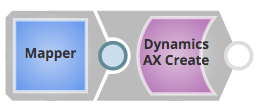
The pipeline uses a Mapper Snap to simulate the upstream pipeline that provides the data that is used by the Dynamics AX Create Snap to create an AX object.
Saving the pipeline allows the Dynamics AX Create Snap to populate the input schema to Mapper. This makes it easier to pick the fields:
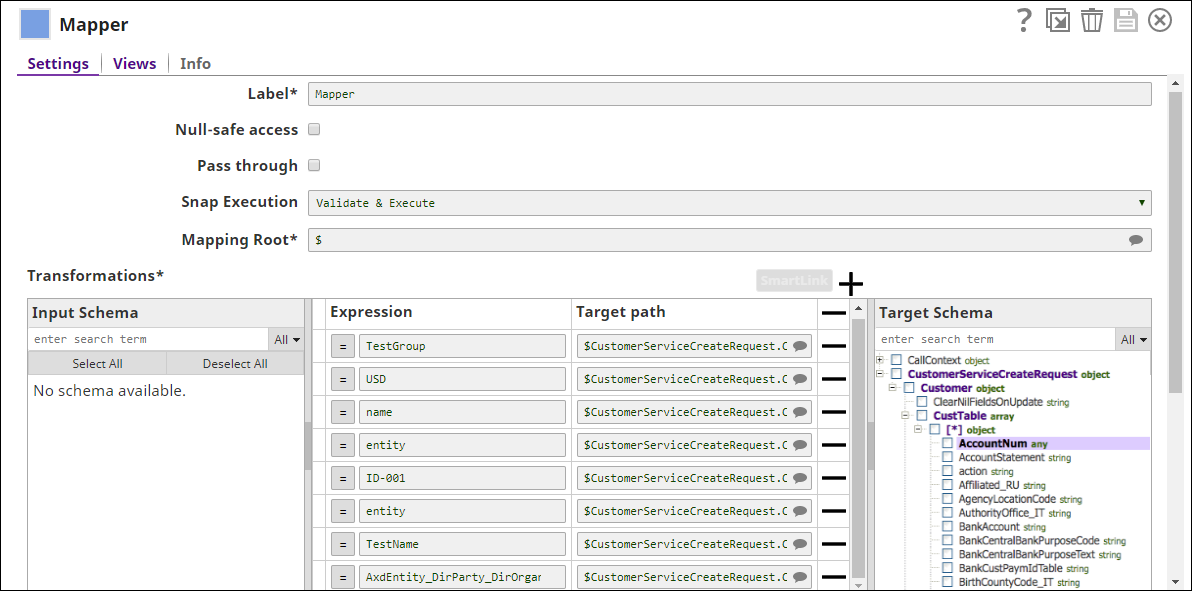
The Dynamics AX Create Snap is configured as below:
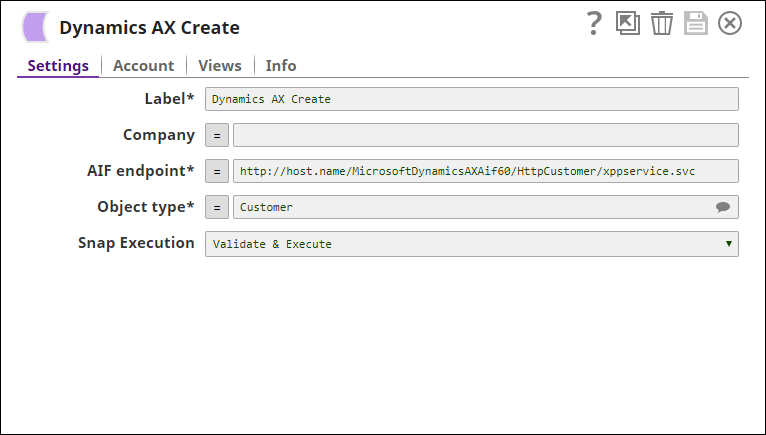
The exported pipeline is available for download in the Downloads section below.
Typical Configuration
Key configuration of the Snap lies in how the data is passed. There are two ways of doing so in the Microsoft Dynamics AX Create Snap:
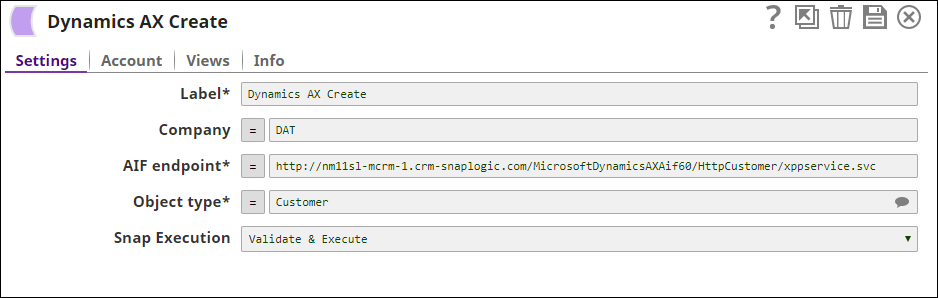
- Without Expressions
Data is passed directly into the Snap:
- With Expressions
- Using Pipeline parameters: Data is passed as a pipeline parameter. The parameters to be applied can be selected by enabling the corresponding checkbox under the Capture column.
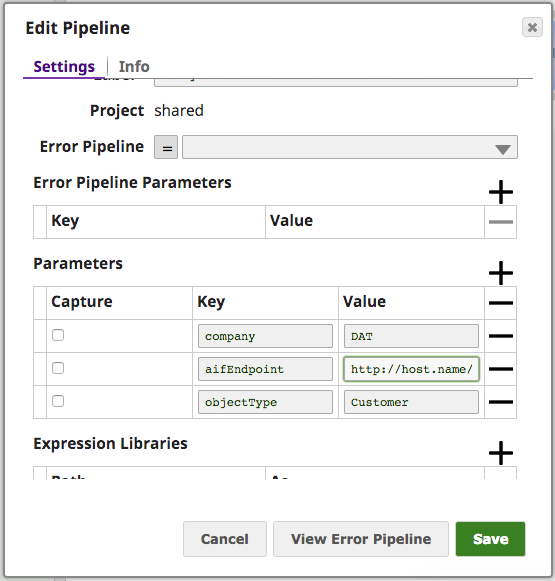
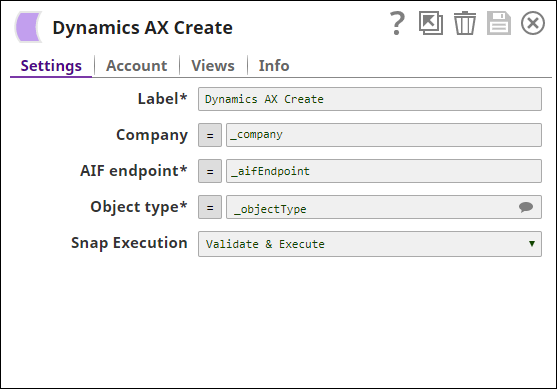
Configuring using upstream parameters
Here are some JSON representations of the mandatory fields for AX object types. They can be copy-paste to JSON Generator Snap and used as the input for the Dynamics AX Create Snap.
[
  {
    "CustomerServiceCreateRequest": {
      "Customer": {
        "CustTable": [
          {
            "CustGroup": "TestGroup",
            "Currency": "USD",
            "Name": "test1",
            "class": "entity",
            "AccountNum": "terence-010",
            "DirParty": [
              {
                "class": "entity",
                "Name": "test create1",
                "xsiType": "AxdEntity_DirParty_DirOrganization"
              }
            ]
          }
        ]
      }
    }
  }
]
[
  {
    "SalesOrderServiceCreateRequest": {
      "SalesOrder": {
        "SalesTable": [
          {
            "CustAccount": "DAT-000001",
            "LanguageId": "en-us",
            "class": "entity",
            "PurchOrderFormNum": "1234",
            "ReceiptDateRequested": "2017-10-10"
          }
        ]
      }
    }
  }
]
Advanced Use Case
The following describes a pipeline, with a broader business logic involving multiple ETL transformations. It shows how, in an enterprise environment, Create, Read, Search and Delete functionalities can typically be used. The pipeline download link is below.
This pipeline moves records from a Salesforce instance to the Dynamics AX instance, where the records are created, searched and read for the required IDs and deleted as needed.

The ETL Transformations:
- Extract: The Salesforce Read Snap retrieves the records from an object type from the Salesforce instance.
- Transform: The Mapper Snap maps the records from the Salesforce object to the Dynamics AX instance.
- Load:The Dynamics AX Create Snap creates the records on the AX instance.
The pipeline further uses:
- The Mapper Snap maps the records to be searched from an Object type.
- The Dynamics AX Search Snap searches all the records.
- The JSON Splitter Snap splits the the records based on the field names.
- The Dynamics AX Read Snap reads the records based on the given fields. They are retrieved from the bottom using the Tail Snap.
- The Mapper Snap maps the records to be deleted using the Dynamics AX Delete Snap.
Downloads
Important steps to successfully reuse Pipelines
- Download and import the pipeline into the SnapLogic application.
- Configure Snap accounts as applicable.
- Provide pipeline parameters as applicable.
Snap Pack History
Have feedback? Email documentation@snaplogic.com | Ask a question in the SnapLogic Community
© 2017-2025 SnapLogic, Inc.