/
Eloqua Basic Auth Account
Eloqua Basic Auth Account
- Kalpana Malladi
- Chandna Mitra
- Gouri Bhagchandani (Deactivated)
- Ritu Sachdeva
Owned by Kalpana Malladi
Last updated: Feb 14, 2024 by Gouri Bhagchandani (Deactivated)
In this article
Overview
Use this account type to connect Eloqua Snaps with datasources that use Eloqua Basic Auth accounts.
Prerequisites
- None.
Account Settings
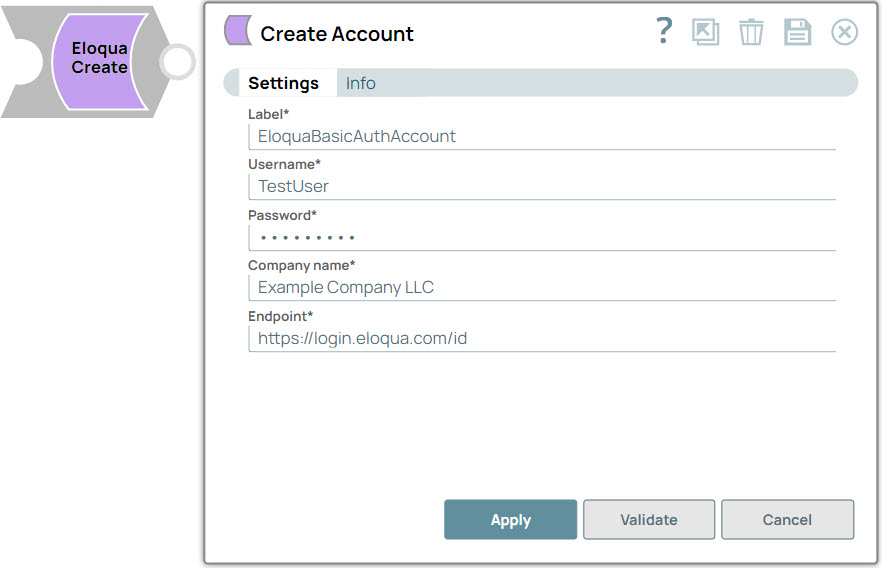
| Parameter Name | Data Type | Description | Default Value | Example |
|---|---|---|---|---|
| Label | String | Required. The name for the account. Preferably, update the account name if your project includes more than one account of the same type. | N/A | EloquaBasicAuthAccount |
| Username | String | Required. The user name for the Eloqua account. | N/A | JonesEric |
| Password | String | Required. The password for the account. | N/A | N/A |
| Company name | String | Required. Company name associated with the Eloqua login. | N/A | Torte LLC |
| Endpoint | String | Required. URI for fetching base REST API URI. Eloqua supports multiple data centers, and the https://login.eloqua.com/id endpoint lets you interface with Eloqua regardless of the location of the Eloqua install. For more information on endpoint URIs, see Determining Base URLs. | https://login.eloqua.com/id | https://login.eloqua.com/id |
Limitations
- None.
Troubleshooting
- None.
, multiple selections available,
Have feedback? Email documentation@snaplogic.com | Ask a question in the SnapLogic Community
© 2017-2025 SnapLogic, Inc.