Box Write
On this Page
Overview
You can use this Snap to write binary data to a file on Box.
Prerequisites
None.
Support for Ultra Pipelines
Works in Ultra Task Pipelines.
Limitations
None.
Snap Input and Output
Input/Output | Type of View | Number of Views | Examples of Upstream and Downstream Snaps | Description |
|---|---|---|---|---|
| Input | Document |
|
| File path. |
| Output | Binary |
|
| Writes the file to the specified file path. |
Snap Settings
| Field Name | Field Dependency | Description | |
|---|---|---|---|
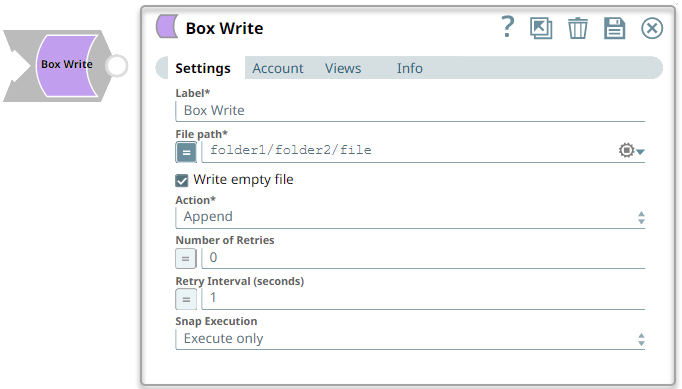
Label* | N/A | Specify the name of the Snap. You can modify this to be more specific, especially if you have more than one of the same Snap in your Pipeline. Default Value: Box Write | |
File path* | N/A | Specify the destination path of the file to be written. Default Value: None | |
| Write empty file | N/A | Select this checkbox to write an empty file when the incoming binary document has empty data, in which case a zero bye file is written to the output. If there is no incoming document at the input view of the Snap, no file is written regardless of the value of the property. Default Value: Selected | |
Action | N/A | Select the action to perform if the file already exists. The available options are:
Default value: Append | |
| Number of Retries | N/A | Specify the number of attempts the Snap must make in case of connection failure or timeout. If the retry value is more than zero, the Snap first stores the input data in a temporary local file before writing to the target Box file. Ensure that the local drive has sufficient free disk space as large as the expected target file size. Minimum value: 0 Default value: 0 | |
| Retry Interval (seconds) | N/A | Specify the minimum number of seconds the Snap must wait before each retry attempt. Default value: 1 For existing Pipelines which have the Enable Staging (deprecated field) checkbox selected, this Snap retries the connection once even if the Number of retries is zero. | |
Snap Execution | N/A | Select one of the three modes in which the Snap executes. Available options are:
| |
Example
To write a file to Box, send a file from the File Reader Snap to the Box Write Snap where the file path is set to the destination path. If the Action property is set to Overwrite, it overwrites the existing file. If the Action property is set to Append, it appends the content to the existing file.
Snap Pack History
Release | Snap Pack Version | Date | Type | Updates |
|---|---|---|---|---|
May 2025 | main31019 | Stable | Updated and certified against the current SnapLogic Platform release. | |
February 2025 | main29887 | Stable | Updated and certified against the current SnapLogic Platform release. | |
November 2024 | main29029 | 13 Nov 2024 | Stable | Updated and certified against the current SnapLogic Platform release. |
August 2024 | main27765 | 21 Aug 2024 | Stable | Updated and certified against the current SnapLogic Platform release. |
May 2024 | main26341 | 08 May 2024 | Stable | Updated and certified against the current SnapLogic Platform release. |
February 2024 | 436patches25102 | 16 Feb 2024 | Latest | Upgraded the Box SDK version from 2.56.0 to 4.7.0 version. |
February 2024 | main25112 | 14 Feb 2024 | Stable | Updated and certified against the current SnapLogic Platform release. |
November 2023 | main23721 | 08 Nov 2023 | Stable | Updated and certified against the current SnapLogic Platform release. |
August 2023 | main22460 | 16 Aug 2023 | Stable | Updated and certified against the current SnapLogic Platform release. |
May 2023 | main21015 | 10 May 2023 | Stable | Upgraded with the latest SnapLogic Platform release. |
February 2023 | main19844 | 09 Feb 2023 | Stable | Upgraded with the latest SnapLogic Platform release. |
November 2022 | main18944 | 10 Nov 2022 | Stable | Upgraded with the latest SnapLogic Platform release. |
August 2022 | main17386 | 11 Aug 2022 | Stable | Upgraded with the latest SnapLogic Platform release. |
4.29 | main15993 | 14 May 2022 | Stable | Enhanced the Box Write Snap with the Write empty file checkbox that allows you to write an empty file when the incoming binary document has empty data. |
4.28 | main14627 | 12 Feb 2022 | Stable | Upgraded with the latest SnapLogic Platform release. |
4.27 | main12833 | 13 Nov 2021 | Stable | Added Connection timeout and Read timeout fields in Box accounts that enable the Box Snaps to read and write data within the specified connection and read timeouts. |
4.25Patch | 425patches10840 | 17 Aug 2021 | Latest | Modified default values for the following fields in Box Read and Box Write Snaps:
For existing Pipelines which have the Enable Staging (deprecated field) checkbox selected, this Snap retries the connection once even if the Number of Retries is zero. |
4.26 | main11181 | 14 Aug 2021 | Stable | Upgraded with the latest SnapLogic Platform release. |
4.25 Patch | 425patches10072 | 10 Jun 2021 | Latest | Modified default values of the following fields across the Snap Pack to trigger automatic retries by default, in case of connection failures or timeouts:
|
4.25 | main9554 | 08 May 2021 | Stable | Enhanced the output view of the Box Directory Browser Snap to display the error message, |
4.24 | 424patches9242 | 04 May 2021 | Latest |
|
4.24 | main8556 | 13 Feb 2021 | Stable | Upgraded with the latest SnapLogic Platform release. |
4.23 Patch | 423patches7526 | 20 Nov 2020 | Latest | Fixes the intermittent failure in access token refresh for the Box OAuth2 account by adopting the |
4.23 | main7430 | 14 Nov 2020 | Stable | Upgraded with the latest SnapLogic Platform release. |
4.22 Patch | 422patches6992 | 12 Oct 2020 | Latest | Fixes the Box Write Snap connection retry issue by allowing the Snap to retry only when the given input is at least '1' in Number of retries field. This fix removes the Enable Staging field. |
4.22 | main6403 | 12 Sep 2020 | Stable | Upgraded with the latest SnapLogic Platform release. |
4.21 | snapsmrc542 | 09 May 2020 | Stable | Upgraded with the latest SnapLogic Platform release. |
4.20 Patch | box8743 | 13 Feb 2020 | Latest | Fixes an issue with the Box Snap Pack wherein the OAuth2 token auto-refresh fails for Box accounts. The fix includes a patch released by Box to restore functionality to the "https://www.box.com/api/oauth2/token URL" of the deprecated version 1 of the Box API. Box recommends users to start using the endpoint in version 2 of the Box API: "https://api.box.com/oauth2/token" as seen in the blogpost here: https://blog.box.com/start-migrating-to-v2-of-the-content-api-deprecating-v1-in-december |
4.20 | snapsmrc535 | 08 Feb 2020 | Stable | Upgraded with the latest SnapLogic Platform release. |
4.19 Patch | azureactivedirectory8341 | 19 Nov 2019 | Latest | Fixes an issue with the Get Group Members Snap wherein the Snap is unable to return more than 100 users. |
4.19 | snaprsmrc528 | 14 Nov 2019 | Stable | Upgraded with the latest SnapLogic Platform release. |
4.18 | snapsmrc523 | 10 Aug 2019 | Stable |
|
4.17 | ALL7402 | 11 Jun 2019 | Latest | Pushed automatic rebuild of the latest version of each Snap Pack to SnapLogic UAT and Elastic servers. |
4.17 | snapsmrc515 | 11 Jun 2019 | Stable | Added the Snap Execution field to all Standard-mode Snaps. In some Snaps, this field replaces the existing Execute during preview check box. |
4.16 | snapsmrc508 | 16 Feb 2019 | Stable | Upgraded with the latest SnapLogic Platform release. |
4.15 | snapsmrc500 | 15 Dec 2018 | Stable | Upgraded with the latest SnapLogic Platform release. |
4.14 | snapsmrc490 | 11 Aug 2018 | Stable | Upgraded with the latest SnapLogic Platform release. |
4.13 | snapsmrc486 | 12 May 2018 | Stable | Upgraded with the latest SnapLogic Platform release. |
4.12 Patch | box5181 | 07 May 2018 | Latest |
|
4.12 | snapsmrc480 | 17 Feb 2018 | Stable | Upgraded with the latest SnapLogic Platform release. |
4.11 Patch | box4306 | 01 Dec 2017 | Latest | Resolved an issue with the Box Read Snap that was unable to run for longer times due to the current token getting expired. The fix helped to proceed with new access token when the current access token expires. |
4.11 | snapsmrc465 | 11 Nov 2017 | Stable | Upgraded with the latest SnapLogic Platform release. |
4.10 | snapsmrc414 | 12 Aug 2017 | Stable | Upgraded with the latest SnapLogic Platform release. |
4.9 | snapsmrc405 | 13 May 2017 | Stable | Upgraded with the latest SnapLogic Platform release. |
4.8 | snapsmrc398 | 11 Feb 2017 | Stable | Upgraded with the latest SnapLogic Platform release. |
4.7 | snapsmrc382 | 23 Nov 2016 | Stable | Upgraded with the latest SnapLogic Platform release. |
4.6 | snapsmrc362 | 13 Aug 2016 | Stable | Upgraded with the latest SnapLogic Platform release. |
4.5.1 | box1576 | 18 May 2016 | Stable |
|
4.5 | rcmsf231 | 14 May 2016 |
| |
4.3.1 | Resolved an issue with Snaps in this Snap Pack not being proxy-aware. |
Have feedback? Email documentation@snaplogic.com | Ask a question in the SnapLogic Community
© 2017-2025 SnapLogic, Inc.