Configuring Teradata Database Accounts
In this article
Overview
This account is used by the Snaps in the Teradata Snap Pack. You can create an account from Designer or Manager. In Designer, when working on pipelines, every Snap that needs an account prompts you to create a new account or use an existing account. The accounts can be created in or used from:
- Your private project folder: This folder contains the pipelines that will use the account.
- Your Project Space’s shared folder: This folder is accessible to all the users that belong to the Project Space.
- The global shared folder: This folder is accessible to all the users within an organization in the SnapLogic instance.
Account Types
Teradata Database Account

Label | Required. User provided label for the account instance | |
|---|---|---|
Account properties | Required. Enter in the information to create a connection to the database. | |
Hostname | Required. The server's address to connect to. Default value: [None] | |
Port Number | The database server's port to connect to. Port can be specified but it often results in the address being parsed as an IPv6 address. Care should be taken. Default value: [None] | |
Database name | Required. The database name to connect to. Default value: [None] | |
Username | Username that is allowed to connect to the database. Username will be used as the default username when retrieving connections. The username must be valid in order to set up the data source. Default value: [None] | |
Password | Password used to connect to the data source. Password wil be used as the default password when retrieving connections. The password must be valid in order to set up the data source. Default value: [None] | |
JDBC jars | List of JDBC JAR files to be loaded. A different driver binary for a driver must have a different name, the same name can not be reused for a different driver. If this property is left blank, a default JDBC driver will be loaded. Default value: [None] | |
JDBC Driver Class | Required. JBDC driver class name to use. Default value: com.teradata.jdbc.TeraDriver | |
| Advanced properties | ||
Auto commit | When selected, each of the batches is committed immediately after it is executed. If the Snap fails, only the batch being executed at that moment is rolled back. When deselected, the Snap execution output is committed only after all the batches are executed. If the Snap fails, the entire transaction is rolled back, unless the Snap finds invalid input data before it sends the insert request to the server, and routes the error documents to the Error view. Default value: Selected | |
Batch size | Required. Number of statements to execute at a time. Using a large batch size could use up the JDBC placeholder limit of 2100. Default value: 50 | |
Fetch size | Required. Number of rows to fetch at a time when executing a query. Large values could cause the server to run out of memory. Default value: 100 | |
Max pool size | Required. Maximum number of connections a pool will maintain at a time. Default value: 50 | |
Max life time | Required. Maximum lifetime of a connection in the pool. Ensure that the value you enter is a few seconds shorter than any database or infrastructure-imposed connection time limit. A value of 0 indicates an infinite lifetime, subject to the Idle Timeout value. An in-use connection is never retired. Connections are removed only after they are closed. Default value: 30 | |
Idle Timeout | Required. The maximum amount of time a connection is allowed to sit idle in the pool. A value of 0 indicates that idle connections are never removed from the pool. Default value: 5 | |
Checkout timeout | Required. Number of milliseconds to wait for a connection to be available when the pool is exhausted. If you provide 0, the Snap waits infinitely until the connection is available. Therefore, we recommend you not to specify 0 for Checkout Timeout. Default value: 10000 | |
| URL Properties | ||
URL property name | URL property name Default value: selectMethod | |
URL property value | URL property value Default value: cursor | |
Account Encryption
| Standard Encryption | If you are using Standard Encryption, the High sensitivity settings under Enhanced Encryption are followed. | |
|---|---|---|
| Enhanced Encryption | If you have the Enhanced Account Encryption feature, the following describes which fields are encrypted for each sensitivity level selected per each account. Account:
| |
Teradata Database Dynamic Account
Selecting the Dynamic Account allows the users to pass the account details dynamically as a pipeline parameter. This would enable the users to use the same Snap within a pipeline to connect to different database instances.

Label | Required. User provided label for the account instance | |
|---|---|---|
Account properties | Required. Enter in the information to create a connection to the database. | |
Hostname | Required. The server's address to connect to. Default value: [None] | |
Port Number | The database server's port to connect to. Port can be specified but it often results in the address being parsed as an IPv6 address. Care should be taken. Default value: 1025 | |
Database name | Required. The database name to connect to. Default value: [None] | |
Username | Required. Username that is allowed to connect to the database. Username will be used as the default username when retrieving connections. The username must be valid in order to set up the data source. Default value: [None] | |
Password | Password used to connect to the data source. Password wil be used as the default password when retrieving connections. The password must be valid in order to set up the data source. Default value: [None] | |
JDBC jars | List of JDBC JAR files to be loaded. A different driver binary for a driver must have a different name, the same name can not be reused for a different driver. If this property is left blank, a default JDBC driver will be loaded. Default value: [None] | |
JDBC Driver Class | Required. JBDC driver class name to use. Default value: com.teradata.jdbc.TeraDriver | |
| Advanced properties | ||
Auto commit | When selected, each of the batches is committed immediately after it is executed. If the Snap fails, only the batch being executed at that moment is rolled back. When deselected, the Snap execution output is committed only after all the batches are executed. If the Snap fails, the entire transaction is rolled back, unless the Snap finds invalid input data before it sends the insert request to the server, and routes the error documents to the Error view. Default value: Selected | |
Batch size | Required. Number of statements to execute at a time. Using a large batch size could use up the JDBC placeholder limit of 2100. Default value: 50 | |
Fetch size . | Required. Number of rows to fetch at a time when executing a query. Large values could cause the server to run out of memory. Default value: 100 | |
Max pool size | Required. Maximum number of connections a pool will maintain at a time. Default value: 50 | |
Max life time | Required. Maximum lifetime of a connection in the pool. Ensure that the value you enter is a few seconds shorter than any database or infrastructure-imposed connection time limit. A value of 0 indicates an infinite lifetime, subject to the Idle Timeout value. An in-use connection is never retired. Connections are removed only after they are closed. Default value: 30 | |
Idle Timeout | Required. The maximum amount of time a connection is allowed to sit idle in the pool. A value of 0 indicates that idle connections are never removed from the pool. Default value: 5 | |
Checkout timeout | Required. Number of milliseconds to wait for a connection to be available when the pool is exhausted. If you provide 0, the Snap waits infinitely until the connection is available. Therefore, we recommend you not to specify 0 for Checkout Timeout. Default value: 10000 | |
| URL Properties | ||
URL property name | URL property name Default value: selectMethod | |
URL property value | URL property value Default value: cursor | |
Account Encryption
| Standard Encryption | If you are using Standard Encryption, the High sensitivity settings under Enhanced Encryption are followed. | |
|---|---|---|
| Enhanced Encryption | If you have the Enhanced Account Encryption feature, the following describes which fields are encrypted for each sensitivity level selected per each account. Account:
| |
Example
For the pipeline, define the pipeline parameters:
- Host
- Username
- Password
- Database
Use the values to supply values them in the Dynamic Account.
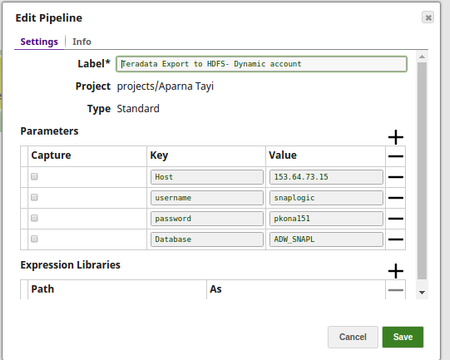
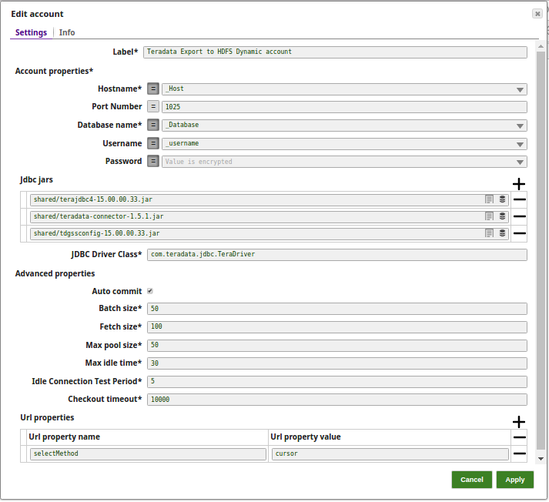
Back in the Teradata Export to HDFS pipeline, create a Teradata Database Dynamic Account
- Set the expression toggle on for the Hostname, Database name, Username and Password
- Supply the pipeline parameter values manually into the toggled properties
- Click Apply and fill the Snap Settings for the desired function.
You cannot Validate an account connection when creating a Teradata Database Dynamic Account because the account properties of a dynamic account are provided dynamically as pipeline parameters.
Snap Pack History
Have feedback? Email documentation@snaplogic.com | Ask a question in the SnapLogic Community
© 2017-2025 SnapLogic, Inc.