Atlassian uses cookies to improve your browsing experience, perform analytics and research, and conduct advertising. Accept all cookies to indicate that you agree to our use of cookies on your device. Atlassian cookies and tracking notice, (opens new window)
/
ELT Snap Pack
ELT Snap Pack
Jun 04, 2025
In this article
Overview
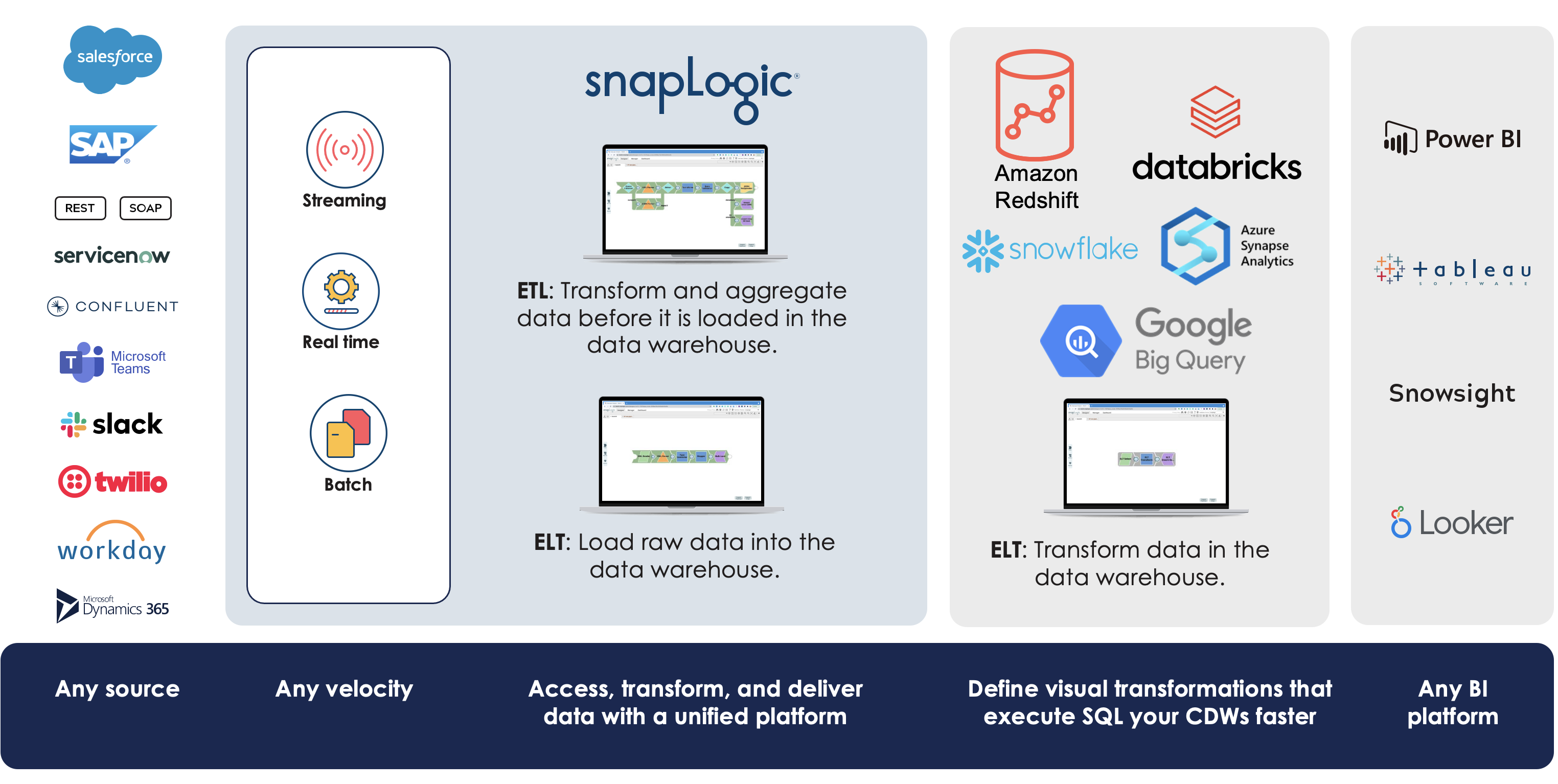
SnapLogic’s ELT Snap Pack is a full pushdown optimization (FPDO) solution that enables you to read, extract data from different cloud storage source locations, load, and transform this data in the target database through ELT Pipelines that parse SQL queries. As such, an ELT Pipeline generates and executes SQL on the target database. ELT Snaps help you to make data available to the enterprise in quick time, eliminating delays in transforming data for your specific purpose.
Read data from a source cloud storage location (such as Amazon S3) or Amazon Redshift (to Google BigQuery only)
Load it into your Data Warehouse in its raw format
Transform the data using the power of the cloud
The ELT Snap Pack is fundamentally different from all other Standard mode Snap Packs in SnapLogic as the ELT Snaps incrementally build an optimized SQL query (and do not process any data) in between them. Snaps like ELT Load, ELT SCD2, and ELT Insert-Select execute the final SQL query on your target CDW to load the source data and then transform it.
Standard Snap Pack Pipelines can execute ELT Pipelines
You can also execute an ELT Pipeline from a standard-mode Pipeline by utilizing the Pipeline Execute Snap.
ELT Source-Target-Hosting Support Matrix
(Source) Data Storage
Cloud Data Warehouse (Target)
(Target) Cloud Host
AWS Simple Storage Service (S3)
Amazon Redshift
Microsoft Azure External Location
DBFS (Databricks File System)
Google Cloud Storage
Amazon AWS
Microsoft Azure
Google Cloud Platform (GCP)
Blob Storage
ADLS Gen2
✔
✖
✔
✖
✖
✔
Snowflake
✔
✔
✔
✔
✖
✖
✖
✖
✖
Amazon Redshift
✔
✖
✖
✖
✖
✔ *
✔ *
✖
✖
Azure Synapse
✖
✔
✖
✔
✖
✔
✔
✔
✖
Databricks Lakehouse Platform (DLP)
✔
✔
✖
✔
✔
✖
✖
✖
✔
Google BigQuery
✖
✖
✔
The ELT Snap Pack supports only the source cloud storage locations and target CDWs mentioned above. In case your source data currently resides in any other storage system, you need to port the data into one of the above data storage locations that fits into your infrastructure policies and preferences.
*ELT Snap Pack supports Azure Blob Storage and ADLS Gen2 as the external (source) locations for loading and transforming data into Azure Synapse.
You can configure your Configuring ELT Database Accounts to automatically use an appropriate JDBC JAR file for connecting to your target CDW and performing the load and transform operations.
Supported CDW
Certified JDBC JAR File
Azure Synapse
mssql-jdbc-11.2.1.jre11.jar
BigQuery
SimbaJDBCDriverforGoogleBigQuery42_1.3.0.1001.zip
Databricks Lakehouse Platform (DLP)
databricks-jdbc-2.6.29.jar
Redshift
redshift-jdbc42-2.1.0.9.jar
Snowflake
snowflake-jdbc-3.13.33.jar
Using Alternate JDBC JAR File Versions
We recommend you to let the ELT Snaps use the listed JAR file versions. However, you may use a different JAR file version of your choice.
Limitations
With the basic authentication type for Databricks Lakehouse Platform (DLP) reaching its end of life on July 10, 2024, SnapLogic ELT pipelines designed to use this authentication type to connect to DLP instances would cease to succeed. We recommend that you reconfigure the corresponding Snap accounts to use the Personal access tokens (PAT) authentication type.
Known Issues
In the ELT Merge Into Snap, the Records Updated parameter in the Snap Statistics tab (on Pipeline execution) displays the combined count of records that were inserted, updated, and deleted for target CDWs: Azure Synapse, Google BigQuery, and Amazon Redshift. The Snap displays individual counts for target tables in Snowflake and DLP
When your Databricks Lakehouse Platform instance uses Databricks Runtime Version 8.4 or lower, ELT operations involving large amounts of data might fail due to the smaller memory capacity of 536870912 bytes (512MB) allocated by default. This issue does not occur if you are using Databricks Runtime Version 9.0.
In case of Databricks Lakehouse Platform (DLP), when you specify a CSV file to load data from and select the Load Action as Alter Table in the ELT Load Snap, the Snap fails with the error Database encountered an error during Bulk Load process.
When you configure an ELT Merge Into Snap to perform an Update or Delete operation or an ELT Execute Snap with a MERGE INTO statement that performs Update or Delete operation on a Databricks Lakehouse Platform cluster, it may return an error if multiple source rows attempt to update or delete the same target row. To prevent such errors, you need to preprocess the source table to have only unique rows.
DO NOT use regular JavaScript expressions (supported in the Standard-mode Snaps and not in the above list).
DO NOT prefix variable names with $ symbol.
The Snaps - ELT Load, ELT Merge-Into, ELT Insert-Select and ELT Select, display the Schema Name field suggestions from all databases that the Snap account user can access, instead of the database selected in the Snap account or the Snap Settings.
Loading
Snap Pack History
Click here to expand...
Release
Snap Pack Version
Date
Type
Updates
May 2025
441patches31159
Latest
Fixed the intermittent null expression errors with the ELT Snap Pack, where some malformed unique identifier suffixes to the Snaps' SQL statements were hindering the SQL statement execution, thereby causing the pipelines to fail.
May 2025
main31019
Stable
Updated and certified against the current SnapLogic Platform release.
February 2025
440patches30341
Latest
Fixed an issue with the ELT Merge Into Snap where the Snap fails to perform the MERGE INTO operation on the RedShift target tables with the error - Failed to set search_path when the specified target Database schema is not one of the default schemas ("$user”, public).
February 2025
main29887
Stable
Updated and certified against the current SnapLogic Platform release.
November 2024
439patches29443
Latest
Fixed an issue with the ELT Merge Into Snap where the Snap fails to perform the MERGE INTO operation on the RedShift target tables with the error - There were no target table columns found. when the specified target Database schema is not one of the default schemas ("$user”, public). This issue did not exist before the May 2024 release.
November 2024
main29029
Stable
Updated and certified against the current SnapLogic Platform release.
August 2024
438patches28010
Latest
The ELT Insert-Select Snap no longer fails to execute SQL statements that contain multiple multiline comment character pairs (/* and */) and/or multiple quoted substrings. Quoted substrings refer to schema, database, table, or column identifiers, which are delimited to allow special characters.
We recommend that you upgrade your main27765 (August 2024 GA release) ELT Snap Pack to this latest version.
August 2024
main27765
Stable
Upgraded the jOOQ library for the ELT Snap Pack from v3.9.1 to v3.17.x.
May 2024
437patches27372
Latest
Enhanced the pipeline execution statistics of ELT Insert-Select Snap to be displayed in its output view and to allow downloading detailed stats as a JSON file that includes additional statistics (extraStats) on DML statement executions on target Databricks Lakehouse Platform (DLP) tables.
May 2024
437patches27246
Latest
Enhanced theELT ExecuteSnap to display SQL execution statistics in the pipeline execution statistics and the output view of the Snap for all SQL statements executed. The Snap also allows you to download detailed stats as a JSON file that includes additional statistics (extraStats) on DML statement executions on target Databricks Lakehouse Platform (DLP) tables.
May 2024
437patches26846
Latest
Fixed the issue with the ADLS Gen 2 account connection where some conflicts between internally used Azure libraries prevented the ELT Load Snap from reading files.
Fixed an issue with the ELT Merge Into Snap where the Snap’s SELECT SQL statement could not fetch the target tables information from the PG_TABLE_DEF catalog table of the Amazon Redshift instance.
The SELECT SQL statement now uses lowercase for both non-delimited and delimited table names and excludes double quotes from delimited table names to fetch the values from the catalog table.
PG_TABLE_DEF is a Redshift system catalog table that contains information about the tables including table names, column names, data types among their other metadata.
Enhanced the ELT Load Snap to support loading data from nested AVRO, JSONLines, ORC, or Parquet files in Azure storage to the target tables in a Databricks Lakehouse Platform (DLP) instance. Only two Load actions are supported: Drop and create table and Append table.
May 2024
main26341
Stable
Fixed an issue where the ELT Merge Into Snap failed to load data into the Google BigQuery target table because of the error: Number of source column expressions in the input SQL is greater than the target table columns (even after altering the target table schema to match the source table columns). The resolution was to modify an SQL statement that was used internally to achieve the merge action.
February 2024
436patches25953
Latest
Enhanced the ELT Load Snap’s capabilities to allow loading flat and nested data sets (from canonical and non-canonical formats) from your Parquet files to the target tables in Snowflake. Learn more about the usage of this feature at Load data from Parquet files and in the following example Pipelines:
Updated and certified against the current SnapLogic Platform release.
November 2023
435patches24461
Latest
Fixed an issue with the ELT Merge Into Snap that caused inaccurate aliases and table identifiers in its generated SQL statement.
November 2023
435patches23671
Latest and Stable
Enhanced the ELT Merge Into Snap to support defining the update expressions for updating tables in your target Databricks Lakehouse Platform instance using the WHEN NOT MATCHED BY SOURCE clause, besides other supported clauses and expression lists.
November 2023
main23721
Stable
Enhanced the ELT Merge Into and ELT SCD2 Snaps to display detailed pipeline execution statistics about the data loaded to target tables on a Databricks Lakehouse Platform instance.
In addition to the individual counts of rows inserted, updated, and deleted that the ELT Merge Into Snap covers, the ELT SCD2 Snap also reports the count of source rows rejected.
August 2023
main22460
Stable
Upgraded the JDBC driver support for Snowflake to snowflake-jdbc-3.13.33.jar.
Updated the ELT Snowflake Account to append the connection parameter application in its JDBC URL with the value SnapLogic_iPaaS.
May 2023
N/A
Stable
Fixed a null pointer exception so no 5XX errors can occur if you download non-existent query details from the Pipeline Execution Statistics of an ELT (write-type) Snap.
May 2023
main21015
Stable
Upgraded with the latest SnapLogic Platform release.
February 2023
432patches20978
Latest
Fixed an issue with the ELT SCD2 Snap where the COLLATE column constraint (used in the new target table definition for Snowflake) resulted in an incorrect syntax internally, causing the pipeline to fail. The load operation succeeds with this fix.
February 2023
main19844
Stable
Upgraded with the latest SnapLogic Platform release.
The ELT Merge Into Snap displays the individual record counts inserted, updated, and deleted for Snowflake targets in the respective Records Inserted, Records Updated, and Records Deleted parameters of the Snap Statistics tab (on Pipeline execution).
With Google deprecating the OAuth out-of-band (OOB) flow, the Refresh Token Accounts defined for connecting your ELT Snaps to the BigQuery instances start failing in a phased manner. We recommend that you immediately modify these Snap account configurations to switch to an Access Token Account or a Service Account from the Refresh Token Account.
The ELT Create View Snap enables you to create a new view when the view does not exist in the target database and/or schema or if the view already exists in the database and/or schema, and you choose to drop the existing view and re-create it.
Enhancements
The ELT Insert-Select Snap is more flexible and easier to use, especially if the number of columns in your source data set is very large. You can choose to update values only in a subset of columns in the target table.
The ELT Execute Snap can retrieve and execute SQL queries from the upstream Snap's output when referenced in the SQL Statement Editor using the Expression language (with the Expression button enabled).
The ELT Load Snap can infer the schema from the source files in Amazon S3, ADLS Gen2, Microsoft Azure Blob Storage, or Google Cloud Storage location and use it to create, overwrite, and append the target table in your Snowflake instance with the source data. The source files can be in the AVRO, CSV, JSON, ORC, or PARQUET format. Learn more at Automatic Schema Inference with ELT Load Snap.
Target Table Name in the following Snaps supports retrieving editable views with the table names from the selected target schema:
The pivot values in the ELT PivotSnap turns dynamic when you select Enable dynamic pivot values. The following field settings are added as part of this dynamic pivot values feature:
Filter Predicate List: A field set to filter the predicate list of the pivot values.
Pivot Values Filter: Condition required to filter the pivot values.
Boolean Operator: Predicate condition type through AND or OR Boolean operators
Sort Order: Sorting order of the pivot values.
You can specify the type of Microsoft Azure external storage location (source)—an Azure Data Lake Gen2 or a Blob Storage—to access your source data using the Storage Integration type of authentication and load it to your target Snowflake instance.
August 2022
main17386
Stable
Upgraded with the latest SnapLogic Platform release.
4.29-Patch
429patches16665
Latest
Enhanced the ELT Snap Pack to support the latest JDBC drivers across CDWs—Azure Synapse, BigQuery, DLP, Redshift, and Snowflake. See Configuring ELT Database Accounts or the respective Account page for the exact versions.
Enhanced the ELT Pivot Snap to make the Value List field dynamic.
Enhanced the ELT DLP Account to configure S3 Bucket, Azure Storage, and DataLake Storage Gen2 Mounts.
Enhanced the ELT Snowflake Account with support for Key Pair Authentication.
To include a new option Overwrite existing table in the Target Table action field.
To display the final SQL query in its output preview upon Pipeline validation.
Enhanced the end Snap SQL query in the ELT Insert Select Snap’s preview output to display the CREATE TABLE... or the DELETE/DROP TABLE statements to be run before the query that inserts/loads data into a new table in the Snowflake target CDW.
Fixed an issue with ELT Insert Select and ELT Merge Into Snaps where they cause the Pipeline to fail when the specified target table does not exist. After this fix, the Snaps create a new target table if it does not exist during Pipeline validation.
The new table that is created will not be dropped in the event of a subsequent/downstream Snap failing during validation.
Fixed the issue with ELT Load Snap where the Snap caused an SQL exception—[Simba][SparkJDBCDriver](500051) ERROR processing query/statement when reading from a CSV file in S3 mount point on DBFS in the case of a DLP target instance.
TheELT Insert Select,ELT Merge Into,ELT Load, and theELT SCD2Snaps now run successfully even when the specified target table does not exist. These Snaps now create a new target table if it does not exist during Pipeline validation.
The new table thus created will not be dropped in the event of a subsequent/downstream Snap failure during validation.
Fixed an issue with the ELT SCD2 Snap where the Snap was rounding off decimal values to the nearest integer—the value 57.601000000000 in the source table was written to the target table as 58.000000000.
4.29
main15993
Stable
Introducedthe following new ELT Snaps:
ELT Cast Function: Snap to convert a data type of a column in the input SQL string into other supported data types.
ELT String Function: Snap to support the various string functions supported by the different databases.
ELT Router: Snap to enable routing input SQL queries into multiple output views based on the given conditional expressions.
Enhanced the following Snaps to display the final SQL query in their output preview upon Pipeline validation.
Enhanced the ELT Database Account to support OAuth2-based authentication on the target Snowflake database.
Enhanced the ELT Select, ELT Insert Select, ELT SCD2, ELT Merge Into, and ELT Load Snaps to display suggestions on the Schema Name field based on the Default Database Name provided in the Snap Account configuration when the Database Name is not specified in the respective Snap.
Improved usability of the suggestions features for these Snaps by making them case-insensitive. For example, typing default in the Schema Name field displays both default and DEFAULT, if they co-exist. You do not need to type DEFAULT to invoke and select the schema name DEFAULT from the suggestions list.
Enhanced the ELT SCD2 Snap to address different feature requests and issues raised by multiple customers. These changes provide more flexibility in configuring your SCD2 operations using this Snap.
Removed Check for nulls and duplicates in the source field and added two dropdown lists - Null Value Behavior and Invalid Row Handling.
Made the following items in the Meaning field of the Target Table Temporal Fields fieldset mandatory while making the Invalid historical rowsflag optional.
Enhanced the ELT Aggregate Snap to support the following GROUP BY features across all supported CDWs:
Group by Cube
Group by Grouping Sets
Group by Rollup
Automatic GROUP BY for all input columns.
Fixed an issue with ELT Merge Into Snap where the Snap erroneously modified the target table column name when the column name contained the target table name.
Fixed an issue in ELT SCD2 Snap where the Snap causes incorrect results with Snowflake targets, when:
The Historical Row End Date value is provided.
Nulls and Invalid rows are recognized, but one or more start dates in the source are null.
Fixed the issue in ELT Transform Snap where the Output Schema of the Snap does not populate all the column names from its Input Schema.
4.28-Patch
428patches15638
Latest
Fixed the issue with ELT Merge Into Snap where the Snap erroneously modified the target table column name when it contained the target table name, due to a misinterpretation of the target table name aliases.
4.28-Patch
428patches15290
Latest
Updated ELT SCD2 Snap to address different feature requests and issues raised by multiple customers. These changes provide more flexibility in configuring your SCD2 operations using this Snap.
Removed Check for nulls and duplicates in source field and added two dropdown lists - Null Value Behavior and Invalid Row Handling.
Introduced a new Snap ELT Router to enable routing input SQL queries into multiple output views based on the given conditional expressions.
4.28
main14627
Stable
Subquery Pushdown Optimization: SnapLogic now optimizes SQL queries before they are passed to the CDW to ensure the queries are performant and cost-efficient in the respective CDW. An SQL subquery means a query inside a query. Pushdown optimization refers to rewriting these incremental (nested) SQL queries produced in your ELT Pipeline to form a more optimal/performant version.
ELT Math Functions: Snap to perform mathematical—arithmetic, logarithmic, trigonometric, exponent, root, rounding, and truncation—operations on data.
Enhanced all the expression-enabled fields in ELT Snaps to display suggestions from the Input Schema (emanating from the upstream Snaps) in addition to the existing standard SQL expressions and functions list.
HAVING clause within GROUP BY clause, when the WHERE clause cannot be used.
GROUP BY ROLLUP.
New aggregate functions for DLP: ANY, SOME, KURTOSIS, and STDDEV.
Enhanced the ELT Load Snap to support loading data into BigQuery targets from S3 buckets and Redshift CDW. These load operations use the BigQuery Data Transfer Service (DTS) client libraries and are carried out in asynchronous mode.
Enhanced the ELT Load and ELT Insert Select Snaps with a new fieldset Table Options List to support defining the Table Options for creating a new table in your target CDW.
Enhanced the ELT Select Snap to support Common Table Expression (CTE)-based SQL queries that contain a WITH clause inside the SQL Query Editor field, when your target CDW is Azure Synapse.
4.27-Patch
427patches13923
Latest
Fixed the issue with ELT SCD2 Snap where the Snap did not equate null values in the corresponding cause-historization rows of both the source and target tables (with no other changes to data in the remaining fields) as the same and produced duplicate rows in the target table, as a result. After this fix, the Snap does not cause any new duplicate rows in the target table.
Fixed the issue with ELT Load Snap where the Snap fails with the error Database encountered an error during Bulk Load process when you specify a CSV file to load data from, with the Load Action as Alter Table. The Snap now performs the specified ALTER TABLE actions—ADD/DROP columns—and loads the data into the target table accordingly (without the need to manually modify the source or target tables beforehand).
4.27-Patch
427patches13539
Latest
Fixed the issue with ELT SCD2 Snap where the Snap failed when you define more than one TargetTable Natural Key in the Snap configuration to load SCD2 data into the target CDW instance.
Fixed an issue with the ELT SCD2 Snap where the Snap failed to update the previous current rows in the target SCD2 table to historical rows when you define an End Date of Historical Row in Target Table Temporal Fields.
Fixed an issue with the ELT SCD2 Snap where the Snap failed to insert new rows when you define the values that exist in the most recent historical rows of the target SCD2 table as the cause-historization values.
Fixed the issue with ELT Transform Snap where the Snap does not omit the source columns marked for removal from the output view—using an empty Target Path for one or more columns selected in the Expression field of the Snap’s Mapping Table. See Using Empty Target Paths to Omit Rows from the Snap Output to understand how to perform this operation.
4.27-Patch
427patches13030
Latest
Fixed the following issues with the ELT SCD2 Snap:
Where the Snap failed to get the right data type due to column name case mismatches between what is used in the Snap and what is actually used in the Azure Synapse tables (returned by the JDBC driver). You no longer need to type the column names in the exact case that Azure Synapse expects.
The Snap failed with the error—start_date does not exist—while writing SCD2 data to a Redshift table column start_date that is specified as the StartDate of Current Row in the Target Table Temporal Field(s) field set.
The Snap failed with the error—Reference 'END_DATE' is ambiguous—while merging SCD2 updates into DLP tables.
Where the Snap failed due to lack of required access privileges on the target database (for example, create table rights to create temporary tables as needed). The Snap now runs the input SQL statement and the elaborate sub-queries instead of attempting to create a temporary table in such scenarios.
Fixed the issue with the ELT SCD2 and ELT Load Snaps that fail to perform an add/drop operation involving multiple columns on a Redshift target table.
4.27
main12833
Stable
Enhanced the ELT Aggregate Snap to support COUNT_IF aggregate function for Redshift and Azure Synapse target databases. Eliminating duplicates with COUNT_IF aggregate function Note: Selecting the Eliminate Duplicates checkbox while using COUNT_IF aggregate function does not eliminate duplicate records in case of Snowflake and BigQuery databases, as there is no native support for this feature. However, for Redshift, Azure Synapse and Databricks Lakehouse Platform (DLP), the duplicates are eliminated from the list of records when you select this checkbox for COUNT_IF function.
Updated the Expressions and Functions Supported for ELT in the Snap and Account configuration sections. This list is common to all target CDWs supported. You can use these expressions to define your Snap or Account settings with the Expression symbol = enabled, where available.
Enhanced the ELT Load Snap to ensure that the Snap uses the default S3 Folder name specified in the Snap's account to accurately resolve the defined File Name Pattern.
Enhanced the ELT Select and ELT Execute Snaps to allow SQL comments inside the SQL Query Editor and SQL Statement Editor fields respectively.
Enhanced the ELT Transform Snap to display the exact data types of fields listed in the Input Schema and Target Schema in case of Azure Synapse.
Enhanced the ELT Merge Into Snap to to support MERGE INTO ALL option and automatic source table aliasing.
Enhanced the ELT Load Snap by adding the Source File to Target Table Columns Map field set to enable mapping of columns between the source file and the target table. In case of Databricks Lakehouse Platform (DLP) the Snap is enhanced further to support delimiters other than the comma in the source CSV files.
Enhanced the ELT Join Snap to support Left Anti and Left Semi join types in BigQuery though it does not natively support these join types.
Enhanced the underlying load mechanism for ELT SCD2 Snap from Insert-and-Update mode to Merge-into mode to substantially improve the Snap's performance while working with large and very large volumes of data (upwards of 500M rows or 50GB size).
4.26-Patch
426patches12534
Latest
Fixed an issue withELT TransformSnap where it may display incorrect schema only in the previews (during Pipeline validation). This occurs especially when the incoming SQL statement (defined in theSQL Statement Editorof the upstream Snap) contains one or more of the WHERE, GROUP BY, HAVING , ORDER BY, LIMIT, LIMIT followed by OFFSET, and SAMPLE clauses. Here are a few Pipeline scenarios where this issue might surface:
… >ELT Select(with one or more of these clauses used in the SQL Statement Editor) >ELT Transform> …
Fixed an issue where the ELT Load Snap connecting to a Databricks Lakehouse Platform (DLP) instance failed to perform the load operation. Ensure that you provide a valid DBFS Folder path in the Snap's account settings as the Snap requires this folder path.
4.26-Patch
426patches11646
Latest
Enhanced the ELT Database Account to support token-based authentication (Source Location Session Credentials) to S3 locations for Snowflake and Redshift target databases.
Enhanced the ELT Aggregate Snap with the following changes:
Revised the field labels from:
GROUP BY Fields Listfield set > Output Field to GROUP BY Field.
ORDER-By Fields to ORDER-BY Fields (Aggregate Concatenation Functions Only).
Removed the Suggestion option for Field Name field under General Aggregate Functions List field.
Made the Alias Name fields in the Aggregate Concatenation Functions List and the Percentile Distribution Functions List field sets mandatory.
If your target database is a Databricks Lakehouse Platform (DLP) instance, then the ELT Load Snap supports loading data from source CSV files that contain only comma as the separator between values.
4.26-Patch
426patches11323
Latest
Enhanced the ELT Database Account to allow parameterization of field values using Pipeline Parameters. You can define and use these parameters in expression-enabled fields to pass values during runtime.
4.26-Patch
426patches11262
Latest
Fixed the following Known Issues recorded in the 4.26 GA version:
For a Snowflake target instance, the ELT Insert Select Snap does not suggest column names to select for the Insert Column field in the Insert Expression List.
The Snaps—ELT Merge Into, ELT Select, ELT Join, and ELT Filter—do not prevent the risk of SQL injection when your target database is Databricks Lakehouse Platform (DLP).
Intermittent null-pointer exceptions in the ELT Load Snap on Databricks Lakehouse Platform (DLP).
The ELT Insert Select Snap attempts to create the target table even when it exists in the Snowflake database.
When loading data from a JSON file into a target Databricks Lakehouse Platform (DLP) instance using an ELT Load Snap, if you choose the Drop and Create Table option as the Load Action and specify an additional column (that is not available in the JSON file) for the new table, it results in one more column null added to the new target table.
When you use the SQL editor in the ELT Select Snap configuration to define your SQL query, the Pipeline validation fails due to a syntax error in the following scenarios. However, the Pipeline execution works as expected. The only workaround is to drop the LIMIT clause and the optional OFFSET clause from the SQL query during Pipeline validation.
The query contains a LIMIT clause on a Snowflake, Redshift or Databricks Lakehouse Platform target instance: The SQL query created during Pipeline validation includes an additional LIMIT clause, for example: SELECT * FROM "STORE_DATA"."ORDERS" LIMIT 10 LIMIT 990.
The query contains an OFFSET clause (supported in case of Snowflake and Redshift): The SQL query created during Pipeline validation looks like SELECT * FROM "STORE_DATA"."ORDERS" LIMIT 10 OFFSET 4 LIMIT 990.
4.26
main11181
Stable
Enhanced the ELT Snap preview to support the following Snowflake data types:array,object,variant, andtimestamp.
The Snaps convert the values to hexadecimal (HEX) equivalents—the default setting for the session parameter BINARY_OUTPUT_FORMAT in Snowflake. SeeSession Parameters for Binary Valuesfor more information.
If this setting is different from hexadecimal (such as base64) in the Snowflake table, the Snaps still convert the values to hexadecimal equivalents for rendering them in the Snap preview.
Enhanced all ELT Snaps to display the Get preview datacheckbox below the Snap'sLabelfield.
Starting with the 4.26 release, all Snaps in the ELT Snap Pack(except the ELT Copy Snap) require an account to connect to the respective target database. Your existing Pipelines that do not use an account may fail. We recommend you to associate an ELT Database Account to each of the ELT Snaps (except ELT Copy Snap) for your Pipelines.
Enhanced theELT AggregateSnap to support Linear Regression functions on Redshift and Azure Synapse. The Snap also supports these functions on Databricks Lakehouse Platform.
Enhanced theELT ExecuteSnapto enable running multiple DML, DDL, and DCL SQLstatements from the same Snap instance.
Support LEFT ANTI JOIN and LEFT SEMI JOIN types on all supported databases.
Display or hide the Resultant Column Names Prefix Typefield based on the target database selected in the Snap's account.
Enhanced the ELT Load and ELT SCD2 Snaps to provide a list of suggested data types, while adding columns to or creating a table.
4.25-Patch
425patches10017
Latest
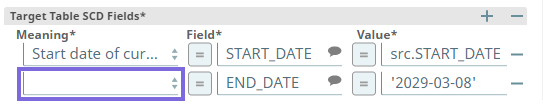
Updated the ELT SCD2 Snap to replace End date of historical row option in the Meaning field of Target Table SCD2 Fields field set with End Date of Current Row.
Breaking change
This may cause the existing Pipelines to fail as the End date of historical row option no longer exists.
You need to make the following update in the ELT SCD2 Snap's settings across your Pipelines after upgrading your Snap Pack to this patch:
Select End Date of Current Row from the Meaning drop-down list in the second entry (highlighted in the image).
Fixed the issue with the ELT Insert-Select Snap containing an open output preview that fails to retrieve output preview data in case of Redshift and Azure Synapse databases, though the Pipeline runs work as expected.
Fixed an issue where the ELT Execute Snap does not error out (Snap turns Green) even when running an SQL query to drop a non-existent table from a Snowflake or Azure Synapse database.
[Update on ]: Enhanced the ELT Snap previews to support the following data types: array, object, variant, and timestamp.
The Snaps convert the values to hexadecimal (HEX) equivalents—the default setting for the session parameter BINARY_OUTPUT_FORMAT in Snowflake. See Session Parameters for Binary Values for more information.
If this setting is different from hexadecimal (such as base64) in the Snowflake table, the Snaps still convert the values to hexadecimal equivalents for rendering them in the Snap previews.
4.25-Patch
425patches9725
Latest
Enhanced the ELT Snap preview to display the exact binary and varbinary values from Snowflake database during Pipeline validation, by converting the values to hexadecimalequivalents—the default setting in Snowflake. If the setting is different from hexadecimal in the Snowflake table, then the Snaps still convert the values to hexadecimal for rendering the Snap preview.
Enhanced theELT TransformSnap to display the appropriate data type (binaryorvarbinary) for the column names populated in the output schema.
Enhanced theELT Window FunctionsSnap to address potential issues due to an incorrect definition for MINUS function in case of Redshift and Azure Synapse databases.
4.25
main9554
Stable
Startingwith the 4.25 release, SnapLogic has now certified the ELT Snap Packto work withSnowflake hosted on Google Cloud Platform (GCP)as the target database, in addition to the other flavors ofSnowflake hosted on AWS and Microsoft Azure.
Introduced theELT ExecuteSnapto enable you to run DML, DDL, and DCL SQL queries in Snowflake in Snowflake, Redshift, andAzure Synapse.
Introduced theELT SCD2Snap to support Type 2 Slowly Changing Dimensions (SCD2) updates to the target databases—Snowflake, Redshift, andAzure Synapse.
Support for Google Cloud Storage as a storage location (source)in addition to AWS S3 and Azure Data Lake Storage (ADLS) when your target database is Snowflake.
Automatic downloadof the JDBC driver required for the selectedDatabase Type using the new Download JDBC Driver Automaticallycheck box.
Enhanced theELT LoadSnap to prevent changes to existing tablesduring Pipeline validation.If you set the Load Action as Drop and Create table, and the target table does not exist,the Snap creates a new (empty) target table based on the schema specified in its settings.
Enhanced theELT Window FunctionsSnap to support Covariance, Correlation, and LinearRegression Functions on Snowflake, Redshift, and Azure Synapse databases. The Snap uses function-specific query re-writes to support these functions on Redshift and Azure Synapse databases.
Enhanced theELT Merge IntoandELT Insert SelectSnaps to support up to one output view, and addedtheGet Preview Datacheck box to these Snaps. You can now connectdownstreamELT Snaps to these Snaps.
4.24-Patch
424patches8793
Latest
Fixes the issue of production job failures due to ELT Insert Select Snap after upgrading to 4.24 GA by updating the ELT Transform Snap to continue allowing duplication of fields in the Expression list for the Pipeline to complete successfully.
No changes are needed to your existing Pipelines.
Fixes the column name collision issue in the Snap's output when the two tables being joined have columns with the same/identical names. You can specify the extent of prefix (that is, to prefix all columns, only duplicate columns, or no prefix) using the Resultant Column Names Prefix Type drop-down list. Based on the prefix you choose, a table alias name is prefixed to the identical columns in the output.
Behavior Change
The behavior of ELT Load Snap for Load Action during Pipeline validation across the supported databases is as follows:
Append rows to existing table: Does not append the data from the source files into the target table.
Overwrite existing table: Does not overwrite the data.
Drop and Create table: Does not drop the target table even if it exists, but the Snap creates a new target table if a table does not exist.
Alter table: Does not modify the schema of the target table.
4.24
main8556
Stable
Adds support for Azure Synapsedatabase. You can now use theELT Snap Packto transform tables in the Snowflake, Redshift as well as Azure Synapse databases.
Updates the Snap Pack with the following features:
ELT Database Account: Enhances the ELT Database Account to support the Azure Synapse database.
Suggest appropriate column names to select from, in the Snap fields.
Create Hash-distributed tables using the Target Table Hash Distribution Column (Azure Synapse Only) field when theLoad Actionis selected asDrop and Create tableand a condition like WHEN NOT MATCHED BY TARGET.
Enhances the Snap to support Natural JOINS (NATURAL INNER JOIN, NATURAL LEFT OUTER JOIN, NATURAL RIGHT OUTER JOIN, and NATURAL FULL OUTER JOIN) in addition to the INNER, LEFT OUTER, RIGHT OUTER, FULL OUTER, and CROSS Joins in Azure Synapse Database. This enhancement also makes account configuration mandatory when using this Snap.
Fixes the column name collision issue in the Snap's result set when the two tables being joined have columns with the same/identical names. You can specify the Resultant Column Names Prefix Type drop-down list. Based on theprefix typeyou choose, a table alias name is prefixed to identical columns in the output.
Support theFile Name Patternoption using Key Based Mechanism for Redshift database.
Suggest appropriate column names to select from, in the Snap fields. This applies to Snowflake, Redshift, and Azure Synapse databases.
Create Hash-distributed tables using the Target Table Hash Distribution Column (Azure Synapse Only) field when theLoad Actionis selected asDrop and Create table.
Suggest appropriate column names to select from, in the Snap fields. This applies to Snowflake, Redshift, and Azure Synapse databases.
Include theTarget Table Hash Distribution Column (Azure Synapse Only) field for the Snap to create hash-distributed tables always.
Include theUpdate Expression List - When Not Matched By Source field set to allow defining one or more Update Expressions for the WHEN clause - WHEN NOT MATCHED BY SOURCE. This applies toAzure Synapse database.
Include theTarget Table Aliasfield to specify the alias name required for the target table. The Snap is also equipped with the ability to auto-replace the actual table names (with the alias name), if any, used in the ON clause condition, secondary AND conditions, Update Expression list, or Insert Expression list. This applies to Snowflake, Redshift, and Azure Synapse databases.
Display input schema and output schema based on the upstream and downstream Snaps connected to this Snap.
Delete fields mentioned in theExpressionfield from the Snap's output when the mappings have an emptyTarget Path.
ELT Window Functions: Enhances the Snap to support the following Window Functions in addition to the existing ones:
Value Based Analytic Functions
LEAD and LAG Analytic Functions
Fixes the issue of displaying generic error messages for Triggered Task failures with ELT Pipelines by displaying detailed error messages for ease in debugging.
4.23
main7430
Stable
Introducesthe following Snaps:
ELT Load: Loads data from AWS S3 buckets and Azure clusters into the Snowflake and Redshift tables.
ELT Sample: Generates a data subset from the source table.
ELT Window Functions: Provides support for SQL Window Functions in ELT Pipelines.
4.22
main6403
Stable
Introduces the ELT Snap Pack that provides you with the Extract, Load, and Transform (ELT) capabilities. Use the following Snaps to build SQL queries that are executed in the Snowflake database:
ELT Aggregate : Builds SQL query to perform aggregate functions such as SUM, COUNT, MIN, and MAX. Also offers the GROUP BY functionality.