Atlassian uses cookies to improve your browsing experience, perform analytics and research, and conduct advertising. Accept all cookies to indicate that you agree to our use of cookies on your device. Atlassian cookies and tracking notice, (opens new window)
This Snap asynchronously fetches records from NetSuite. If the Get async results property is selected, the Snap submits a job, checks the job status and gets the results. If the Get async results property is deselected, the Snap submits a job and returns a job ID at the output view.
Expected upstream Snaps: Any Snap that provides a document output view, such as Mapper or Structure or a JSON Generator Snap.
Expected downstream Snaps: [None] or any Snap that has a document input view, such as Filter or Mapper or JSON Formatter.
Expected input: This Snap provides schema on its input view for the selected object that can then be used in a Mapper Snap to map the required fields.
Expected output: This Snap provides the result of the operation for the given criteria on the output view. Errors can be routed to the error view if enabled or cause the Snap to fail during execution.
Empty number values should be given as 0.0, not as null.
Prerequisites:
Make sure the data to be added maps correctly to the fields where it is being directed and is of the correct data type.
This Snap currently does not support custom records.
Account:
This Snap uses account references created on the Accounts page of SnapLogic Manager to handle access to this endpoint. See NetSuite Account for information on setting up this type of account.
Views:
Input
This Snap has exactly one document input view.
Output
This Snap has at most one document output view.
Error
This Snap has at most one document error view and produces zero or more documents in the view.
Settings
Label
Required. The name for the Snap. You can modify this to be more specific, especially if you have more than one of the same Snap in your pipeline.
Batch size
Required. The maximum number of input documents to batch in a single request. Set to 1 to make a separate request for each input document.
Default value: 1000
Get async results
Required. If selected, the Snap submits a job, checks the job status and gets the results when finished. If not selected, the Snap submits a job and produces a job ID information at the output view.
Default value: Selected
Pass through
Required. If selected, the Snap passes the input document to the output view under the 'original' key.
Default value: Selected
Request timeout
Required. Timeout for the web service call (in seconds). 0 indicates no timeout. Default value: 0
Maximum request attempts
Required. The maximum number of requests to attempt in case of failure.
Default value: 3
Retry request interval
Required. Specifies the interval between two successive SOAP requests. A retry happens only when the previous attempt resulted in an exception.
Default value: 2
Snap execution
Default Value: Execute only Example: Validate & Execute
Select one of the following three modes in which the Snap executes:
Validate & Execute: Performs limited execution of the Snap, and generates a data preview during pipeline validation. Subsequently, performs full execution of the Snap (unlimited records) during Pipeline runtime.
Execute only: Performs full execution of the Snap during Pipeline execution without generating preview data.
Disabled: Disables the Snap and all Snaps that are downstream from it.
This Snap does not currently support custom records.
Troubleshooting
Error
Reason
Resolution
HTTP/1.1 407 Proxy Authentication required.
Unable to tunnel through proxy.
Add the following key-value pair values to your Groundplex configuration and restart the plex to reflect the changes.
Key : jcc.jvm_options Value : -Djdk.http.auth.tunneling.disabledSchemes=""
Example
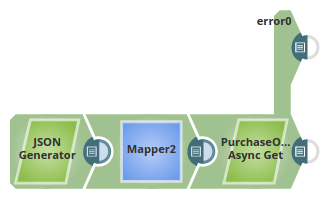
This pipeline gets the records asynchronously from a NetSuite object, and routes the valid records to the output view and the invalid records to the error view.
The JSON Generator Snap passes the values to be retrieved from the NetSuite Object. In this example, we are passing a set of four values for the records to be retrieved.
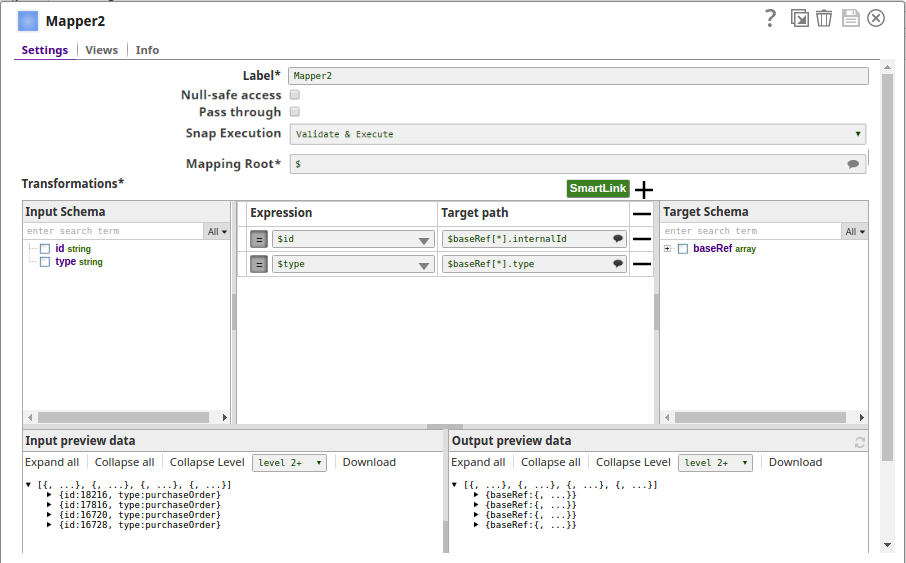
The Mapper Snap maps the values to the records to be retrieved.
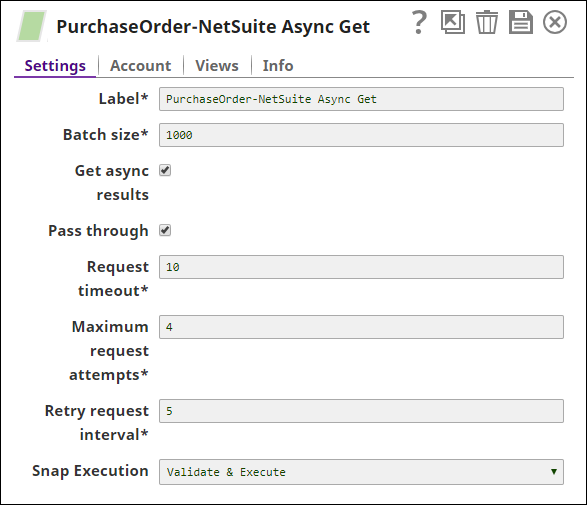
The NetSuite Async Snap gets the records from the Label object 'Purchase Order-NetSuite Async Get' pertaining to the values passed and mapped via the upstream Snaps.
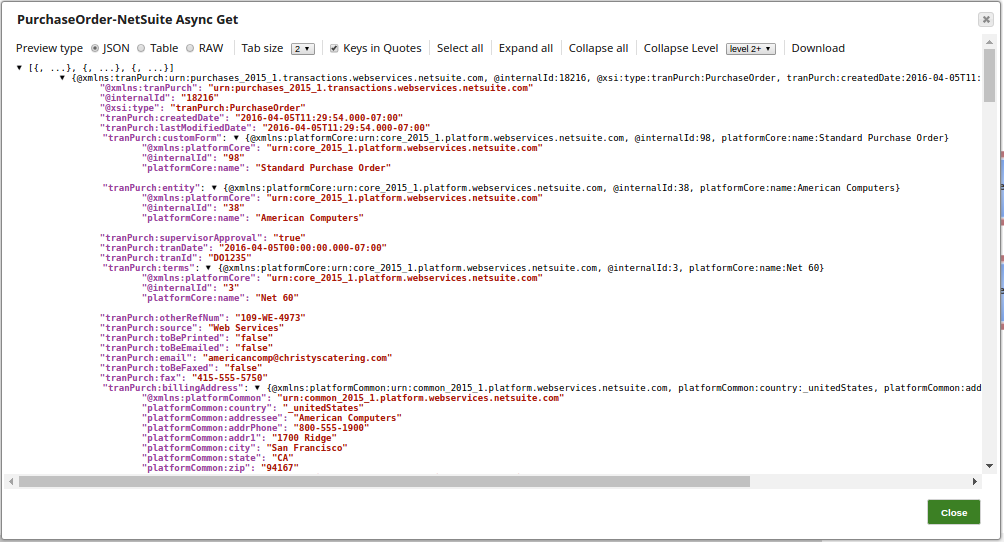
Successful execution of the pipeline gives the displayed output preview:
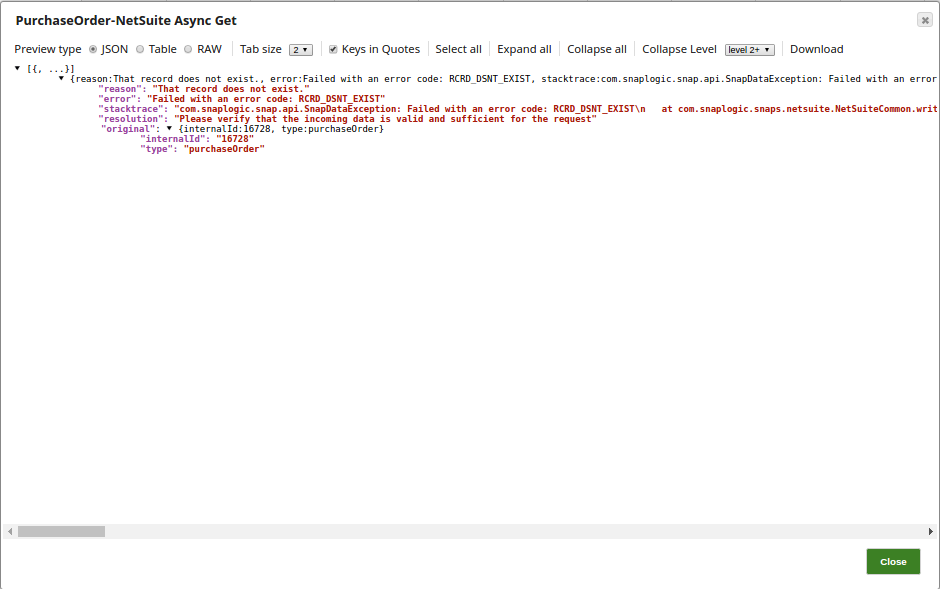
The invalid records are routed to the error view as displayed:
Snap Pack History
Click to view/expand
Release
Snap Pack Version
Date
Type
Updates
February 2025
main29887
Stable
Updated and certified against the current SnapLogic Platform release.
November 2024
main29029
Stable
Updated and certified against the current SnapLogic Platform release.
August 2024
main27765
Stable
Updated and certified against the current SnapLogic Platform release.
May 2024
437patches26823
Latest
In a specific scenario where the body is absent in the SOAP request, the NetSuite Search Snap reloads the envelope to prevent the Snap from erroring out.
May 2024
437patches26705
Latest
Added NetSuite Get Server Time Snap to the NetSuite SOAP Snap Pack. This Snap returns the NetSuite server time in GMT, regardless of the user's time zone.
May 2024
main26341
Stable
Updated the following NetSuite SOAP Snap names for usability based on the functionality of the Snaps:
Upgraded Apache CXF from version 3.4.2 to 3.6.3 to prevent vulnerability issues.
February 2024
436patches25995
Latest
Updated the default and maximum batch size for NetSuite Add List and NetSuite Async Add List Snaps as follows: NetSuite Add List: Default batch size: 100 Maximum batch size: 200
NetSuite Async Add List: Inserts a list of records in NetSuite asynchronously, and the Snap returns a job ID after a successful operation.
February 2024
436patches25801
Latest
Fixed an issue with NetSuite Upsert Snap that displayed a null pointer exception when the account had insufficient permissions. Now the Snap displays a configuration exception when the customFieldRecord is null.
February 2024
main25112
Stable
Updated and certified against the current SnapLogic Platform release.
Updated and certified against the current SnapLogic Platform release.
May 2023
433patches21878
Latest
The Snap Pack now supports Customer-Subsidiary and Vendor-Subsidiary relationship Object types.
NetSuite's application requires the Oneworld extension for utilizing these subsidiary relationships, and Snap integration must use WSDL 2019_1 or later versions.
May 2023
main21015
Stable
Upgraded with the latest SnapLogic Platform release.
February 2023
main19844
Stable
Upgraded with the latest SnapLogic Platform release.
Upgraded with the latest SnapLogic Platform release.
4.29 Patch
429patches16915
Latest
Fixed an issue with NetSuite Search Snap where the Snap displayed the Could not translate an element declaration element exception intermittently when multiple search Snaps are executed simultaneously.
4.29
main15993
Stable
Upgraded with the latest SnapLogic Platform release.
4.28
main14627
Stable
Upgraded with the latest SnapLogic Platform release.
4.27 Patch
427patches13080
Latest
Fixed an XML parsing issue with stripping empty elements for the NetSuite Snaps.
4.27 Patch
427patches13072
Latest
Fixed an issue in the NetSuite Search Snap where the Snap failed when the body is not present in the SOAP request.
4.27
main12833
Stable
Upgraded with the latest SnapLogic Platform release.
4.26
main11181
Stable
Upgraded with the latest SnapLogic Platform release.
4.25
main9554
Stable
Upgraded with the latest SnapLogic Platform release.
4.24 Patch
424 patches8891
Latest
Introduced the new Snap NetSuite Call RESTlet that enables calling RESTlet scripts using token-based authentication.This Snap provides the functionality of the NetSuite RESTlet framework that supports the HTTP methods (GET, DELETE, POST, PUT) and MIME types.
4.24
main8556
Stable
Upgraded with the latest SnapLogic Platform release.
4.23
main7430
Stable
Upgraded with the latest SnapLogic Platform release.
4.22
main6403
Stable
Upgraded with the latest SnapLogic Platform release.
Removed the now redundantCustom WSDL URL Domainfield from theNetSuite Token Accountto support NetSuite's transition to automatic account-specific domain identification.
4.20 Patch
netsuite8799
Latest
Updates the NetSuite Create, Update, Upsert, and Async Upsert Snaps to use the Classificationtype instead of Class, to resolve schema generation issues. While theClasstype remains available in the NetSuite Search and Async Search Snaps for backwards compatibility, use of the Classificationtype is recommended.
4.20
snapsmrc535
Stable
Upgraded with the latest SnapLogic Platform release.
4.19
snaprsmrc528
Stable
Certified the NetSuite Snap Pack against the NetSuite version 2019.1. This does not impact existing Pipelines.
4.18 Patch
netsuite7879
Latest
Fixed the NetSuite Snaps where the Snaps intermittently fail to reach, cache, and view the NetSuite WSDL and XSD files.
4.18 Patch
netsuite7779
Latest
Fixed an issue with the NetSuite Update Snap and the NetSuite Create Snap wherein the Snaps are unable to properly handle null values for the standard and the custom fields.
4.18
snapsmrc523
Stable
Upgraded with the latest SnapLogic Platform release.
4.17
ALL7402
Latest
Pushed automatic rebuild of the latest version of each Snap Pack to SnapLogic UAT and Elastic servers.
4.17
snapsmrc515
Latest
Deprecated the NetSuite Credential account type.
Added the Snap Execution field to all Standard-mode Snaps. In some Snaps, this field replaces the existing Execute during preview check box.
4.16 Patch
netsuite6911
Latest
Fixed an issue with running multiple Pipelines by lazy-fetching custom fields metadata.
4.16
snapsmrc508
Stable
Custom fields are not displayed in the updated NetSuite Create, Update, Upsert, Search, Async Upsert, or Async Search Snaps. They are visible only for Snaps where you have configured custom fields with SnapLogic 4.15 or earlier releases. With the updated NetSuite Snaps, you must connect a Mapper Snap as an upstream Snap to map custom fields.
4.15
snapsmrc500
Stable
Upgraded with the latest SnapLogic Platform release.
4.14
snapsmrc490
Stable
Upgraded with the latest SnapLogic Platform release.
4.13
snapsmrc486
Stable
Upgraded with the latest SnapLogic Platform release.
4.12 Patch
netsuite4888
Latest
Increased the maximum timeout to two minutes when parsing the WSDL file to fix an issue where the Netsuite Snap Pack is unable to parse XML schema information from the given WSDL file.
4.12
snapsmrc480
Stable
Upgraded with the latest SnapLogic Platform release.
4.11 Patch
netsuite4382
Latest
Resolved an issue with the NetSuite Search, Create and Update Snaps that now show the custom field suggestions in the drop down.
4.11 Patch
netsuite4296
Latest
Resolved an issue with NetSuite Update and Search Snaps where Custom fields are not populated on the Snaps.
4.11
snapsmrc465
Stable
Upgraded with the latest SnapLogic Platform release.
4.10
snapsmrc414
Stable
Upgraded with the latest SnapLogic Platform release.
4.9.0 Patch
netsuite3227
Latest
Addressed an issue with retry disabled if the reason field contains INVALID_KEY_OR_REF
4.9.0 Patch
netsuite3112
Latest
Addressed an issue in NetSuite Upsert where List/Record type is sent as MultiSelectCustomFieldRef.
4.9.0 Patch
netsuite3015
Latest
Added Thread Safety to the creation of Soap Request Message for the NetSuite Search Snap.
4.9
snapsmrc405
Stable
Upgraded with the latest SnapLogic Platform release.
4.8.0 Patch
netsuite2839
Latest
Provided a new property for custom WSDL support for NetSuite
4.8.0 Patch
netsuite2704
Latest
Fixed performance issue on NetSuite Snap Pack which was caused by the WSDL imports.
4.8
snapsmrc398
Stable
Route records to appropriate views and Pass through properties added to the Netsuite Upsert, Delete and GetList Snaps.
Introduced the NetSuite Get Async Result, NetSuite Check Async Status, NetSuite Async Delete, NetSuite Async Get, NetSuite Async Upsert, NetSuite Async Search Snaps in this release.
Info tab added to accounts.
4.7
snapsmrc382
Stable
Upgraded with the latest SnapLogic Platform release.
4.6.0 Patch
netsuite1855
Resolved an issue with the NetSuite Search Snap intermittently generating a "The body is not present in the SOAP request" error.
4.6
snapsmrc362
Stable
Maximum request attempts and Retry request interval options added to the NetSuite Upsert, Get, Get List, Create, Search, Delete and Update Snaps.
NetSuite Get Item Availability Snap was introduced in this release.
Resolved an issue in NetSuite Snap Pack that caused Snaps to fail with read timeout errors.
Enhanced the NetSuite Snaps to support custom fields on the following object types: VendorBill, VendorBillItem, VendorBillExpense, ExpenseReportExpense, PurchaseOrderExpense. Additionally, Address on Contact, Customer, Partner, Vendor, Job, & Employee are also supported when using WSDL version 2014.2 or later.
Enhanced the NetSuite Search Snap to support the general object types Item and Transaction, rather than just their more specific subtypes.
Resolved an issue with the NetSuite Upsert Snap that was incorrectly handling some failed requests as successful requests. Any response containing at least one error status is now written to the error view instead of the output view.
4.5.1
netsuite1565
Stable
Updated the Search Snap to support advanced search. This enables you to execute a saved search using its ID & search for relevant records in it.
Fixed an error in NetSuite Update Snap that restricted access to a custom field in the addressbook sublist of a contact object.
4.5
snapsmrc344
Stable
Item and Inventory Item added as options for the Object property in NetSuite Search.
Token Based Authentication for SuiteTalk web services added.
Resolved an issue in NetSuite Snaps to ensure appropriate handling and display of error messages during failure.
Resolved an issue in NetSuite Snaps that occurred when different values were entered for a custom field.
Resolved an issue in NetSuite Search Snap to ensure all records are returned when the input search criteria is empty.
NetSuite Snaps are enhanced to support the APIs from 2016 (version 2016). Starting from SnapLogic 4.5 release, only APIs from 2014 or later are supported.
MIGRATION IMPACT: Note that the accounts have changed for NetSuite. The existing NetSuite account was renamed to NetSuite Credentials Account; the properties of WSDL Release and WSDL Patch were added and the Testdrive account option was removed. A NetSuite Token Account was also added.
4.4.1
Stable
SnapLogic's pre-assigned NetSuite Application ID is now in every header sent for NetSuite Calls.
Resolved an issue with a memory leak in this Snap Pack.
Resolved an issue that occurred while collecting JSON schema information.
Resolved an issue with setting a custom field to blank in the Update, Create, and Upsert Snaps.
Resolved an issue with not being able to clear standard fields that have a value in Update and Upsert Snaps.
Resolved an issue with "custom field" suggest showing an error when using a standard type with only one active custom field definition.
Resolved an issue with NetSuite Search Snap not producing contact address info as output.
In validation/preview mode only, WSDL versions are checked for consistency between the Snap and the Account.
4.4.0
Stable
Resolved an issue with NetSuite Search Snap ignoring criteria from an input document if any custom field criteria was specified in the Snap.
Support for Custom Records added.
Support for additional object types added.
Support for custom fields for all Transaction types added.
Support for custom fields of type Checkbox (boolean) added to the Search, Create, and Update Snaps.
Support for custom fields of type Date and Decimal added to the Create and Update Snaps.
Resolved an issue with the consistency of the output schema when Search returned more than one page.
4.3.2
Stable
Resolved an issue with custom fields not appearing in the Update Snap.
Resolved an issue with NetSuite Create with custom field not showing in the output payload.
Improved performance of the NetSuite Snap Pack.
4.2.2
Stable
Snaps tested against NetSuite server version 2015.2.
.png?version=1&modificationDate=1490242437582&cacheVersion=1&api=v2)