You can configure Hadoop accounts in SnapLogic using either the Designer or Manager.
Using SnapLogic Designer
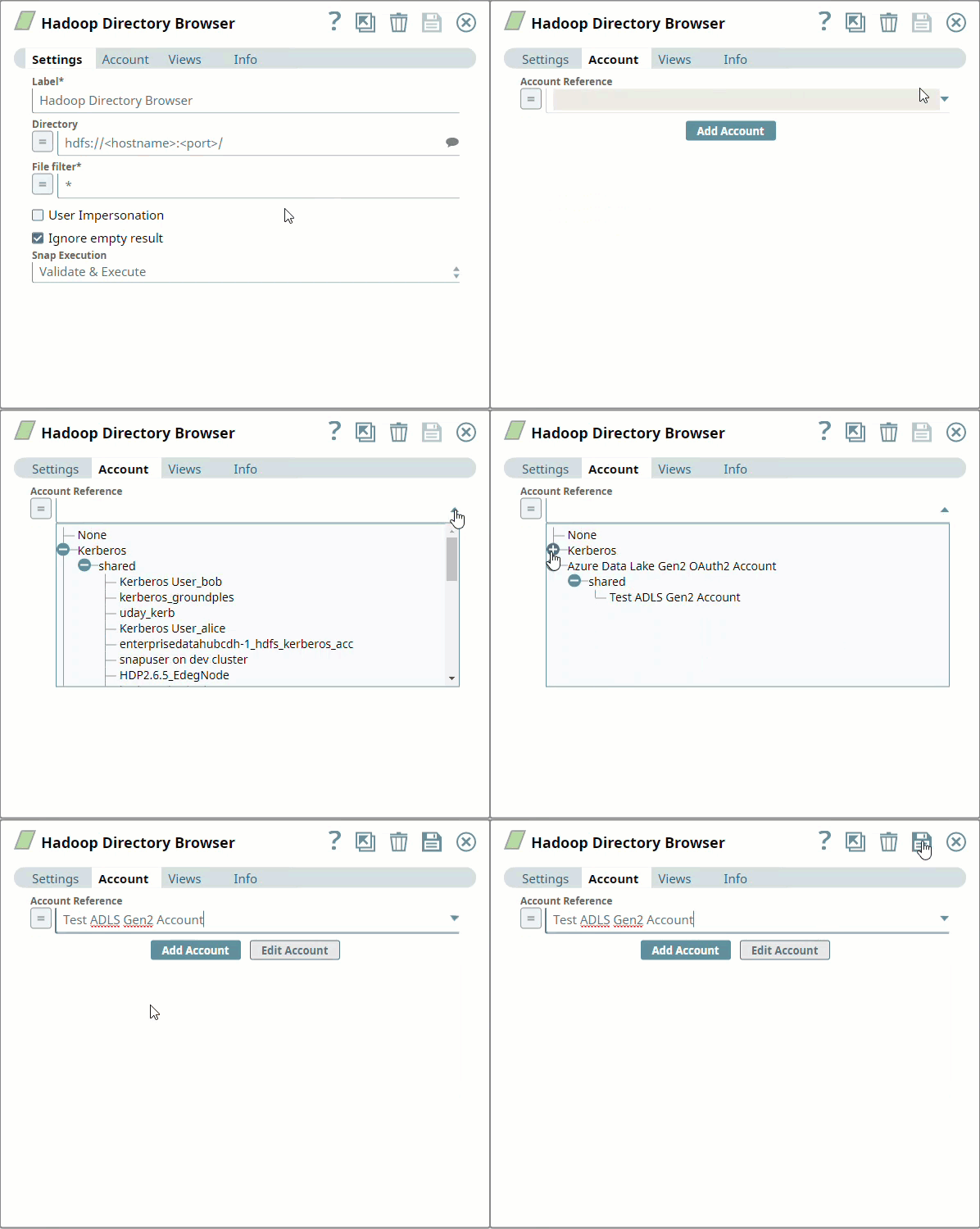
Selecting an existing account
SnapLogic organizes and displays all accounts to which you have access, sorting them by account type and location. To select an existing account:
Click the icon to view the accounts to which you have access and select the account that you want to use.
Click.
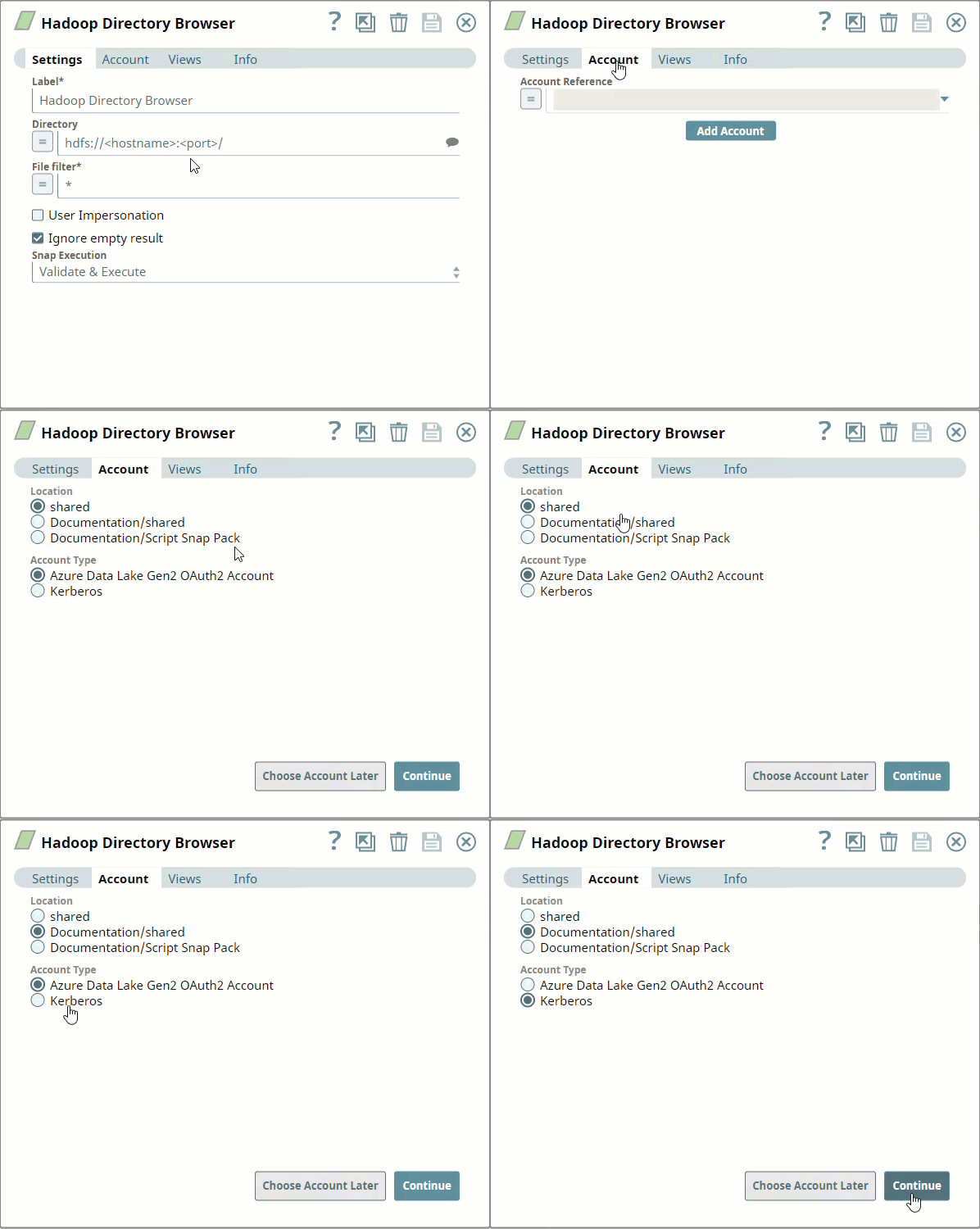
Creating an account
Click Add Accountin theAccount Referencedialog.
Select theLocationin which you want to create the account, select the account type, and clickContinue. TheAdd Accountdialog associated with the account type appears.
Enter the required account details. For detailed guidance on how to provide information associated with each account type, use the following links:
Enter additional information on this account in the Notes field of the Info tab. This will help you–and other users–understand the purpose of the account, especially if there are multiple accounts of the same type.
Click Validate to verify the account, if the account type supports validation.
Click Apply to complete configuring the binary account.
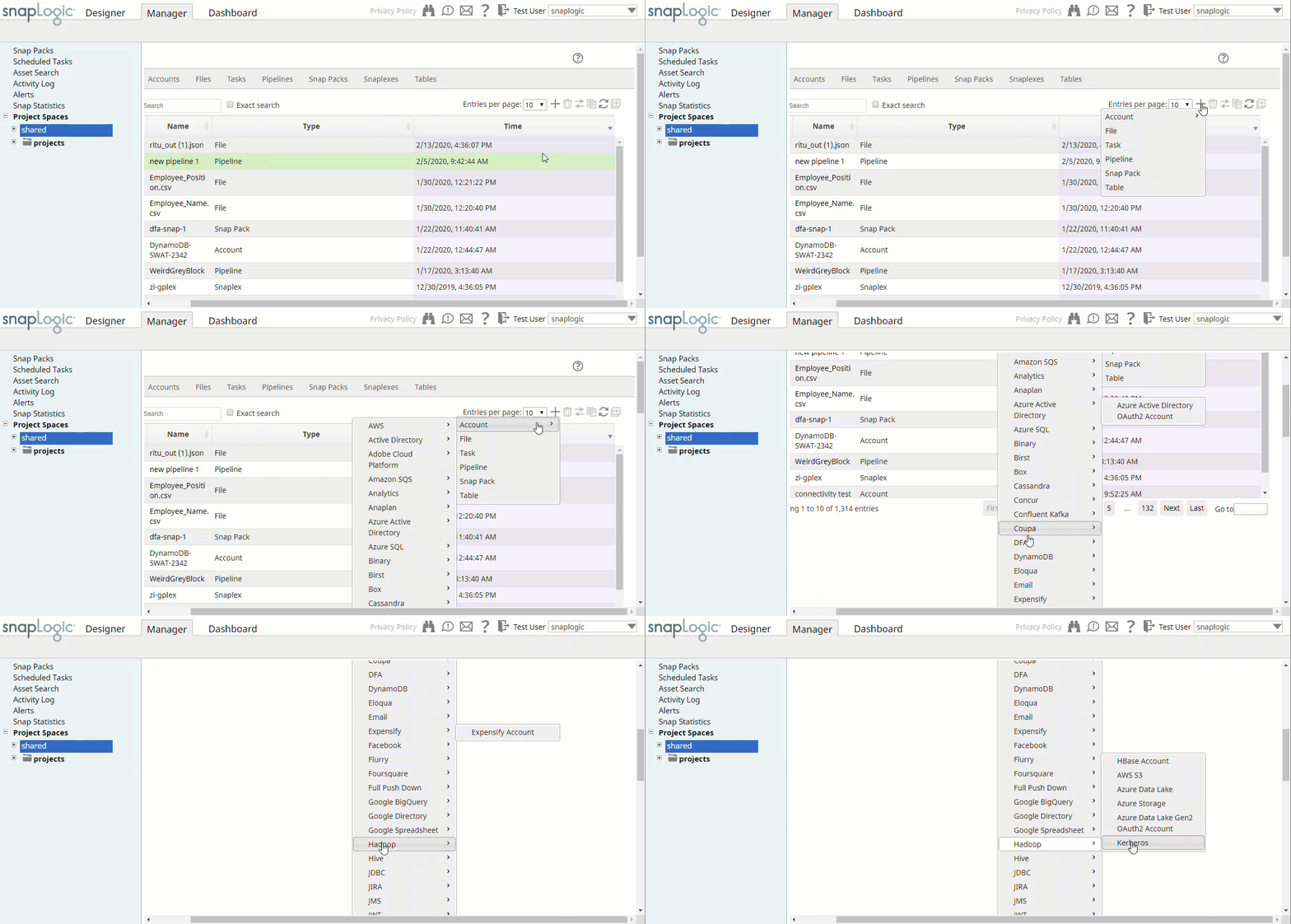
Using SnapLogic Manager
UseManagerto create accounts without associating them immediately with Pipelines.
Accounts in SnapLogic are associated with projects. You can use accounts created in other projects only if you have at least Read access to them.
In the left pane, browse to the project in which you want to create the account and click Create > Account > Binary, followed by the appropriate account type.
The Create Account dialog associated with the selected account type appears.
Repeat the steps numbered 3 through 5 in the previous section.
Avoid updating account credentials while Pipelines using that account are executing. This may lead to unexpected results, including locking your account.
Click to view/expand
Release
Snap Pack Version
Date
Type
Updates
February 2024
436patches25902
Latest
Fixed a memory management issue in the HDFS Writer, HDFS ZipFile Writer, ORC Writer, and Parquet Writer Snaps, which previously caused out-of-memory errors when multiple Snaps were used in the pipeline. The Snap now conducts a pre-allocation memory check, dynamically adjusting the write buffer size based on available memory resources when writing to ADLS.
February 2024
435patches25410
Latest
Enhanced the AWS S3 Account for Hadoop with an External ID that enables you to access Hadoop resources securely.
February 2024
main25112
Stable
Updated and certified against the current SnapLogic Platform release.
November 2023
435patches23904
Latest
Fixed an issue with the Parquet Writer Snap that displayed an error Failed to write parquet data when the decimal value passed from the second input view exceeded the specified scale.
Fixed an issue with the Parquet Writer Snap that previously failed to handle the conversion of BigInt/int64 (larger numbers) after the 4.35 GA now converts them accurately.
November 2023
435patches23780
Latest
Fixed an issue related to error routing to the output view. Also fixed a connection timeout issue.
November 2023
main23721
Stable
Updated and certified against the current SnapLogic Platform release.
August 2023
434patches23173
Latest
Enhanced the Parquet Writer Snap with a Decimal Rounding Mode dropdown list to enable the rounding method for decimal values when the number exceeds the required decimal places.
August 2023
434patches22662
Latest
Enhanced the Parquet Writer Snap with the support for LocalDate and DateTime. The Snap now shows the schema suggestions for LocalDate and DateTime correctly.
Enhanced the Parquet Reader Snap with the Use datetime types checkboxthat supports LocalDate and DateTime datatypes.
Behavior change:
When you select the Use datetime types checkbox in the Parquet Reader Snap, the Snap displays the LocalDate and DateTime in the output for INT32 (DATE) and INT64 (TIMESTAMP_MILLIS) columns. When you deselect this checkbox, the columns retain the previous datatypes and display string and integer values in the output.
August 2023
main22460
Stable
Updated and certified against the current SnapLogic Platform release.
May 2023
433patches22180
Latest
Introduced the HDFS Delete, which deletes the specified file, group of files, or directory from the supplied path and protocol in the Hadoop Distributed File System (HDFS).
May 2023
433patches21494
Latest
The Hadoop Directory Browser Snap now returns all the output documents as expected after implementing pagination for the ABFS protocol.
May 2023
main21015
Stable
Upgraded with the latest SnapLogic Platform release.
February 2023
432patches20820
Latest
Fixed an authorization issue that occurs with the Parquet Writer Snap when it receives empty document input.
February 2023
432patches20209
Latest
The Apache Commons Compress library has been upgraded to version 1.22.
February 2023
432patches20139
Latest
The Kerberos Account that is available for a subset of snaps in the Hadoop Snap pack now supports a configuration that enables you to read from and write to the Hadoop Distributed File System (HDFS) managed by multiple Hadoop clusters. You can specify the location of the Hadoop configuration files in the Hadoop config directory field. The value in this field overrides the value that is set on the Snaplex system property used for configuring a single cluster.
February 2023
main19844
Stable
Upgraded with the latest SnapLogic Platform release.
November 2022
main18944
Stable
The AWS S3 and S3 Dynamic accounts now support a maximum session duration of an IAM role defined in AWS.
Fixed an issue in the following Snaps that use AWS S3 dynamic account, where the Snaps displayed the security credentials like Access Key, Secret Key, and Security Token in the logs. Now, the security credentials in the logs are blurred for the Snaps that use AWS S3 dynamic account.
Upgraded with the latest SnapLogic Platform release.
4.27 Patch
427patches13769
Latest
Fixed an issue with the Hadoop Directory Browser Snap where the Snap was not listing the files in the given directory for Windows VM.
4.27 Patch
427patches12999
Latest
Enhanced the Parquet Reader Snap with int96 As Timestamp checkbox, which when selected enables the Date Time Format field. You can use this field to specify a date-time format of your choice for int96 data-type fields. The int96 As Timestamp checkbox is available only when you deselect Use old data format checkbox.
4.27
main12833
Stable
Enhanced the Parquet Writer and Parquet Reader Snaps with Azure SAS URI properties, and Azure Storage Account for Hadoop with SAS URI Auth Type. This enables the Snaps to consider SAS URI given in the settings if the SAS URI is selected in the Auth Type during account configuration.
4.26
426patches12288
Latest
Fixed a memory leak issue when using HDFS protocol in Hadoop Snaps.
4.26
main11181
Stable
Upgraded with the latest SnapLogic Platform release.
4.25 Patch
425patches9975
Latest
Fixed the dependency issue inHadoop Parquet ReaderSnap while reading fromAWS S3. The issue is caused due to conflicting definitions for some of the AWS classes (dependencies) in the classpath.
4.25
main9554
Stable
Enhanced the HDFS Reader and HDFS Writer Snaps with the Retry mechanism that includes the following settings:
Number of Retries: Specifies the maximum number of retry attempts when the Snap fails to connect to the Hadoop server.
Retry Interval (seconds): Specifies the minimum number of seconds the Snap must wait before each retry attempt.
4.24 Patch
424patches9262
Latest
Enhanced the AWS S3 Account for Hadoop to support role-based access when you select IAM role checkbox.
4.24 Patch
424patches8876
Latest
Fixes the missing library error inHadoop Snap Pack when running Hadoop Pipelines in JDK11 runtime.
4.24
main8556
Stable
Upgraded with the latest SnapLogic Platform release.
4.23 Patch
423patches7440
Latest
Fixes the issue inHDFS ReaderSnap by supporting to read and write files larger than 2GB using ABFS(S) protocol.
4.23
main7430
Stable
Upgraded with the latest SnapLogic Platform release.
4.22
main6403
Stable
Upgraded with the latest SnapLogic Platform release.
4.21 Patch
hadoop8853
Latest
Updates the Parquet Writer and Parquet Reader Snaps to support the yyyy-MM-dd format for the DATE logical type.
4.21
snapsmrc542
Stable
Upgraded with the latest SnapLogic Platform release.
4.20 Patch
hadoop8776
Latest
Updates the Hadoop Snap Pack to use the latest version of org.xerial.snappy:snappy-java for compression type Snappy, in order to resolve the java.lang.UnsatisfiedLinkError: org.xerial.snappy.SnappyNative.maxCompressedLength(I)I error.
4.20
snapsmrc535
Stable
Upgraded with the latest SnapLogic Platform release.
4.19 Patch
hadoop8270
Latest
Fixes an issue with the Hadoop Parquet Writer Snap wherein the Snap throws an exception when the input document includes one or all of the following:
Empty lists.
Lists with all null values.
Maps with all null values.
4.19
snaprsmrc528
Stable
Upgraded with the latest SnapLogic Platform release.
4.18 Patch
hadoop8033
Latest
Fixed an issue with the Parquet Writer Snap wherein the Snap throws an error when working with WASB protocol.
Added ADLS Gen2 support for ABFS (Azure Blob File System) and ABFSS protocols.
4.17
ALL7402
Latest
Pushed automatic rebuild of the latest version of each Snap Pack to SnapLogic UAT and Elastic servers.
4.17
snapsmrc515
Latest
Added the Snap Execution field to all Standard-mode Snaps. In some Snaps, this field replaces the existing Execute during preview check box.
4.16
snapsmrc508
Stable
Added a new property, Output for each file written, to handle multiple binary input data in the HDFS Writer Snap.
4.15
snapsmrc500
Stable
Added two new Snaps: HDFS ZipFile Reader and HDFS ZipFile Writer.
Added support for the Data Catalog Snaps in Parquet Reader and Parquet Writer Snaps.
4.14 Patch
hadoop5888
Latest
Fixed an issue wherein the Hadoop snaps were throwing an exception when a Kerberized account is provided, but the snap is run in a non-kerberized environment.
4.14
snapsmrc490
Stable
Added the Hadoop Directory BrowserSnap, which browses a given directory path in the Hadoop file system using the HDFS protocol and generates a list of all the files in the directory. It also lists subdirectories and their contents.
Added support for S3 file protocol in theORC Reader, andORC WriterSnaps.
Added support for reading nested schema in the Parquet Reader Snap.
4.13 Patch
hadoop5318
Latest
Fixed the HDFS Reader/Writer and Parquet Reader/Writer Snaps, wherein Hadoop configuration information does not parse from the client's configuration files.
Fixed the HDFS Reader/Writer and Parquet Reader/Writer Snaps, wherein User Impersonation does not work on Hadooplex.
4.13
snapsmrc486
Stable
KMS encryption support added to AWS S3 account in the Hadoop Snap Pack.
Enhanced the Parquet Reader, Parquet Writer, HDFS Reader, and HDFS Writer Snaps to support WASB and ADLS file protocols.
Added the AWS S3 account support to the Parquet Reader and Writer Snaps.
Added second input view to the Parquet Reader Snap that when enabled, accepts table schema.
Supported with AWS S3, Azure Data Lake, and Azure Storage Accounts.
4.12 Patch
hadoop5132
Latest
Fixed an issue with the HDFS Reader Snap wherein the pipeline becomes stale while writing to the output view.
4.12
snapsmrc480
Stable
Upgraded with the latest SnapLogic Platform release.
4.11 Patch
hadoop4275
Latest
Addressed an issue with Parquet Reader Snap leaking file descriptors (connections to HDFS data nodes). The Open File descriptor values work stable now,
4.11
snapsmrc465
Stable
Added Kerberos support to the standard mode Parquet Reader and Parquet Writer Snaps.
4.10 Patch
hadoop4001
Latest
Supported HDFS Writer to write to the encryption zone.
4.10 Patch
hadoop3887
Latest
Addressed the suggest issue for the HDFS Reader on Hadooplex.
4.10 Patch
hadoop3851
Latest
ORC supports read/write from local file system.
Addressed an issue to bind the Hive Metadata to Parquet Writer Schema at Runtime.
4.10 Patch
hadoop3838
Latest
Made HDFS Snaps work with Zone encrypted HDFS.
4.10
snapsmrc414
Stable
Updated the Parquet Writer Snap withPartition byproperty to support the data written into HDFS based on the partition definition in the schema in Standard mode.
Support for S3 accounts with IAM Roles added to Parquet Reader and Parquet Writer
HDFS Reader/Writer with Kerberos support on Groundplex (including user impersonation).
4.9 Patch
hadoop3339
Latest
Addressed the following issues:
ORC Reader passing, but ORC Writer failing when run on a Cloudplex.
ORC Reader Snap is not routing error to error view.
Intermittent failures with the ORC Writer
4.9.0 Patch
hadoop3020
Latest
Added missing dependency org.iq80.snappy:snappy to Hadoop Snap Pack.
4.9
snapsmrc405
Stable
Upgraded with the latest SnapLogic Platform release.
4.8
snapsmrc398
Stable
Snap-aware error handling policy enabled for Spark mode in Sequence Formatter and Sequence Parser. This ensures the error handling specified on the Snap is used.
4.7.0 Patch
hadoop2343
Latest
Spark Validation: Resolved an issue with validation failing when setting the output file permissions.
4.7
snapsmrc382
Stable
Updated the HDFS Writer and HDFS Reader Snaps with Azure Data Lake account for standard mode pipelines.
HDFS Writer: Spark mode support added to write to a specified directory in an Azure Storage Layer using the wasb file system protocol.
HDFS Reader: Spark mode support added to read a single file or an HDFS directory from an Azure Storage Layer.
4.6
snapsmrc362
Stable
The following Snaps now support error view in Spark mode: HDFS Reader, Sequence Parser.
Resolved an issue in HDFS Writer Snap that sends the same data in output & error view.
4.5
snapsmrc344
Stable
HDFS Reader and HDFS Writer Snaps updated to support IAM Roles for Amazon EC2.
Support for Spark mode added to Parquet Reader, Parquet Writer
The HBase Snaps are no longer available as of this release.
4.4.1
Stable
Resolved an issue with Sequence Formatter not working in Spark mode.
Resolved an issue with HDFSReader not using the filter set when configuring SparkExec paths.
4.4
Stable
NEW! Parquet Reader and Writer Snaps
NEW!ORC Reader and Writer Snaps
Spark support added to the HDFS Reader, HDFS Writer, Sequence Formatter, and Sequence Parser Snaps.
Behavior change: HDFS Writer in SnapReduce mode now requires the File property to be blank.
4.3.2
Stable
Implemented wasbs:// protocol support in Hadoop Snap Pack.
Resolved an issue with HDFS Reader unable to read all files under a folder (including all files under its subfolders) using the ** filter.

 icon to view the accounts to which you have access and select the account that you want to use.
  .
.