
SAP S/4HANA Basic Auth Account
- Anand Vedam
- Gouri Bhagchandani (Deactivated)
- Kalpana Malladi
In this article
Overview
Use this account type to connect the SAP S/4HANA Snaps to SAP S/4HANA On-Premise using Basic Authentication.
Prerequisites
- Valid SAP Gateway system (which includes Host, Port, Client, Logon Language, Path prefix, Service collection URL).
- Valid User Id.
- Valid Password.
Limitations and Known Issues
None.
Account Settings
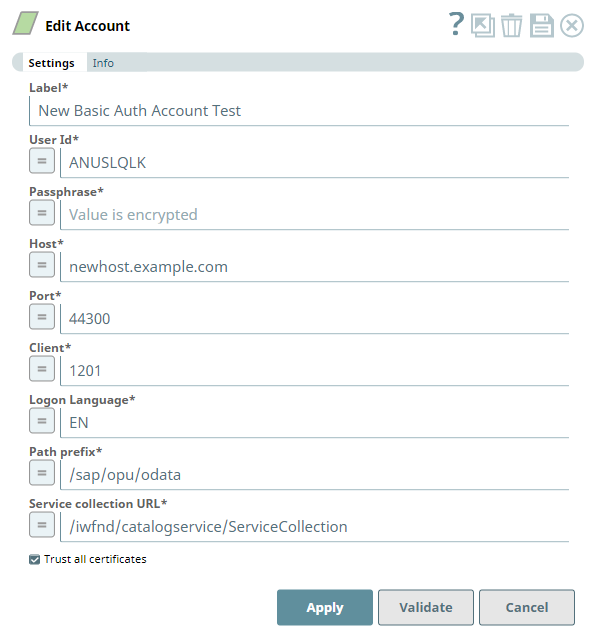
| Parameter | Data Type | Description | Default Value | Example |
|---|---|---|---|---|
Label | String | Required. Enter a unique name for the account. | N/A | SAPS4HANA_Basic_Auth |
User Id | String | Required. Enter the user name to connect to the SAP S/4HANA On-premise server. | N/A | username |
Passphrase | String | Required. Specify the password associated with the entered user name. | N/A | MyUser |
Host | String | Required. Enter the host name of SAP S/4HANA On-premise server. | N/A | s4hana.example.com |
Port | String | Required. Specify the port on which the SAP S/4HANA On-premise server listens for connection requests. | N/A | 44300 |
Client | String | Required. Enter the client id of the SAP S/4HANA On-premise that you are authorized to access. | N/A | 100 |
Logon Language | String | Required. Specify the logon language as specified in the Application Server. | N/A | EN |
| Path prefix | String | Required. Enter the prefix in the gateway endpoint path needed to build a Catalog URL and fetch associated service collection. For more information, see SAP Gateway in this page. Add Path prefix immediately after the first backslash '/' in the URL to connect to the service. For example, http(s)://<host>:<port>/<Path prefix> in the typical URL format. | /sap/opu/odata | /sap/opu/odata |
Service collection URL | String | Required. Specify the relative path—from the gateway endpoint location—needed to retrieve the catalog service. For more information, see SAP Gateway in this page. | /iwfnd/catalogservice/ServiceCollection | /iwfnd/catalogservice/ServiceCollection |
Trust all certificates | Checkbox | SAP S/4HANA Basic Auth account trusts all certificates, by default. Deselect this checkbox when there is a third-party signed certificate to be separately authenticated. Trusted Certificates To authorize applications only based on trust certificates, use SAP S/4HANA SSL Auth Account. | Selected | Selected |
Troubleshooting
| Error | Reason | Resolution |
|---|---|---|
PKIX path building failed: sun.security.provider.certpath. | Unable to find valid certification path to requested target. | Make sure that you have a valid certificate installed on your SAP S/4HANA server. Alternatively, you can check the Trust all certificates checkbox. |
| Failed to validate account: Error on line 1: Content is not allowed in prolog. Cause: Error on line 1: Content is not allowed in prolog. (Reason: Exception occurred while processing the API metadata XML. Content is not allowed in prolog.; Resolution: Please file a defect against the snap) | Wrong logon details or the logon account is locked. |
|
| Timeout when retrieving Entity suggestions | The list of API objects are displayed in the Snap Settings dialog, but the corresponding Entity suggestions time out. It is possible that the SAP S/4HANA is relatively new; in which case the transactions need to be performed in the backend as a way to force code compilation. | Alternatively, you can initiate the compilation externally through a browser using the link specific to the API object and entity. Once the page load is complete, try loading the entities list in Snap Settings. Example: https://<host>:<port>/sap/opu/odata/sap/ |
| Snap[com.rojoconsultancy.sap.saps4hana. SAPS4HanaBasicAuthAccount error | This error occurs when the Snap version deployed is incorrect. | Raise an incident with SnapLogic to get this dependency (change of deployed Snap version) resolved. |
| 401 or an unauthorized error for the entity | This error occurs when the Account configuration is incorrect. | Make sure that you have entered the correct User Id, Passphrase and Client number "?sap-client=015". |
Additional information
SAP Gateway
SAP Gateway, an integral part of SAP NetWeaver, lets you connect devices, environments, and platforms to SAP systems. It uses the Open Data Protocol (OData) so you can use any programming language or model to connect to SAP and non-SAP applications. SAP S/4HANA uses SAP Gateway and OData services to bring business data to compelling SAP Fiori apps.
Snaps in the SAP S/4HANA Snap Pack use an SAP Gateway URL to access the S/4HANA services.
| SAP S/4HANA Gateway URL | |
|---|---|
| Format | http(s)://<host>:<port>/<Path Prefix>/<Service collection URL>? sap-client=<Client Entry Number>&sap-language=<Logon Language> |
| Example | https://s4hana.example.com:44300/sap/opu/odata/iwfnd/catalogservice/ServiceCollection?sap-client=100&sap-language=EN |
| Contents of Gateway URL | |
| Host | s4hana.example.com |
| Port | 44300 |
| Client | 100 |
| Logon Language | EN |
| Path prefix | /sap/opu/odata |
| Service collection URL | /iwfnd/catalogservice/ServiceCollection |
User Authorization
The SAP S/4 HANA On-premise account specified in Snap settings must have specific authorizations to access the various OData APIs and to call the OData API Objects configured in the Snap.
To enable dynamic loading of objects and entities in the Snaps:
- Create a new profile in the transaction PFCG of SAP S/4 HANA On-premise.
- Add the services shown in the figure below:
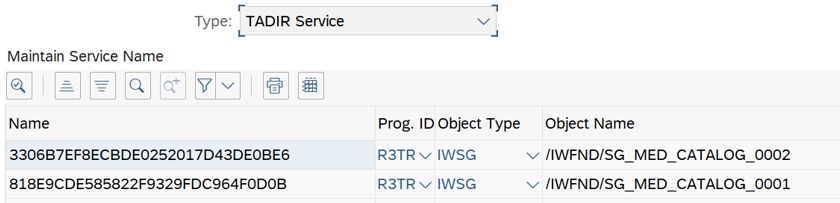
See User Authorization in SAP Help for a step-by-step procedure.
Snap Pack History
See Also
Have feedback? Email documentation@snaplogic.com | Ask a question in the SnapLogic Community
© 2017-2025 SnapLogic, Inc.