Atlassian uses cookies to improve your browsing experience, perform analytics and research, and conduct advertising. Accept all cookies to indicate that you agree to our use of cookies on your device. Atlassian cookies and tracking notice, (opens new window)
This Snap is used to acknowledge the Java Message Service (JMS) messages read by a JMS consumer used in the upstream Snap. This Snap should always be used in conjunction with JMS Consumer Snap in a Pipeline. The JMS Consumer Snap should have the Acknowledgement mode set to CLIENT_ACKNOWLEDGE and Processing mode set to Synchronous.
Acknowledgment Modes:
Client Acknowledge: When a message is read, the client acknowledges the message.
Auto Acknowledge: The messages are acknowledged automatically (by user) after the message is read.
This Snap optionally accepts the JMS MessageID of the JMS message consumed by JMS Consumer Snap upstream.
Output
Document
Min:0 Max:1
Filter
Mapper
JSON Formatter
This Snap writes the JMS MessageID received to output view if present.
Error
Error handling is a generic way to handle errors without losing data or failing the Snap execution. You can handle the errors that the Snap might encounter while running the Pipeline by choosing one of the following options from the When errors occur list under the Views tab. The available options are:
Stop Pipeline Execution: Stops the current pipeline execution when the Snap encounters an error.
Discard Error Data and Continue: Ignores the error, discards that record, and continues with the rest of the records.
Route Error Data to Error View: Routes the error data to an error view without stopping the Snap execution.
Select this option to explicitly place a message back in the JMS queue to recover messages.
If the Snap fails to read the JMS messages for processing, you can recover those messages by selecting the Recover message checkbox so that the Snap can read the messages additional times for further processing.
Snap Execution
Default Value: Validate & Execute Example: Execute only
Dropdown list
Select one of the three modes in which the Snap executes. Available options are:
Validate & Execute: Performs limited execution of the Snap, and generates a data preview during Pipeline validation. Subsequently, performs full execution of the Snap (unlimited records) during Pipeline runtime.
Execute only: Performs full execution of the Snap during Pipeline execution without generating preview data.
Disabled: Disables the Snap and all Snaps that are downstream from it.
Example
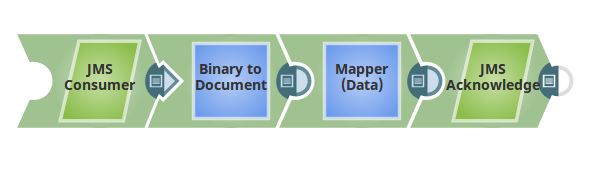
A Pipeline for JMS Acknowledge may look something like this:
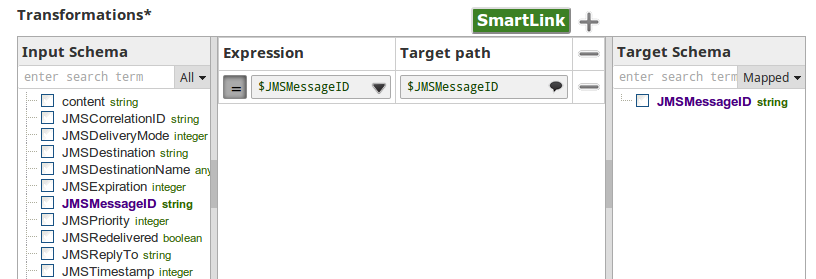
Configure a Mapper Snap to join upstream Snaps to JMS Acknowledge:
The sample output of the JMS Acknowledge Snap may look like this:
Snap Pack History
Click to view/expand
Release
Snap Pack Version
Date
Type
Updates
February 2025
main29887
Stable
Updated and certified against the current SnapLogic Platform release.
November 2024
439patches29671
Latest
Fixed an issue with the JMS Consumer Snap that caused it to stop receiving messages by adding a timeout policy around the JMS provider receive() method.
November 2024
439patches29329
Latest
Fixed an issue with the JMS Consumer Snap that displays ExecutionException when the Snap captures a connection error. Now, it routes the connection error to the error view.
November 2024
main29029
Stable
Updated and certified against the current SnapLogic Platform release.
August 2024
main27765
Stable
Updated and certified against the current SnapLogic Platform release.
May 2024
main26341
Stable
Updated and certified against the current SnapLogic Platform release.
February 2024
main25112
Stable
Updated and certified against the current SnapLogic Platform release.
November 2023
main23721
Stable
Updated and certified against the current SnapLogic Platform release.
August 2023
main22460
Stable
Updated and certified against the current SnapLogic Platform release.
May 2023
main21015
Stable
Upgraded with the latest SnapLogic Platform release.
February 2023
432patches20479
Latest
Fixed an issue where the JMS Producer Snap was previously only writing headers to the WebLogic queue. Now the Snap writes the entire document.
February 2023
main19844
Stable
Upgraded with the latest SnapLogic Platform release.
November 2022
main18944
Stable
Upgraded with the latest SnapLogic Platform release.
August 2022
main17386
Stable
Upgraded with the latest SnapLogic Platform release.
4.29
main15993
Stable
Upgraded with the latest SnapLogic Platform release.
4.28
main14627
Stable
Upgraded with the latest SnapLogic Platform release.
4.27
main12833
Stable
Upgraded with the latest SnapLogic Platform release.
4.26
main11181
Stable
Upgraded with the latest SnapLogic Platform release.
4.25
main9554
Stable
Upgraded with the latest SnapLogic Platform release.
4.24 Patch
4.24patches9098
Latest
Enhances the JMS account in the JMS Snap Pack by updating the JNDI properties (java.naming.security.principal, java.naming.security.credentials) with username and password, to support the requirements of certain JMS servers.
4.24 Patch
424patches9104
Latest
Fixes an issue in the JMS Consumer Snap, where different JMS SQS accounts interfere with each other while running on the same jcc node by using the AWSStaticCredentialProvider instead of the SystemPropertiesCredentialsProvider.
4.24
main8556
Stable
Upgraded with the latest SnapLogic Platform release.
4.23
main7430
Stable
Upgraded with the latest SnapLogic Platform release.
4.22 Patch
422patches6992
Latest
Fixes the JMS Snap Pack by replacing JMS class loader for Oracle AQ (Advance Queuing).
4.22
main6403
Stable
Upgraded with the latest SnapLogic Platform release.
4.21
snapsmrc542
Stable
Upgraded with the latest SnapLogic Platform release.
4.20 Patch
jms8824
Latest
Fixes an issue in the JMS Consumer Snap due to which the Snap does not release the memory even after Pipeline termination, leading to huge memory spikes.
4.20 Patch
jms8810
Latest
Fixes the connection leak issue in the JMS Producer Snap.
4.20 Patch
jms8765
Latest
Fixes an issue with the JMS Consumer Snap that fails to successfully create durable subscribers when run in asynchronous mode.
4.20
snapsmrc535
Stable
Upgraded with the latest SnapLogic Platform release.
4.19 Patch
jms8420
Latest
Adds the following properties to the JMS Consumer and JMS Producer Snaps to enable retry and reconnect features:
Number of retries: Defines the number of times the Snap must re-attempt an operation before throwing a connection/network error.
Retry interval (milliseconds): Defines the time in milliseconds the Snap must wait between subsequent retries upon a connection/network error.
Enables the JMS Producer Snap to clean up stale connections.
Fixes the JMS Acknowledge Snap where the Snap fails unexpectedly without providing a reason.
4.19
snaprsmrc528
Stable
Upgraded with the latest SnapLogic Platform release.
4.18 Patch
jms7865
Latest
Fixed an issue with the JMS Consumer Snap that reinserts failed messages in the JMS queue without checking for duplicate messages.
4.18
snapsmrc523
Stable
Upgraded with the latest SnapLogic Platform release.
4.17
ALL7402
Latest
Pushed automatic rebuild of the latest version of each Snap Pack to SnapLogic UAT and Elastic servers.
4.17
snapsmrc515
Latest
Added the Snap Execution field to all Standard-mode Snaps. In some Snaps, this field replaces the existing Execute during preview check box.
4.16
snapsmrc508
Stable
Upgraded with the latest SnapLogic Platform release.