Atlassian uses cookies to improve your browsing experience, perform analytics and research, and conduct advertising. Accept all cookies to indicate that you agree to our use of cookies on your device. Atlassian cookies and tracking notice, (opens new window)
/
HDFS Reader
HDFS Reader
Oct 01, 2024
On this Page
Snap type
Read
Description
This Snap reads data from HDFS (Hadoop File System) and produces a binary data stream at the output. For the hdfs protocol, please use a SnapLogic on-premises Groundplex and make sure that its instance is within the Hadoop cluster and SSH authentication has already been established. The Snap also supports reading from a Kerberized cluster using the HDFS protocol.
Expected upstream Snaps: [None]
Expected downstream Snaps: Any data transformation or formatting Snaps.
Expected input: [None]
Expected output: A document with the columns and data of the Parquet file.
HDFS 2.4.0 is supported for the HDFS protocol. This Snap supports HDFS, ADL (Azure Data Lake), ABFS(Azure Data Lake Storage Gen 2 ), and WASB(Azure storage) protocols.
Hadoop allows you to configure proxy users to access HDFS on behalf of other users; this is called impersonation. When user impersonation is enabled on the Hadoop cluster, any jobs submitted using a proxy are executed with the impersonated user's existing privilege levels rather than those of the superuser associated with the cluster. For more information on user impersonation in this Snap, see the section on User Impersonation below.
The platform does not support generating output previews for files larger than 8KB. This does not mean that the Snap has failed: The file will be read upon the Snap's execution; only the output preview will not be generated upon validation.
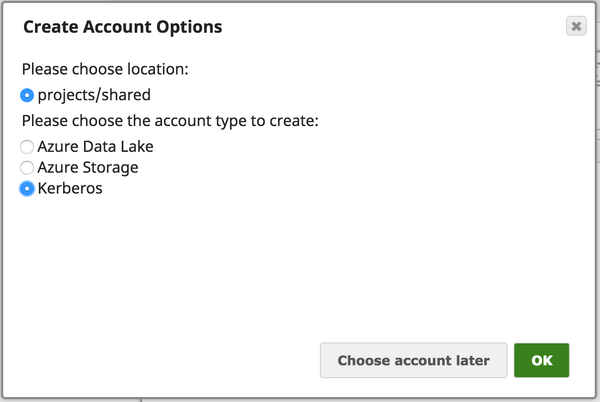
This Snap uses account references created on the Accounts page of SnapLogic Manager to handle access to this endpoint. This Snap supports Azure storage account, Azure Data Lake account, Kerberos account, or no account. Account types supported by each protocol are as follows:
Protocol
Account types
wasb
Azure Storage
wasbs
Azure Storage
adl
Azure Data Lake
hdfs
Kerberos
Required settings for account types are as follows:
Account Type
Settings
Azure Storage
Account name, Primary access key
Azure Data Lake
Tenant ID, Access ID, Secret Key
Kerberos Account
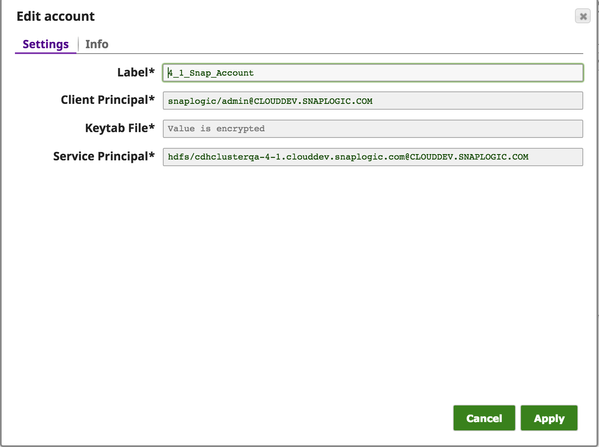
Client Principal, Service Principal, Keytab File
IAM Roles for Amazon EC2
global properties
jcc.jvm_options = -DIAM_CREDENTIAL_FOR_S3=TRUE
Please note this feature is supported in only in Groundplex nodes hosted in the EC2 environment.
For more information on IAM Roles, see http://docs.aws.amazon.com/AWSEC2/latest/UserGuide/iam-roles-for-amazon-ec2.html
Kerberos Account UI Configuration
The security model configured for the Groundless (SIMPLE or KERBEROS authentication) must match the security model of the remote server. Due to limitations of the Hadoop library we are only able to create the necessary internal credentials for the configuration of the Groundplex.
Views
Input
This Snap has at most one document input view. It may contain values for the File expression property.
Output
This Snap has exactly one binary output view and provides the binary data stream read from the specified sources. Examples of Snaps that can be connected to this output are CSV Parser, JSON Parser, and XML Parser.
Error
This Snap has at most one document error view and produces zero or more documents in the view.
Settings
Label
Required. Specify the name for the Snap. You can modify this to be more specific, especially if you have more than one of the same Snap in your pipeline.
Directory
Specify the URL for the data source (directory). The Snap supports the following protocols.
When you use the ABFS protocol to connect to an endpoint, the account name and endpoint details provided in the URL override the corresponding values in the Account Settings fields.
The Directory property is not used in the pipeline execution or preview and used only in the Suggest operation. When you press the Suggest icon, it will display a list of subdirectories under the given directory. It generates the list by applying the value of the Filter property.
SnapLogic automatically appends "azuredatalakestore.net" to the store name you specify when using Azure Data Lake; therefore, you do not need to add 'azuredatalakestore.net' to the URI while specifying the directory.
File Filter
Specify the Glob filter pattern.
Use glob patterns to display a list of directories or files when you click the Suggest icon in the Directory or File property. A complete glob pattern is formed by combining the value of the Directory property with the Filter property. If the value of the Directory property does not end with "/", the Snap appends one, so that the value of the Filter property is applied to the directory specified by the Directory property.
Glob Pattern Interpretation Rules
The following rules are used to interpret glob patterns:
The * character matches zero or more characters of a name component without crossing directory boundaries. For example, the *.csv pattern matches a path that represents a file name ending in .csv, and *.* matches all file names that contain a period.
The ** characters match zero or more characters across directories; therefore, it matches all files or directories in the current directory and in its subdirectories. For example, /home/** matches all files and directories in the /home/ directory.
The ? character matches exactly one character of a name component. For example, 'foo.?' matches file names that start with 'foo.' and are followed by a single-character extension.
The \ character is used to escape characters that would otherwise be interpreted as special characters. The expression \\ matches a single backslash, and \{ matches a left brace, for example.
The ! character is used to exclude matching files from the output.
The [ ] characters form a bracket expression that matches a single character of a name component out of a set of characters. For example, '[abc]' matches 'a', 'b', or 'c'. The hyphen (-) may be used to specify a range, so '[a-z]' specifies a range that matches from 'a' to 'z' (inclusive). These forms can be mixed, so '[abce-g]' matches 'a', 'b', 'c', 'e', 'f' or 'g'. If the character after the [ is a ! then it is used for negation, so '[!a-c]' matches any character except 'a', 'b', or 'c'.
Within a bracket expression, the '*', '?', and '\' characters match themselves. The '-' character matches itself if it is the first character within the brackets, or the first character after the !, if negating.
The '{ }' characters are a group of sub-patterns where the group returns a match if any sub-pattern in the group matches the contents of a target directory. The ',' character is used to separate sub-patterns. Groups cannot be nested. For example, the pattern '*.{csv, json}' matches file names ending with '.csv' or '.json'.
Leading dot characters in a file name are treated as regular characters in match operations. For example, the '*' glob pattern matches file name ".login".
All other characters match themselves.
Examples:
'*.csv' matches all files with a csv extension in the current directory only.
'**.csv' matches all files with a csv extension in the current directory and in all its subdirectories.
*[!{.pdf,.tmp}] excludes all files with the extension PDF or TMP.
File
The name of the file to be read. This can also be a relative path under the directory given in the Directory property. It should not start with a URL separator "/". The File property can be a JavaScript expression which will be evaluated with values from the input view document. When you press the Suggest icon, it will display a list of regular files under the directory in the Directory property. It generates the list by applying the value of the Filter property. If this property is left blank (the * wildcard is used) when the Snap is executed, all files under the directory matching the glob filter will be read. Example:
sample.csv
tmp/another.csv
$filename
_filename
Default value: [None]
User Impersonation
Select this check box to enable user impersonation.
For encryption zones, use user impersonation.
Default value: Not selected
For more information on working with user impersonation, click the link below.
User Impersonation Details
Generic User Impersonation Behavior
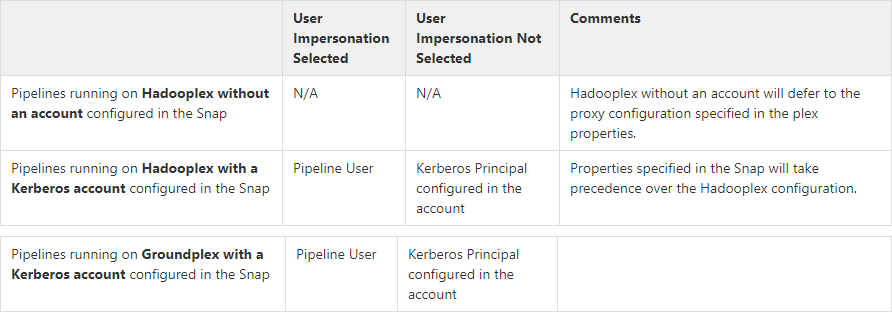
When the User Impersonation check box is selected, and Kerberos is the account type, the Client Principal configured in the Kerberos account impersonates the pipeline user.
When the User Impersonation option is selected, and Kerberos is not the account type, the user executing the pipeline is impersonated to perform HDFS Operations. For example, if the user logged into the SnapLogic platform is operator@snaplogic.com, the user name "operator" is used to proxy the super user.
User impersonation behavior on pipelines running on Groundplex with a Kerberos account configured in the Snap
When the User Impersonation checkbox is selected in the Snap, it is the pipeline user who performs the file operation. For example, if the user logged into the SnapLogic platform is operator@snaplogic.com, the user name "operator" is used to proxy the super user.
When the User Impersonation checkbox is not selected in the Snap, the Client Principal configured in the Kerberos account performs the file operation.
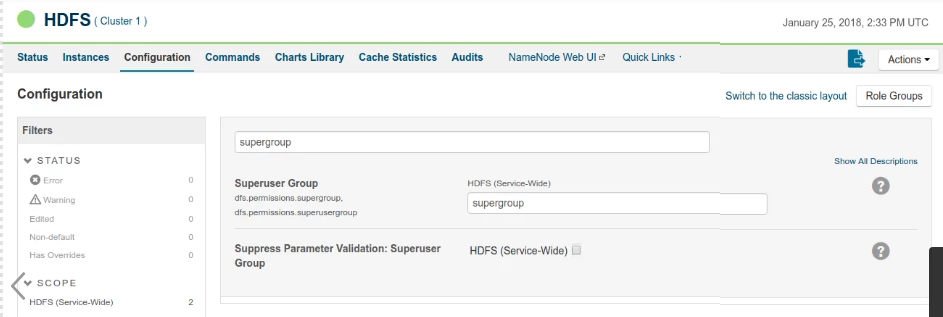
For non-Kerberised clusters, you must activate Superuser access in the Configuration settings.
HDFS Snaps support the following accounts:
Azure storage account
Azure Data Lake account
Kerberos account
No account
When an account is configured with an HDFS Snap, user impersonation settings have no impact on all accounts, except the Kerberos account.
Number Of Retries
Specify the maximum number of attempts to be made to receive a response.
The request is terminated if the attempts do not result in a response.
When the number of retries are exhausted, the Snap writes the error to the error view.
Retry operation, which is the attempts to receive a response occurs only when the Snap loses the connection with the server.
Default value: 0
Retry Interval (seconds)
Specify the time interval between two successive retry requests. A retry happens only when the previous attempt resulted in an exception.
Default value: 1
Loading
Select one of the three following modes in which the Snap executes: Available options are:
Validate & Execute: Performs limited execution of the Snap and generates a data preview during Pipeline validation; then performs full execution of the Snap (unlimited records) during Pipeline runtime.
Execute only: Performs full execution of the Snap during Pipeline execution without generating preview data.
Disabled: Disables the Snap and all Snaps downstream from it.
Troubleshooting
Writing to S3 files with HDFS version CDH 5.8 or later
When running HDFS version later than CDH 5.8, the Hadoop Snap Pack may fail to write to S3 files. To overcome this, make the following changes in the Cloudera manager:
Go to HDFS configuration.
In Cluster-wide Advanced Configuration Snippet (Safety Valve) for core-site.xml, add an entry with the following details:
Name: fs.s3a.threads.max
Value: 15
Click Save.
Restart all the nodes.
Under Restart Stale Services, select Re-deploy client configuration.
Click Restart Now.
Click to view/expand
Release
Snap Pack Version
Date
Type
Updates
May 2025
441patches31334
Latest
Fixed an issue with the Parquet Writer Snap that did not initialize the buffer directory for Hadoop when the username contained a dollar ($) sign.
May 2025
main31019
Stable
Updated and certified against the current SnapLogic Platform release.
February 2025
main29887
Stable
Updated and certified against the current SnapLogic Platform release.
November 2024
439patches29616
Latest
Fixed an issue with the Parquet Writer Snap, where string-formatted timestamps were stored and retrieved as invalid data because of improper handling. Now, the Snap properly handles the string-formatted timestamps through the Timestamp parquet type option. The Timestamp parquet type dropdown option enables you to choose the appropriate Parquet type for your timestamp schema based on the format of the timestamp data.
November 2024
main29029
Stable
Updated and certified against the current SnapLogic Platform release.
August 2024
main27765
Stable
Upgraded the org.json.json library from v20090211 to v20240303, which is fully backward compatible.
May 2024
437patches27226
-
The upgrade of the Azure Storage library from v3.0.0 to v8.3.0 has impacted the Hadoop Snap Pack causing the following issue when using the WASB protocol.
Known Issue
When you use invalid credentials for the WASB protocol in Hadoop Snaps (HDFS Reader, HDFS Writer, ORC Reader, Parquet Reader, Parquet Writer), the pipeline does not fail immediately, instead it takes 13-14 minutes to display the following error:
reason=The request failed with error code null and HTTP code 0. , status_code=error
SnapLogic® is actively working with Microsoft®Support to resolve the issue.
Fixed a resource leak issue with the following Hadoop Snaps, which involved too many stale instances of ProxyConnectionManager and significantly impacted memory utilization.
Enhanced the HDFS Writer Snap with the Write empty file checkbox to enable you to write an empty or a 0-byte file to all the supported protocols that are recognized and compatible with the target system or destination.
May 2024
main26341
Stable
The Azure Data Lake Account has been removed from the Hadoop Snap Pack because Microsoft retired the Azure Data Lake Storage Gen1 protocol on February 29, 2024. We recommend replacing your existing Azure Data Lake Accounts (in Binary or Hadoop Snap Packs) with other Azure Accounts.
February 2024
436patches25902
Latest
Fixed a memory management issue in the HDFS Writer, HDFS ZipFile Writer, ORC Writer, and Parquet Writer Snaps, which previously caused out-of-memory errors when multiple Snaps were used in the pipeline. The Snap now conducts a pre-allocation memory check, dynamically adjusting the write buffer size based on available memory resources when writing to ADLS.
February 2024
435patches25410
Latest
Enhanced the AWS S3 Account for Hadoop with an External ID that enables you to access Hadoop resources securely.
February 2024
main25112
Stable
Updated and certified against the current SnapLogic Platform release.
November 2023
435patches23904
Latest
Fixed an issue with the Parquet Writer Snap that displayed an error Failed to write parquet data when the decimal value passed from the second input view exceeded the specified scale.
Fixed an issue with the Parquet Writer Snap that previously failed to handle the conversion of BigInt/int64 (larger numbers) after the 4.35 GA now converts them accurately.
November 2023
435patches23780
Latest
Fixed an issue related to error routing to the output view. Also fixed a connection timeout issue.
November 2023
main23721
Stable
Updated and certified against the current SnapLogic Platform release.
August 2023
434patches23173
Latest
Enhanced the Parquet Writer Snap with a Decimal Rounding Mode dropdown list to enable the rounding method for decimal values when the number exceeds the required decimal places.
August 2023
434patches22662
Latest
Enhanced the Parquet Writer Snap with the support for LocalDate and DateTime. The Snap now shows the schema suggestions for LocalDate and DateTime correctly.
Enhanced the Parquet Reader Snap with the Use datetime types checkboxthat supports LocalDate and DateTime datatypes.
Behavior change:
When you select the Use datetime types checkbox in the Parquet Reader Snap, the Snap displays the LocalDate and DateTime in the output for INT32 (DATE) and INT64 (TIMESTAMP_MILLIS) columns. When you deselect this checkbox, the columns retain the previous datatypes and display string and integer values in the output.
August 2023
main22460
Stable
Updated and certified against the current SnapLogic Platform release.
May 2023
433patches22180
Latest
Introduced the HDFS Delete, which deletes the specified file, group of files, or directory from the supplied path and protocol in the Hadoop Distributed File System (HDFS).
May 2023
433patches21494
Latest
The Hadoop Directory Browser Snap now returns all the output documents as expected after implementing pagination for the ABFS protocol.
May 2023
main21015
Stable
Upgraded with the latest SnapLogic Platform release.
February 2023
432patches20820
Latest
Fixed an authorization issue that occurs with the Parquet Writer Snap when it receives empty document input.
February 2023
432patches20209
Latest
The Apache Commons Compress library has been upgraded to version 1.22.
February 2023
432patches20139
Latest
The Kerberos Account that is available for a subset of snaps in the Hadoop Snap pack now supports a configuration that enables you to read from and write to the Hadoop Distributed File System (HDFS) managed by multiple Hadoop clusters. You can specify the location of the Hadoop configuration files in the Hadoop config directory field. The value in this field overrides the value that is set on the Snaplex system property used for configuring a single cluster.
February 2023
main19844
Stable
Upgraded with the latest SnapLogic Platform release.
November 2022
main18944
Stable
The AWS S3 and S3 Dynamic accounts now support a maximum session duration of an IAM role defined in AWS.
Fixed an issue in the following Snaps that use AWS S3 dynamic account, where the Snaps displayed the security credentials like Access Key, Secret Key, and Security Token in the logs. Now, the security credentials in the logs are blurred for the Snaps that use AWS S3 dynamic account.
Upgraded with the latest SnapLogic Platform release.
4.27 Patch
427patches13769
Latest
Fixed an issue with the Hadoop Directory Browser Snap where the Snap was not listing the files in the given directory for Windows VM.
4.27 Patch
427patches12999
Latest
Enhanced the Parquet Reader Snap with int96 As Timestamp checkbox, which when selected enables the Date Time Format field. You can use this field to specify a date-time format of your choice for int96 data-type fields. The int96 As Timestamp checkbox is available only when you deselect Use old data format checkbox.
4.27
main12833
Stable
Enhanced the Parquet Writer and Parquet Reader Snaps with Azure SAS URI properties, and Azure Storage Account for Hadoop with SAS URI Auth Type. This enables the Snaps to consider SAS URI given in the settings if the SAS URI is selected in the Auth Type during account configuration.
4.26
426patches12288
Latest
Fixed a memory leak issue when using HDFS protocol in Hadoop Snaps.
4.26
main11181
Stable
Upgraded with the latest SnapLogic Platform release.
4.25 Patch
425patches9975
Latest
Fixed the dependency issue inHadoop Parquet ReaderSnap while reading fromAWS S3. The issue is caused due to conflicting definitions for some of the AWS classes (dependencies) in the classpath.
4.25
main9554
Stable
Enhanced the HDFS Reader and HDFS Writer Snaps with the Retry mechanism that includes the following settings:
Number of Retries: Specifies the maximum number of retry attempts when the Snap fails to connect to the Hadoop server.
Retry Interval (seconds): Specifies the minimum number of seconds the Snap must wait before each retry attempt.
4.24 Patch
424patches9262
Latest
Enhanced the AWS S3 Account for Hadoop to support role-based access when you select IAM role checkbox.
4.24 Patch
424patches8876
Latest
Fixes the missing library error inHadoop Snap Pack when running Hadoop Pipelines in JDK11 runtime.
4.24
main8556
Stable
Upgraded with the latest SnapLogic Platform release.
4.23 Patch
423patches7440
Latest
Fixes the issue inHDFS ReaderSnap by supporting to read and write files larger than 2GB using ABFS(S) protocol.
4.23
main7430
Stable
Upgraded with the latest SnapLogic Platform release.
4.22
main6403
Stable
Upgraded with the latest SnapLogic Platform release.
4.21 Patch
hadoop8853
Latest
Updates the Parquet Writer and Parquet Reader Snaps to support the yyyy-MM-dd format for the DATE logical type.
4.21
snapsmrc542
Stable
Upgraded with the latest SnapLogic Platform release.
4.20 Patch
hadoop8776
Latest
Updates the Hadoop Snap Pack to use the latest version of org.xerial.snappy:snappy-java for compression type Snappy, in order to resolve the java.lang.UnsatisfiedLinkError: org.xerial.snappy.SnappyNative.maxCompressedLength(I)I error.
4.20
snapsmrc535
Stable
Upgraded with the latest SnapLogic Platform release.
4.19 Patch
hadoop8270
Latest
Fixes an issue with the Hadoop Parquet Writer Snap wherein the Snap throws an exception when the input document includes one or all of the following:
Empty lists.
Lists with all null values.
Maps with all null values.
4.19
snaprsmrc528
Stable
Upgraded with the latest SnapLogic Platform release.
4.18 Patch
hadoop8033
Latest
Fixed an issue with the Parquet Writer Snap wherein the Snap throws an error when working with WASB protocol.
Added ADLS Gen2 support for ABFS (Azure Blob File System) and ABFSS protocols.
4.17
ALL7402
Latest
Pushed automatic rebuild of the latest version of each Snap Pack to SnapLogic UAT and Elastic servers.
4.17
snapsmrc515
Latest
Added the Snap Execution field to all Standard-mode Snaps. In some Snaps, this field replaces the existing Execute during preview check box.
4.16
snapsmrc508
Stable
Added a new property, Output for each file written, to handle multiple binary input data in the HDFS Writer Snap.
4.15
snapsmrc500
Stable
Added two new Snaps: HDFS ZipFile Reader and HDFS ZipFile Writer.
Added support for the Data Catalog Snaps in Parquet Reader and Parquet Writer Snaps.
4.14 Patch
hadoop5888
Latest
Fixed an issue wherein the Hadoop snaps were throwing an exception when a Kerberized account is provided, but the snap is run in a non-kerberized environment.
4.14
snapsmrc490
Stable
Added the Hadoop Directory BrowserSnap, which browses a given directory path in the Hadoop file system using the HDFS protocol and generates a list of all the files in the directory. It also lists subdirectories and their contents.
Added support for S3 file protocol in theORC Reader, andORC WriterSnaps.
Added support for reading nested schema in the Parquet Reader Snap.
4.13 Patch
hadoop5318
Latest
Fixed the HDFS Reader/Writer and Parquet Reader/Writer Snaps, wherein Hadoop configuration information does not parse from the client's configuration files.
Fixed the HDFS Reader/Writer and Parquet Reader/Writer Snaps, wherein User Impersonation does not work on Hadooplex.
4.13
snapsmrc486
Stable
KMS encryption support added to AWS S3 account in the Hadoop Snap Pack.
Enhanced the Parquet Reader, Parquet Writer, HDFS Reader, and HDFS Writer Snaps to support WASB and ADLS file protocols.
Added the AWS S3 account support to the Parquet Reader and Writer Snaps.
Added second input view to the Parquet Reader Snap that when enabled, accepts table schema.
Supported with AWS S3, Azure Data Lake, and Azure Storage Accounts.
4.12 Patch
hadoop5132
Latest
Fixed an issue with the HDFS Reader Snap wherein the pipeline becomes stale while writing to the output view.
4.12
snapsmrc480
Stable
Upgraded with the latest SnapLogic Platform release.
4.11 Patch
hadoop4275
Latest
Addressed an issue with Parquet Reader Snap leaking file descriptors (connections to HDFS data nodes). The Open File descriptor values work stable now,
4.11
snapsmrc465
Stable
Added Kerberos support to the standard mode Parquet Reader and Parquet Writer Snaps.
4.10 Patch
hadoop4001
Latest
Supported HDFS Writer to write to the encryption zone.
4.10 Patch
hadoop3887
Latest
Addressed the suggest issue for the HDFS Reader on Hadooplex.
4.10 Patch
hadoop3851
Latest
ORC supports read/write from local file system.
Addressed an issue to bind the Hive Metadata to Parquet Writer Schema at Runtime.
4.10 Patch
hadoop3838
Latest
Made HDFS Snaps work with Zone encrypted HDFS.
4.10
snapsmrc414
Stable
Updated the Parquet Writer Snap withPartition byproperty to support the data written into HDFS based on the partition definition in the schema in Standard mode.
Support for S3 accounts with IAM Roles added to Parquet Reader and Parquet Writer
HDFS Reader/Writer with Kerberos support on Groundplex (including user impersonation).
4.9 Patch
hadoop3339
Latest
Addressed the following issues:
ORC Reader passing, but ORC Writer failing when run on a Cloudplex.
ORC Reader Snap is not routing error to error view.
Intermittent failures with the ORC Writer
4.9.0 Patch
hadoop3020
Latest
Added missing dependency org.iq80.snappy:snappy to Hadoop Snap Pack.
4.9
snapsmrc405
Stable
Upgraded with the latest SnapLogic Platform release.
4.8
snapsmrc398
Stable
Snap-aware error handling policy enabled for Spark mode in Sequence Formatter and Sequence Parser. This ensures the error handling specified on the Snap is used.
4.7.0 Patch
hadoop2343
Latest
Spark Validation: Resolved an issue with validation failing when setting the output file permissions.
4.7
snapsmrc382
Stable
Updated the HDFS Writer and HDFS Reader Snaps with Azure Data Lake account for standard mode pipelines.
HDFS Writer: Spark mode support added to write to a specified directory in an Azure Storage Layer using the wasb file system protocol.
HDFS Reader: Spark mode support added to read a single file or an HDFS directory from an Azure Storage Layer.
4.6
snapsmrc362
Stable
The following Snaps now support error view in Spark mode: HDFS Reader, Sequence Parser.
Resolved an issue in HDFS Writer Snap that sends the same data in output & error view.
4.5
snapsmrc344
Stable
HDFS Reader and HDFS Writer Snaps updated to support IAM Roles for Amazon EC2.
Support for Spark mode added to Parquet Reader, Parquet Writer
The HBase Snaps are no longer available as of this release.
4.4.1
Stable
Resolved an issue with Sequence Formatter not working in Spark mode.
Resolved an issue with HDFSReader not using the filter set when configuring SparkExec paths.
4.4
Stable
NEW! Parquet Reader and Writer Snaps
NEW!ORC Reader and Writer Snaps
Spark support added to the HDFS Reader, HDFS Writer, Sequence Formatter, and Sequence Parser Snaps.
Behavior change: HDFS Writer in SnapReduce mode now requires the File property to be blank.
4.3.2
Stable
Implemented wasbs:// protocol support in Hadoop Snap Pack.
Resolved an issue with HDFS Reader unable to read all files under a folder (including all files under its subfolders) using the ** filter.