BigQuery Write

BigQuery Write

On this Page

Snap type:

Write


Description:

This Snap allows you to load data into BigQuery easily leveraging the jobs and query APIs. A complete list of supported queries as well as examples are documented here: https://cloud.google.com/bigquery/query-reference.

  • Expected upstream SnapsThe Snap will expose a schema of the selected table that can be mapped using Mapper or any other Snap that has the same schema as the table selected.
  • Expected downstream SnapsMapper or [None]
  • Expected input[None]
  • Expected outputCount of the number of records successfully inserted / Erroneous records are written out to the Error view.

Snaps in Google BigQuery Snap Pack

  • Write datetime values to the database tables, always in UTC format.

  • Convert any non-UTC values in the incoming data to UTC before writing them.

  • Consider datetime values without the time zone mentioned, as in UTC.

So, ensure that you include the time zone in all the datetime values that you load into Google BigQuery tables using this Snap.

For example: "2020-08-29T18:38:07.370 America/Los_Angeles", “2020-09-11T10:05:14.000-07:00", “2020-09-11T17:05:14.000Z”

Prerequisites:

[None]


Support, limitations, and known issuesWorks in Ultra Tasks.

Known Issue

Copying data by creating a table with the same name in Google BigQuery immediately after deleting it, may not insert the rows as expected. This behavior is due to the way the tables are cached and the internal table ID is propagated throughout the system. 

Workaround

We recommend you avoid rewriting in Google BigQuery and suggest the following workarounds. You can choose to use them individually or in unison, to suit your requirement.

  • Truncate the existing table instead of deleting it.

  • Add some randomly generated prefix to the table name each time you create the table (new or unique table name every time).

Behavior ChangeIn the 4.27 (427patches13615) release and later, pipelines that truncated (or deleted and re-created) a table and then used the BigQuery Write or BigQuery Bulk Load (Streaming) Snaps were allowed to retry the load operation. This lead to potential data loss because Google BigQuery uses an eventually consistent backend where one server might respond that it’s okay to write, but other servers still truncate the table.

In the 4.32 (432patches20298) release and later, we disabled retries on truncated tables in these two Snaps to prevent a potential loss of data. We recommend that you use the BigQuery Bulk Load (Cloud Storage) Snap instead.
Account: 

This Snap uses account references created on the Accounts page of SnapLogic Manager to handle access to this endpoint. See Google BigQuery Account for information on the type of account to use.


Views:
InputThis Snap has exactly one document input view. By connecting a Snap like Mapper, the schema of the selected table maybe viewed and mapped to send data into the columns.
OutputThis Snap has at most one document output view that displays the number of records successfully inserted into the BigQuery table.
ErrorThis Snap has at most one document error view and produces zero or more documents in the view. The error view would contain error, reason, resolution and stack trace like invalid queries, column names, and so on.

Settings

Label


Specify a name for the Snap. You can modify this to be more specific, especially if you have more than one of the same Snap in your pipeline.

Project ID 

Required. This drop-down shows you a list of all the available projects that your user Account has access to. Clicking on the drop-down always pulls the latest list of available projects. The project on which the query should be executed should be selected.


Dataset ID


Required. After selecting the project, this drop-down will be populated with the list of available datasets in the Project.


Table ID


Required. After selecting the dataset, this drop-down will be populated with the list of available tables in the project. All the tables in BigQuery can also be viewed from the BigQuery console and entered directly into this field.


Create table if not present

Whether the table should be automatically created if not already present.

Default value: Not selected

Loading


Loading

Loading

Writing numeric values into Google BigQuery tables

Google BigQuery tables support columns with NUMERIC data type to allow storing big decimal numbers (up to 38 digits with nine decimal places). But Snaps in Google BigQuery Snap Pack that load data into tables cannot create numeric columns. When the Create table if not present check box is selected, the Snaps create the required table schema, but map big decimals to a FLOAT64 column. So, to store the data into numeric columns using these Snaps, we recommend the following actions:

  • Create the required schema, beforehand, with numeric columns in Google BigQuery.
  • Pass the number as a string.

The Google API converts this string into a number with full precision and saves it in the numeric column.

Example

Value Passed Through SnapValue Stored in BigQueryRemarks
"12345678901234567890123456789.123456789"12345678901234567890123456789.123456789As per this issue logged in Google Issue Tracker, if you send the values as strings, the values are never converted to floating-point form, so this works as expected.
12345678901234567890123456789.123456789123456789012345678000000000000Big decimal values sent as non-string values lose precision.

 Example


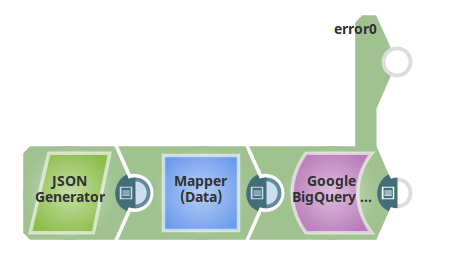
The sample pipeline is as shown below that writes data into a BigQuery table.


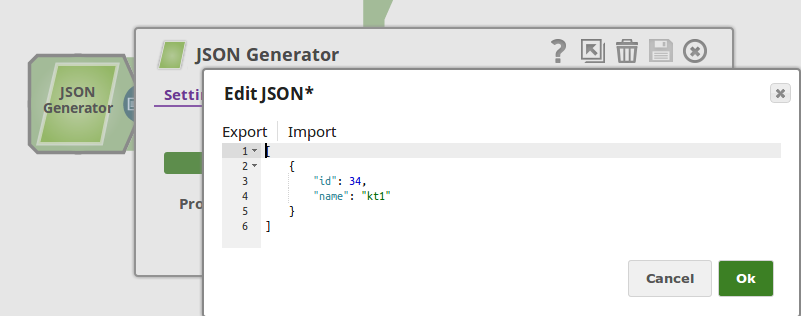
The input record is passed from the JSON Generator. Its contents are shown below.
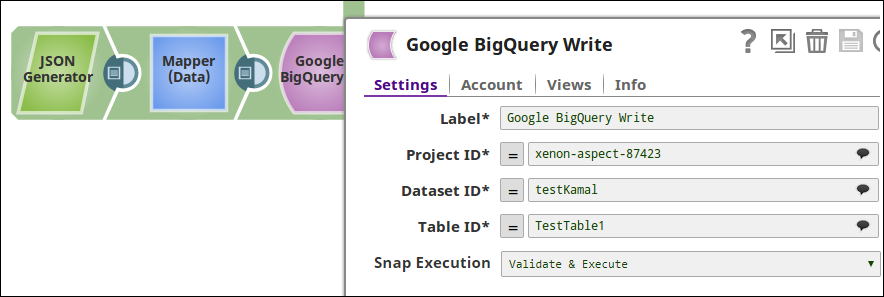
The BigQuery Write Snap with Project ID, Dataset ID and Table ID completed is shown as below.
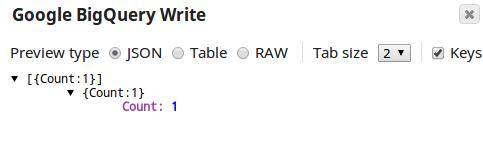
The number of records inserted into the BigQuery table are shown in the output view.

Snap Pack History

 Click to view/expand

Release 

Snap Pack Version

Date

Type

  Updates

November 2025

main33142

Stable

Updated and certified against the current SnapLogic Platform release.

August 2025

442patches32588

Latest

Fixed an issue with the Google BigQuery Execute Snap where it ran into an infinite loop while calling stored procedures (SP).

August 2025

442patches32113

Latest

Fixed an issue with the Google BigQuery Bulk Upsert (Streaming) Snap, which produced output even without any input documents.

August 2025

main32088

Stable

Updated and certified against the current SnapLogic Platform release.

May 2025

441patches31077


Latest

Fixed an issue with the Google BigQuery Bulk Upsert (Streaming) Snap, which failed when there were no input documents. 

May 2025

main31019


Stable

Updated and certified against the current SnapLogic Platform release.

February 2025

440patches30928


Latest

Fixed an issue with the Ultra task for the BigQuery Write Snap.

February 2025

440patches30368


Latest

Fixed the thread leak issue in Google BigQuery Snaps.

February 2025

440patches29960


Latest

Fixed an issue with the BigQuery Upsert (Streaming) Snap where an HTTP 404 error occurred when retrieving job status for multi-regional datasets in BigQuery. This occurred because the location was not explicitly specified in the request. The job request now includes the location information, ensuring successful job polling regardless of the region (for example, the US or EU).

February 2025

main29887


Stable

November 2024

439patches29574


Latest

Fixed an issue with BigQuery Upsert (Streaming) Snap that displayed a 404 Not Found error because of the region mismatch by ensuring the region is specified correctly in the dataset.

November 2024

439patches29499


Latest

November 2024

main29029


Stable

Updated and certified against the current SnapLogic Platform release.

August 2024

438patches28058


Latest

Fixed an issue with the BigQuery Table Data List Snap that displayed a null pointer exception when the table source schema contained a nested Array list schema.

August 2024

main27765


Stable

Updated and certified against the current SnapLogic Platform release.

May 2024

main26341


Stable

Updated and certified against the current SnapLogic Platform release.

February 2024

main25112


Stable

Updated and certified against the current SnapLogic Platform release.

November 2023

main23721


Stable

Updated and certified against the current SnapLogic Platform release.

August 2023

main22460


Stable

Updated and certified against the current SnapLogic Platform release.

May 2023

433patches22057


Latest

Introduced the Google BigQuery Upsert (Streaming) Snap, which enables you to perform bulk update/insert operations into a BigQuery table from existing tables or any input data stream.

May 2023

433patches21955


Latest

Fixed an issue with the GBQ-Google Service Account that caused an input stream to remain open.

May 2023

main21015


Stable

Updated and certified to be compatible with the August SnapLogic Platform release.

February 2023

432patches20962


Latest

Fixed an intermittent null pointer exception that occurred in the BigQuery Write Snap.

February 2023

432patches20298


Latest

February 2023

432patches19840


Latest

Fixed an issue with the Google BigQuery Bulk Load (Streaming) Snap that caused the Table not found message to display even when Create table if not present was selected.

February 2023

main19844


Stable

November 2022

431patches19301


Latest

The Google BigQuery Bulk Load (Streaming) Snap works as expected, with no active Timer threads remaining when the Pipeline execution fails. 

November 2022

main18944


Stable

Upgraded with the latest SnapLogic Platform release.

August 2022

main17386


Stable

4.29

main15993


Stable

Upgraded with the latest SnapLogic Platform release.

4.28 Patch

428patches15459


Latest

  • Fixed an issue with Google BigQuery Execute Snap, where the Snap displayed 404 Job not found error when calling a procedure.

  • Fixed an issue with the Google BigQuery Bulk Load (Cloud Storage) Snap where the Snap failed, because the access token expired when it had to wait longer to execute. With this fix, the Snap is reloaded to get refreshed access token.

4.28 Patch

428patches14743


Latest

  • Fixed an issue with the Google BigQuery Execute Snap, where the Snap displayed an error when the input data contained a table having the record type column and its value was null.

  • Fixed an issue with the Google BigQuery Write Snap, when the input data contained complex data type columns (such as nested fields) and Create table if not present checkbox was selected.

4.28

main14627


Stable

Upgraded with the latest SnapLogic Platform release.

4.27 Patch

427patches13752


Latest

Upgraded Google BigQuery driver to 1.119.0 version to support time partition intervals by MONTH and YEAR.

4.27 Patch

427patches13615


Latest

Fixed the table truncate 404 error with the Google BigQuery Load (Streaming) Snap by supporting the retry functionality. The Snap now waits in case of an error and retries before loading the data.

4.27 Patch

427patches12691


Latest

Fixed an issue with the Google BigQuery Bulk Load (Cloud Storage) Snap, where the Snap failed with an exception for big query tables. The CreateDisposition is now set conditionally on the basis of the setting in the Create table if not present checkbox.

4.27

main12833

Stable

Enhanced the Google BigQuery Bulk Load (Cloud Storage) Snap with the following batching and retry properties to process input records:

  • Batching: Processes the input records in batches.

  • Batch Size: The number of records batched per request.

  • Batch Timeout (milliseconds): Time in milliseconds to elapse following which the batch, if not empty, will be processed even though it might be lesser than the given batch size.

4.26

main11181


Stable

Upgraded with the latest SnapLogic Platform release.

4.25

main9554


Stable

Upgraded with the latest SnapLogic Platform release.

4.24

main8556

Stable

Upgraded with the latest SnapLogic Platform release.

4.23

main7430


Stable

4.22

main6403


Stable

Upgraded with the latest SnapLogic Platform release.

4.21

snapsmrc542


Stable

Upgraded with the latest SnapLogic Platform release.

4.20 Patch 

google/bigquery8773


Latest

Fixed the NPE issue with stored procedures and DROP TABLE queries in the Google BigQuery Execute Snap.

4.20

snapsmrc535


Stable

Upgraded with the latest SnapLogic Platform release.

4.19

snaprsmrc528


Stable

Upgraded with the latest SnapLogic Platform release.

4.18

snapsmrc523


Stable

Upgraded with the latest SnapLogic Platform release.

4.17

ALL7402


Latest

Pushed automatic rebuild of the latest version of each Snap Pack to SnapLogic UAT and Elastic servers.

4.17

snapsmrc515


Stable

Added the Snap Execution field to all Standard-mode Snaps. In some Snaps, this field replaces the existing Execute during preview check box.

4.16

snapsmrc508


Stable

Upgraded with the latest SnapLogic Platform release.

4.15

snapsmrc500


Stable

Upgraded with the latest SnapLogic Platform release.

4.14

snapsmrc490


Stable

Upgraded with the latest SnapLogic Platform release.

4.13

snapsmrc486


Stable

Upgraded with the latest SnapLogic Platform release.

4.12

snapsmrc480


Stable

Added a new property Schema auto detect in the Google BigQuery Bulk Load (Cloud Storage) Snap to support CSV and JSON files where one or more columns in the source file may not contain any values. 

4.11

snapsmrc465


Stable

  • Added new Snap: Google BigQuery Bulk Load (Cloud Storage)

  • Added new Snap: Google BigQuery Bulk Load (Streaming).

  • Updated Google Big Query Write Snap with a new Create table if not present property.

4.10 Patch 

google/bigquery4046


Latest

Addressed an issue when authenticating with Dynamic OAuth accounts.

4.10

snapsmrc414


Stable

Upgraded with the latest SnapLogic Platform release.

4.9

snapsmrc405


Stable

Upgraded with the latest SnapLogic Platform release.

4.8 Patch

bigquery2952


Latest

Supports refreshing OAuth access tokens during long-running pipeline executions. Fixed an issue with writing small batch sizes and when querying empty dataset tables.

4.8.0 Patch

bigquery2813


Latest

Reload OAuth account from Platform when the access token expires during pipeline execution.

4.8

snapsmrc398


Stable

Upgraded with the latest SnapLogic Platform release.

4.7

snapsmrc382


Stable

Upgraded with the latest SnapLogic Platform release.

4.6

snapsmrc362


Stable

Upgraded with the latest SnapLogic Platform release.

4.5.1

snapsmrc344


Stable

Upgraded with the latest SnapLogic Platform release.

4.4.1

NA


Stable

Upgraded with the latest SnapLogic Platform release.

4.4

NA


Stable

Upgraded with the latest SnapLogic Platform release.

4.3.2

NA


Stable

  • Resolved the following issues with the Google BigQuery Execute Snap:

    • throwing binary data in stacktrace and two error messages.

    • improve error handling for suggestions

    • improve error handling on bad queries

    • suggestion bubble missing for Destination table ID

  • Resolved an issue with Auto refresh token not working in Google BigQuery account.