
Configuring SAP HANA Accounts
- Gouri Bhagchandani (Deactivated)
- Aparna Tayi (Unlicensed)
- Mohammed Iqbal
On this Page
This account is used by the Snaps in the SAP HANA Snap Pack.
You can create an account from Designer or Manager. In Designer, when working on pipelines, every Snap that needs an account prompts you to create a new account or use an existing account. The accounts can be created in or used from:
- Your private project folder: This folder contains the pipelines that will use the account.
- Your Project Space’s shared folder: This folder is accessible to all the users that belong to the Project Space.
- The global shared folder: This folder is accessible to all the users within an organization in the SnapLogic instance.
Account Configuration
In Manager, you can navigate to the required folder and create an account in it (see Accounts). To create an account for SAP HANA:
- Click Create, then select SAP HANA > SAP HANA Account.
- Supply an account label.
- Supply the account properties for your database.
- (Optional) Supply additional information on this account in the Notes field of the Info tab.
- Click Apply.
Avoid changing account credentials while pipelines using them are in progress. This may lead to unexpected results, including locking the account.
Account Types
SAP HANA Account
Label | Required. Specify a unique name for the account instance. |
|---|---|
Account properties* | |
Hostname* | Required. Specify the database server host name. Default value: [None] Example: localhost |
Port number* | Required. Specify the port number of the database server. Default value: 30015 Example: 30015 |
Database name* | Required. Specify the name of the database to connect. Default value: [None] When configuring a SAP account to connect to SAP DWC, enter the Database name in the following format: Database name: <Space Schema Name> For the account to work as expected, you must do the following:
|
Username | Specify the database username to use in the following format: Example: Snapuser Default value: [None] |
Password | Specify the password to use the database. Example: Snapuser Default value: [None] |
JDBC driver | Select the JDBC driver to use. The default driver is included in the Snap. If the user wants to override it then upload the jar here. Default value: [None] |
JDBC driver class* | Specify the JDBC Driver class name to use. Example: com.sap.db.jdbc.Driver Default value: [None] |
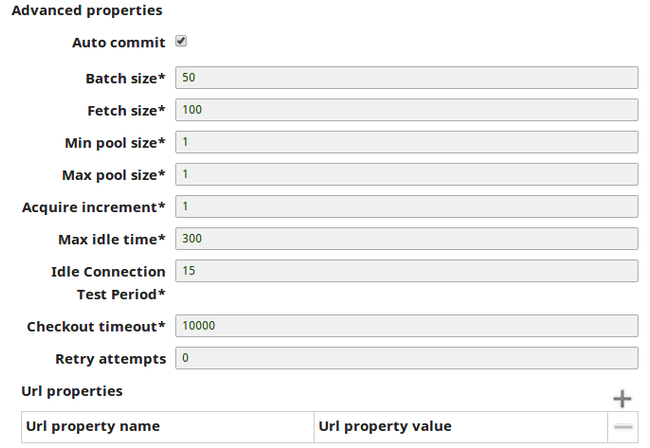
Advanced Properties | |
Auto commit | Select this checkbox to commit the individual batches immediately after they are executed. If the Snap fails, only the batch being executed at that moment is rolled back. When deselected, the Snap execution output is committed only after all the batches are executed. If the Snap fails, the entire transaction is rolled back, unless the Snap finds invalid input data before it sends the insert request to the server, and routes the error documents to the Error view. Default value: Selected |
Fetch size | Required. Specify the number of records to retrieve from the DB at a time. Default value: 100 |
Batch size | Required. Specify the number of statements to execute at a time. Default value: 1000 |
Min pool size | Required. Specify the minimum connection pooling size to use. Default value: 1 |
Max pool size | Required. Specify the maximum connection pooling size to use. Default value: 10 |
Max lifetime (minutes)* | Required. Specify the maximum lifetime of a connection in the pool. Ensure that the value you enter is a few seconds shorter than any database or infrastructure-imposed connection time limit. A value of 0 indicates an infinite lifetime, subject to the Idle Timeout value. An in-use connection is never retired. Connections are removed only after they are closed. Default value: 30 |
Idle timeout (minutes)* | Required. Specify the maximum amount of time a connection is allowed to sit idle in the pool. A value of 0 indicates that idle connections are never removed from the pool. Default value: 5 |
Checkout timeout (milliseconds)* Default value: 10000 | Specify the maximum time in milliseconds you want the system to wait for a connection to become available when the pool is exhausted. If you provide 0, the Snap waits infinitely until the connection is available. Therefore, we recommend that you do not specify 0 for Checkout Timeout. For any other value other than 0, the Snap displays an exception after the wait time has expired. Minimum value: 0 |
URL properties | Specify the properties to use in JDBC url. Default value: [None] |
Auto Commit with Execute Snaps
For a DB Execute Snap, assume that a stream of documents enters the input view of the Snap and the SQL statement property has JSON paths in the WHERE clause. If the number of documents are large, the Snap executes in more than one batches rather than executing one per each document. Each batch would contain a certain number of WHERE clause values. If Auto commit is turned on, a failure would only roll back the records in the current batch. If Auto commit is turned off, the entire operation would be rolled back. For a single execute statement (with no input view), the setting has no practical effect.
Example
Enabling SSL in the SAP HANA Account
To enable SSL you must ensure that:
- The keystore is present in the SAP HANA instance.
- You have the keystore's location and password.
To enable SSL, configure the following URL properties:
- encrypt: Set to true to enable SSL encryption.
- validateCertificate: Set to true to validate the server certificate.
- keyStore: Enter the location of the keystore.
- keyStorePassword: Enter the keystore's password.

There are also other applicable URL properties aside from those above. See Client-Side TLS/SSL Configuration Properties (JDBC) for details on all URL properties.
304pxAccount Encryption
| Standard Encryption | If you are using Standard Encryption, the High sensitivity settings under Enhanced Encryption are followed. | |
|---|---|---|
| Enhanced Encryption | If you have the Enhanced Account Encryption feature, the following describes which fields are encrypted for each sensitivity level selected per each account. Account:
| |
Snap Pack History
Have feedback? Email documentation@snaplogic.com | Ask a question in the SnapLogic Community
© 2017-2025 SnapLogic, Inc.