
Microsoft OneDrive Dynamic Account
- Anand Vedam
- Gouri Bhagchandani (Deactivated)
- Kalpana Malladi
In this article
Overview
Use this account type to connect Microsoft OneDrive Snaps with data sources that use Microsoft OneDrive Dynamic accounts.
Expression-enabled authentication fields, such as Username, Password, and Client Secret, support Secrets Management, a SnapLogic add-on that allows you to store endpoint credentials in a third-party secrets manager, such as AWS Secrets Manager, Azure Key Vault, or HashiCorp Vault. During validation and execution, pipelines obtain the credentials directly from the secrets manager. Learn more: Configure Accounts to use secrets.
Prerequisites
- A registered application in the Microsoft Azure Portal with appropriate permissions can be used to generate the Access token. Learn more about how to configure a registered application and for information needed to define settings for the OAuth2 account: Application Configuration in Azure Portal for OAuth2 Account.
Limitations and Known Issues
None.
Account Settings
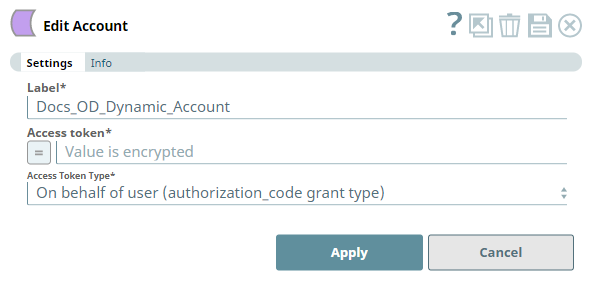
| Field | Field Type | Description | Default Value | Example |
|---|---|---|---|---|
| Label | String | Required. Unique user-provided label for the account. | N/A | Docs_OD_Dynamic_Account |
| Access token | String/Expression | Required. Enter the Access Token generated using the authorization code. See Access Token Generation for details. | N/A | N/A |
| Access Token Type | Drop-down list | Required. Choose the appropriate access token type for your account from the following options:
| on behalf of user (authorization_code grant type) | on behalf of application (client credentials grant type) |
| Apply | Button | Click this button to save the account. | N/A | N/A |
Access Token Generation
You must generate an Access Token to create and use a Microsoft OneDrive Dynamic account with this Snap Pack. To generate the Access Token:
Step 1: Collect the following details after configuring an Azure portal application to use with your Microsoft OneDrive Snap Pack:
- Tenant name or Tenant ID
- Client ID
- Scope
- Response Type (token for Access Token and code for Authorization Code)
- Redirect URLs
Step 2: Fill the details pertaining to your OneDrive (Azure Portal) application in the above URL and load it in a browser or a web-browser control.
URLs to use for generating Token and Code
For Application Account: https://login.microsoftonline.com/{Tenant_id}/oauth2/v2.0/authorize?client_id={client_id}&scope={scope}&response_type=token&redirect_uri={redirect_uri}
OR
For User Account: https://login.microsoftonline.com/{Tenant_id}/oauth2/v2.0/authorize?client_id={client_id}&scope={scope}&response_type=code&redirect_uri={redirect_uri}
Step 3: Upon successful authentication and authorization of the application, the URL returns the Access Token inside the redirect_uri passed along side additional parameters, similar to the URL below.
URL with Access Token
For Access Token: {redirect_uri}#access_token=EwC...EB&authentication_token=eyJ...3EM&token_type=bearer&expires_in=3600&scope=onedrive.readwrite&user_id=3626...1d
OR
For User Account: {redirect_uri}?code=0.AS...iAA&session_state=f26be63e-e1b1-4d64-a3c2-e003b36b7f08#
Use the value of the access_token parameter or the code parameter from these URLs to configure your Microsoft OneDrive Dynamic Account for the respective token type. See OneDrive Authentication and sign-in in OneDrive Developer Center (Microsoft Docs) for more information.
Snap Pack History
Related Content
Have feedback? Email documentation@snaplogic.com | Ask a question in the SnapLogic Community
© 2017-2025 SnapLogic, Inc.