Atlassian uses cookies to improve your browsing experience, perform analytics and research, and conduct advertising. Accept all cookies to indicate that you agree to our use of cookies on your device. Atlassian cookies and tracking notice, (opens new window)
This Snap deletes an existing table from AWS DynamoDB.
DynamoDB delete operation is eventually consistent. Therefore the Snap may poll up to 5 seconds to confirm deletion through table metadata query in order to set the output view status to DELETED. If deletion not confirmed after 5 seconds, output view status will remain the original DynamoDB response of DELETING.
Expected upstream Snaps: Any Snap that provides a document output view, such as Structure or a JSON Generator Snap.
Expected downstream Snaps: Any Snap that has a document input view, such as Filter or Data or JSON Formatter.
Expected input: None
Expected output: This Snap provides the updated record for each input record. Errors can be routed to the error view if enabled or cause the Snap to fail during execution.
Refer here for more information on DynamoDB Delete Table.
This Snap uses account references created on the Accounts page of SnapLogic Manager to handle access to this endpoint.
See DynamoDB Account for information on setting up this type of account.
Views:
Input
This Snap has exactly one document input view.
Output
This Snap has exactly one document output view.
Error
This Snap has at most one document error view and produces zero or more documents in the view.
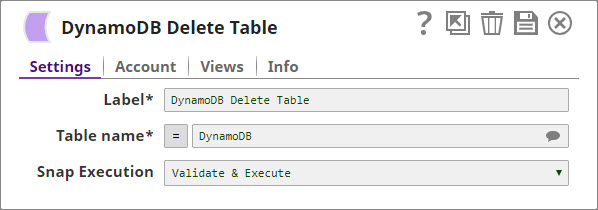
Settings
Label
Required. The name for the Snap. You can modify this to be more specific, especially if you have more than one of the same Snap in your pipeline.
Table name
Required. The name of the table to be deleted. This property is suggestible, which shows the list of the tables in the database. Example: Thread Default value: [None]
Snap execution
Select one of the three modes in which the Snap executes. Available options are:
Validate & Execute: Performs limited execution of the Snap, and generates a data preview during Pipeline validation. Subsequently, performs full execution of the Snap (unlimited records) during Pipeline runtime.
Execute only: Performs full execution of the Snap during Pipeline execution without generating preview data.
Disabled: Disables the Snap and all Snaps that are downstream from it.
Example
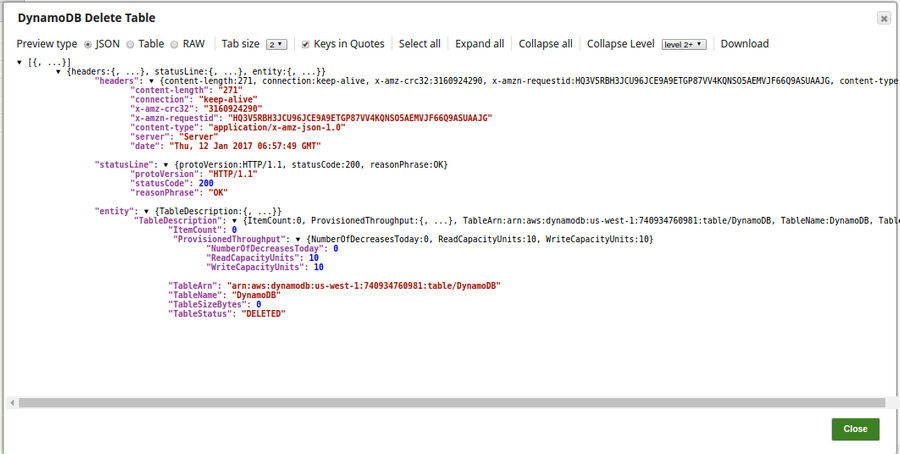
In this pipeline, the DynamoDB DeleteTable Snap deletes an existing table, DynamoDB, from the database.
On successful execution of the pipeline, the output preview displays the Table Status as 'Deleted'. If the table does not exist in the database, it will be routed to the error view.
Snap Pack History
Click to view/expand
Release
Snap Pack Version
Date
Type
Updates
February 2025
main29887
Stable
Updated and certified against the current SnapLogic Platform release.
November 2024
main29029
Stable
Updated and certified against the current SnapLogic Platform release.
August 2024
main27765
Stable
Updated and certified against the current Snaplogic Platform release.
May 2024
main26341
Stable
Updated and certified against the current SnapLogic Platform release.
February 2024
main25112
Stable
Updated and certified against the current SnapLogic Platform release.
November 2023
main23721
Stable
Updated and certified against the current SnapLogic Platform release.
August 2023
main22460
Stable
Updated and certified against the current SnapLogic Platform release.
May 2023
main21015
Stable
Upgraded with the latest SnapLogic Platform release.
February 2023
main19844
Stable
Upgraded with the latest SnapLogic Platform release.
The DynamoDB Bulk Write Snap now does not fail with the Duplicate keys <table-name> are provided error when the Batch size or the Thread count is high.
August 2022
main17386
Stable
The DynamoDB Account includes AWS Security Token field to pass the security token when making calls using temporary credentials.
4.29 Patch
429patches16169
Latest
Fixed an issue with the DynamoDB Snaps where the Snaps did not route the errors to the error view when the Snap encountered an exception and the Pipeline failed. Now the Snap route the errors to the error view and does not fail when it encounters an exception. If the error view is disabled, Snap stops the execution.
4.29 Patch
429patches15954
Latest
Enhanced the DynamoDB Account with AWS Security Token field to pass the security token when making calls using temporary credentials.
4.29
main15993
Stable
Upgraded with the latest SnapLogic Platform release.
4.28
main14627
Stable
Upgraded with the latest SnapLogic Platform release.
4.27
main12833
Stable
Upgraded with the latest SnapLogic Platform release.
4.26
426patches11593
Latest
Fixed an issue with the DynamoDB UpdateSnap, where the data type conversion for input keys caused an error.
4.26
main11181
Stable
Upgraded with the latest SnapLogic Platform release.
4.25
425patches10571
Latest
Updated the AWS SDK from version 1.11.688 to 1.11.1010 in the DynamoDB Snap Pack and added a custom SnapLogic User Agent header value.
4.25
main9554
Stable
Upgraded with the latest SnapLogic Platform release.
4.24 Patch
424patches9031
Latest
Supports autoscaling by adding retry logic with exponential backoff to the Snaps.
Enhanced the Dynamo DB Accountto support the expression enabler for account properties and creation of dynamic account.
Upgraded with the latest SnapLogic Platform release.
4.23
main7430
Stable
Upgraded with the latest SnapLogic Platform release.
4.22
main6403
Stable
Upgraded with the latest SnapLogic Platform release.
4.21 Patch
421patches5851
Latest
Removed the Snap timeout setting while waiting for the threads to complete processing.
4.21 Patch
dynamodb8854
Latest
Fixed theDynamoDB ScanSnap pagination issue where the second page of output and beyond cannot be accessed during execution and validation.
4.21
snapsmrc542
Stable
Upgraded with the latest SnapLogic Platform release.
4.20 Patch
dynamodb8709
Latest
Fixed the DynamoDB Scan Snap and the DynamoDB Update Snap where:
The DynamoDB Scan Snap is unable to produce a preview output on validation. (Instead, the Snap passes the output to the downstream Snap.)
The DynamoDB Update Snap produces two error documents for the same error during preview output.
4.20
snapsmrc535
Stable
Upgraded with the latest SnapLogic Platform release.
4.19
snaprsmrc528
Stable
Upgraded with the latest SnapLogic Platform release.
4.18 Patch
MULTIPLE7778
Latest
Updated the AWS SDK library version to default to Signature Version 4 Signing process for API requests across all regions.
4.18
snapsmrc523
Stable
Upgraded with the latest SnapLogic Platform release.
4.17
ALL7402
Latest
Pushed automatic rebuild of the latest version of each Snap Pack to SnapLogic UAT and Elastic servers.
4.17
snapsmrc515
Latest
Added the Snap Execution field to all Standard-mode Snaps. In some Snaps, this field replaces the existing Execute during preview check box.
4.16
snapsmrc508
Stable
Upgraded with the latest SnapLogic Platform release.
4.15 Patch
dynamodb6670
Latest
Added new functionality to the property Expression attribute values in the Delete Table Item, Scan, Update, and Bulk Get Snaps. The property now handles columns that are named after the DynamoDB reserve words.
4.15
snapsmrc500
Stable
Upgraded with the latest SnapLogic Platform release.
4.14
snapsmrc490
Stable
Upgraded with the latest SnapLogic Platform release.
4.13
snapsmrc486
Stable
Upgraded with the latest SnapLogic Platform release.
4.12
snapsmrc480
Stable
Upgraded with the latest SnapLogic Platform release.
4.11
snapsmrc465
Stable
Added a newDynamoDB QuerySnap with Secondary Index support.
4.10 Patch
dynamodb3950
Latest
Resolved an issue with the DynamoDB Scan Snap which was not able to perform the scan operation on the table with huge amount of data (Actual description Error executing scan process, 0 after the 4.10 release)