File Reader
- Lakshmi Manda (Deactivated)
- Aparna Tayi (Unlicensed)
- John Brinckwirth
In this article
Overview
You can use this Snap to read data from various sources (such as SLDB, HTTP, S3, SFTP, HDFS, etc.) and produce a binary data stream at the output.
Important
We plan to introduce additional S3 features exclusively in Amazon S3 Snaps, while Binary Snaps with S3 support will not contain these updates. Therefore, we recommend you to use the Amazon S3 Snap Pack for all your S3 operations within your pipelines. However, Binary Snaps will be retained as is to maintain backward compatibility, but be aware that we will no longer provide S3 support for the Binary Snaps.
Learn more: Migration from Binary Snaps to Amazon S3 Snaps.
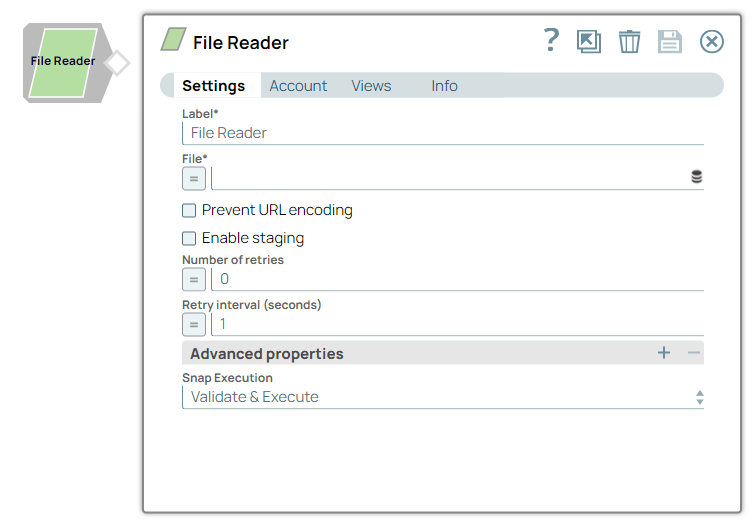
Snap Type
The File Reader Snap is a Read type Snap.
Prerequisites
The 'IAM_CREDENTIAL_FOR_S3' feature is used to access S3 files from EC2 Groundplex, without Access-key ID and Secret key in the AWS S3 account in the Snap. The IAM credential stored in the EC2 metadata is used to gain access rights to the S3 buckets. To enable this feature, set the Global properties (Key-Value parameters) and restart the JCC: This feature is supported in the EC2-type Groundplex only. Learn more. IAM Roles for Amazon EC2
jcc.jvm_options = -DIAM_CREDENTIAL_FOR_S3=TRUE
Connect to FTP server: To connect to the FTP server that needs to reuse the session for data transfer over TLS protocol, add:-DFTPS_SSL_TLS_PROTOCOL=TLSV1.2 (or) TLSV1.3property as a JVM option under the Global properties of the Node Properties tab: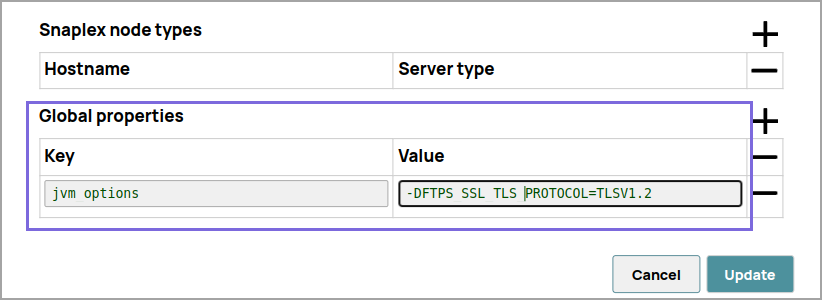
Support for Ultra Pipelines
Works in Ultra Pipelines.
Limitations
For most file protocols, the Snap behaves the same in both Snaplex and Groundplex. However, the HDFS protocol works only in the Groundplex. The Hadoop cluster must be open to the Groundplex server instance without any authentication.
When reading a file over HTTP, the File Reader Snap displays an error if the number of bytes consumed does not match the Content-Length header value present in the response.
- Do not use
sldbas a file system or storage. File Assets are intended only for specialized files that a pipeline uses to reference specific data, such as accounts, expressions, or JAR files. Use a Cloud storage provider to store production data. File Assets should not be used as a file source or as a destination in production pipelines. When you configure the File Reader Snap, set the file path to a cloud provider or an external file system.
Known Issues
- This Snap fails for SMB file path with the error:
unable to create new native thread. - This Snap Pack does not natively support SHA1-based algorithms to connect to SFTP endpoints. With the August 2023 GA release, you can now leverage the properties specified in the Configuration settings for Snaps to add support for ones that are disabled on your Snaplex.
- If the Snap encounters a file with the same name as your Project Space, it can result in an error when you attempt to use that file's name within the Mapper Snap. For instance, if your Project Space is named "
servicenow/to_snowflake" and the file being read is named "servicenow_to_snowflake_demo.json," you may encounter issues.
Consider using the complete file path instead of just the file name as a workaround.
Snap Views
Input | Document |
| Upstream Snap is optional. Any Snap with a document output view can be connected upstream. | Input may contain value(s) to evaluate the JavaScript expression in the File property. |
Output | Binary |
|
| Binary data read from the source specified in the File property with header information about the binary stream. When reading a file, all the characters in the filename (except dot, hyphen, underscore, space, alphabet, and digit) are replaced with an underscore (_) in the An example of the output preview on the File property value of "http://www.facebook.com" is as follows: [ { "": "Preview binary0...", "content-type": "text/html; charset=utf-8", "x-frame-options": "DENY",
"connection": "keep-alive", "transfer-encoding": "chunked", "date": "Thu, 23 Oct 2014 00:24:40
GMT", "content-location": "https://www.facebook.com", "pragma": "no-cache", "p3p": "CP=\"Facebook
does not have a P3P policy. Learn why here: http://fb.me/p3p\"", "cache-control": "private, no-
cache, no-store, must-revalidate", "x-xss-protection": "0", "x-content-type-options": "nosniff", "x-
fb-debug":
"N6wiHWAvz9kzpPUoM5vTm+yZzCZyiSrHXFXumHQixfMd0Qi+VDm514PkrrmQu2ISuuMTTFtUTqDZgDVG4blPTw==",
"expires": "Sat, 01 Jan 2000 00:00:00 GMT", "set-cookie": "reg_ext_ref=deleted; expires=Thu, 01-Jan-
1970 00:00:01 GMT; Max-Age=0; path=/; domain=.facebook.com" } ]
|
| Error | Error handling is a generic way to handle errors without losing data or failing the Snap execution. You can handle the errors that the Snap might encounter when running the Pipeline by choosing one of the following options from the When errors occur list under the Views tab:
Learn more about Error handling in Pipelines. | |||
Snap Settings
| Field | Field Type | Description | ||||||||||||||||||||||||||||||||||||||||||||||||||||||||||||||||
|---|---|---|---|---|---|---|---|---|---|---|---|---|---|---|---|---|---|---|---|---|---|---|---|---|---|---|---|---|---|---|---|---|---|---|---|---|---|---|---|---|---|---|---|---|---|---|---|---|---|---|---|---|---|---|---|---|---|---|---|---|---|---|---|---|---|---|
Label* Default Value: File Reader | String | Specify a unique name for the Snap. You can modify this to be more specific, especially if you have more than one of the same Snap in your Pipeline. | ||||||||||||||||||||||||||||||||||||||||||||||||||||||||||||||||
File* Default Value: N/A
| String/Expression | Specify the URL for a regular file that must begin with a file protocol. The supported file protocols are:
You can also upload a file from using the Upload This Snap supports S3 Virtual Private Cloud (VPC) endpoints. For example:
This Snap supports Oracle Object Storage endpoints when used with pre-authenticated requests. For example:
To create a pre-authenticated request, refer to the instructions in the following Oracle article: Reading files from Project and Shared Project Spaces
File value as an Expression The File value can be a JavaScript expression which is evaluated with values from the input view document and the pipeline parameters. The syntax for file value is:
The File value should be an absolute path for all protocols except for SLDB. For files in SLDB, the Snap can read only files in the same Project Directory or the Shared Project Directory. It cannot access files from other Projects. Typically, the file names in the Reader Snaps are read from incoming document which might have a structure different from the relative path. For optimal results, we recommend that you build absolute paths to their projects and then add the file name.
| ||||||||||||||||||||||||||||||||||||||||||||||||||||||||||||||||
Prevent URL encoding Default value: Deselected | Checkbox | When enabled, this will prevent the Snap from automatically URL encoding the file path (including the query string if it exists). Enable this setting to use the file path value as-is. When disabled, the following are some of the common characters that are automatically encoded by the Snap:
And these are some of the characters that are not automatically encoded by the Snap:
| ||||||||||||||||||||||||||||||||||||||||||||||||||||||||||||||||
Enable staging Default value: Deselected | Checkbox | If selected, the Snap downloads the source file into a local temporary file. When the download is completed, it streams the data from the temporary file to the output view. This property prevents the Snap from being blocked by slow downstream pipeline. The local disk should have sufficient free space as large as the expected file size. Some Snaps may take a long time to process large amounts of data. This, in turn, could lead to connection timeouts, causing the pipeline to fail. Selecting this property saves the data on your local disk, enabling you to avoid such timeouts. | ||||||||||||||||||||||||||||||||||||||||||||||||||||||||||||||||
Number of retries Default Value: 0 | Integer/Expression | Specify the maximum number of retry attempts that the Snap must make in case there is a network failure, and the Snap is unable to read the target file.
Minimum value: 0 | ||||||||||||||||||||||||||||||||||||||||||||||||||||||||||||||||
Retry interval (seconds) Default Value: 1 | Integer/Expression | Specify the minimum number of seconds for which the Snap must wait before attempting recovery from a network failure. Minimum value: 1 | ||||||||||||||||||||||||||||||||||||||||||||||||||||||||||||||||
Advanced properties | Use this field set to define specific settings for polling files. Click  to add a new row for defining an advanced property. This field set contains the following fields: to add a new row for defining an advanced property. This field set contains the following fields:
| |||||||||||||||||||||||||||||||||||||||||||||||||||||||||||||||||
| Properties | Dropdown list | The URI of the Shared Access Storage (SAS) to be accessed. Supported SAS types are: | ||||||||||||||||||||||||||||||||||||||||||||||||||||||||||||||||
Values Default Value: N/A Example: https://myaccount.blob.core.windows.net/sascontainer/sasblob.txt?sv=2015-04-05&st=2015-04- | String/Expression | Specify the value for the SAS URI. Ensure that the URI is specified in the format described here. If the SAS URI value is provided in the Snap settings, then the settings provided in the account (if any account is attached) are ignored. | ||||||||||||||||||||||||||||||||||||||||||||||||||||||||||||||||
Snap Execution
| Dropdown list | Select one of the following three modes in which the Snap executes:
| ||||||||||||||||||||||||||||||||||||||||||||||||||||||||||||||||

As of the Fall 2015 release, only File Reader/Writer Snaps support the Azure Storage protocol (azure:///).
As of the Fall 2017 release, the File Reader Snap shows the progress message during the Pipeline runtime.
Preview File
To preview a file, in the File field, click the Preview  icon.
icon. 
The Preview Type contains the following options:
- Hex: Displays the preview data in hexadecimal format.
- Text: Displays the preview data in text format.
- Render text with whitespace: Renders whitespaces as dots "." and tabs as underscores "_" in the preview data.
Examples
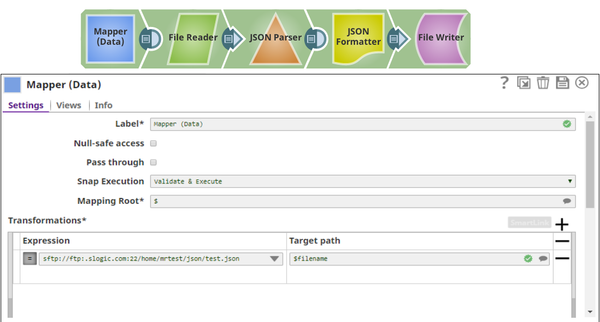
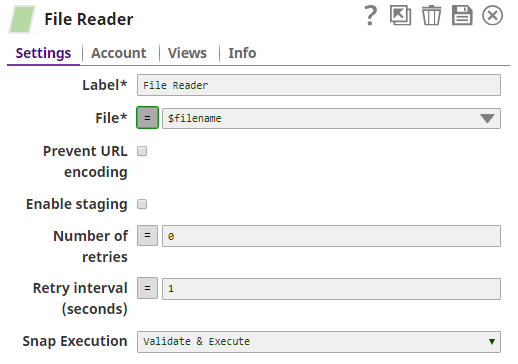
SFTP File Read
Example pipeline for an SFTP file read as shown below:
The 'IAM_CREDENTIAL_FOR_S3' feature is to access S3 files from EC2 Groundplex without Access-key ID and Secret key in the AWS S3 account in the Snap. The IAM credential stored in the EC2 metadata is used to gain the access rights to the S3 buckets. To enable this feature, the following line should be added to global properties and restart the JCC:
jcc.jvm_options = -DIAM_CREDENTIAL_FOR_S3=TRUE
This feature is supported in the EC2-type Groundplex only.
Sample for AWS S3 Support
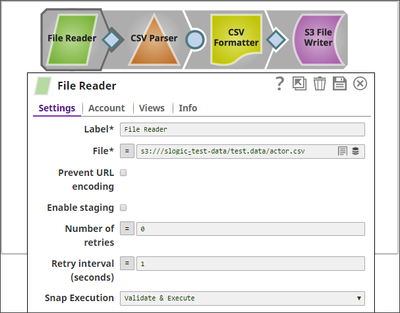
Troubleshooting
| Error | Reason | Resolution |
|---|---|---|
Response code: 400, unable to import the file < Request from elastic.snaplogic.com returned an error. | The name of the file that is being read by the Snap cannot be the same as the Project Space name. | Provide the complete path of the file (instead of only the file name) in this format: “ For example: |
Response code: 400, unable to import expression library: Request from elastic.snaplogic.com returned an error. | Path names at root level are not allowed. | Provide the complete path of the file (instead of only the file name) in this format: “ For example: |
Related Links
Fixed an issue with the Directory Browser Snap that failed when the WASB file name contained colon characters. February 2025 main29887 Stable Updated and certified against the current SnapLogic Platform release. Fixed an issue in the Directory Browser Snap where a mount error was displayed if the hostname contained an underscore, resulting in an empty hostname in the SMB URL. August 2024 main27765 Stable Upgraded the Enhanced the Decompress Snap to support encrypted and unencrypted ZIP and 7z files through the new File Password Account type. The Azure Data Lake Account has been removed from the Binary Snap Pack because Microsoft retired the Azure Data Lake Storage Gen1 protocol on February 29, 2024. We recommend replacing your existing Azure Data Lake Account with other Azure Accounts. Fixed an SMB (server message block) connectivity issue within the Binary Snap Pack, as the incorrect name provided by the SMB client did not match the Windows cluster virtual name, affecting the SPN (service principal name) connection. Fixed a Fixed an issue with the File Writer Snap, which partially writes the file for some FTPS servers by pausing for seconds before closing the output stream as specified in the global property Fixed an issue with the Binary Snaps that failed to build a data connection when connecting to the FTP server over FTPS protocol. Updated and certified against the current SnapLogic Platform release. Fixed an issue that occurred when node properties were used to override default algorithm specifications for SFTP operations. Fixed an issue that caused NTLM authentication issues when trying to access SMB servers. The JSON key field in the Binary Google Service Account supports JSON strings. You can upload the JSON key either from SLDB or dynamically pass the value using a pipeline parameter or access values from Secrets Manager. August 2023 main22460 Stable Updated and certified against the current SnapLogic Platform release. 433patches21913 433patches21645 With the 4.33 GA release, support for some algorithms for SFTP connection negotiation is removed for improved security and because we’ve updated the library used to connect to SFTP sources. With Snap Pack version Fixed the issues with the AES Encrypt and AES Decrypt Snaps, where the Snaps previously did not include the error stack trace in the error view. The Snaps now provide detailed information in case of any issues or errors. Fixed an issue that caused a Enhanced the PGP Encrypt Snap with the Encryption key ID field, which allows you to specify the key ID for encrypting the data. If you do not specify an encryption key ID, the Snap uses the primary key in the public key (master key). Starting from version 433patches21482, the PGP Encrypt Snap will no longer support encryption with an expired key. To ensure continued support for encryption, we highly recommend extending the expiration of your PGP key. Fixed an issue with the File Delete Snap where the Snap failed with a Fixed an issue where Binary Snaps could not handle region information for the Amazon S3 file protocol, which resulted in an error. The Key passphrase field in the Private Key Account now supports expressions, allowing dynamic evaluation using pipeline parameters when the expression button is enabled. 432patches20458 Fixed an issue where the ZipFile Read and ZipFIle Write Snaps failed to display the input schema for the File or File name field when using an expression. Fixed an issue where the File Writer Snap would not retry on completing the writing of the file. The JSCH library has been upgraded to version 0.2.7. The PGP Decrypt Snap now allows you to skip the signature verification when you face an issue with the signature in the encrypted file. The File Delete Snap now passes the input document to the error view correctly. The AWS S3 and S3 Dynamic accounts now support the maximum session duration of an IAM role defined in AWS. 430patches17292 Fixed an issue with the Directory Browser Snap, which failed with a null pointer exception error when connecting to the SFTP server containing a port number. The Binary Snap Pack is deployed as both the latest and stable distribution. We recommend that you use this version for your Org when using the recommended Snaplex version (main-13269 - 4.30 GA). The File Operation Snap supports moving data from a local node to an Azure blob through the AZ Copy utility. The Azure Storage Account includes the Request Size (MB) field to set the buffer limit before writing to Azure storage to enhance the performance. The SSH Auth Account supports dynamic values for the following fields that allow you to use Pipeline parameters. Username Private key Key passphrase 429patches16569 Enhanced the File Operation Snap to support moving data from local node to Azure blob through the AZ Copy utility. Enhanced Azure Storage Account with the Request Size (MB) field to set the buffer limit before writing to Azure storage to enhance the performance. Enhanced the following Binary Snaps to partially support '?' character in the file names and file paths: Enhanced the following Snaps and Accounts that use SnapLogic File System (SLFS) to display Lint warnings in Pipelines when using incorrect file paths to read and write files. We recommend that you use the File Upload :Upload_icon: icon to specify the file path. 428patches14736 Fixed an issue in the File Writer, S3 File Writer, and ZipFile Write Snaps where the Snaps failed with Enhanced the File Operation Snap to support Azure Data Lake Storage (ADLS) Gen2 protocol for moving and copying files in the Azure Blob File System (ABFS). Fixed an issue with the File Poller Snap to enhance performance of the polling operations that allows the Snap to poll the files without stopping. Fixed an issue with the File Writer Snap where the Server Message Block (SMB) mount failed to connect unless the Pipeline was restarted. Enhanced the S3 File Writer Snap with the Suggest fully-qualified file names checkbox that allows you to use fully-qualified file names in the File name Suggestions list for gov cloud instances. Fixed an issue with the File Poller Snap to handle indefinite polling operations without stopping in the process of execution. Fixed an issue with the ZipFile Write Snap where the ZIP extension files were downloaded with an incorrect file extension. Fixed an issue with the Zip File Read Snap where an archive failed to uncompress. Fixed an issue with the File Writer Snap when a file greater than 10 MB failed to write when uploading to Google Storage. Upgraded the Google Cloud Storage Java libraries from version 1.105.1 to version 2.2.2. 427patches13004 Fixed an issue with the SMB Account where the Snaps could not re-establish a lost connection to the SMB mount point. Fixed a memory leak issue when using HDFS protocol in Binary Snaps. 425patches10994 Fixed an issue with the PGP Decrypt Snap where the Snap writes an empty document to the output view when there is an error in the Snap. It will now decrypt the document and write it to the output view only if it succeeds. As of we have discovered an issue with this Binary patch affecting the PGP Decrypt Snap. In case your Pipelines use the PGP Decrypt Snap, we recommend you to NOT use this patch. Else, your Pipelines will likely fail. We're working on a fix and will be deploying a Snap patch soon. Enhanced the SFTP session in Binary Snaps to support the SFTP servers which close SFTP sessions slowly. Enhanced the S3 File Writer Snap with an ability to write S3objects with Access Control List (ACL) details in a single API call. In the 4.23 release, the S3 File Writer Snap used to write an S3 file and then set ACL if the ACL property was not empty. If the file write was successful and the ACL setting failed, both the output document in the output view and the error document in the error view was displayed. This issue has been resolved in the 4.24 release by enabling the Snap to configure ACL while writing the file. Therefore, the Snap produces an error document in the error view if the ACL configuration fails, irrespective of whether the file write action passes or fails. Enhanced the S3 File Writer to use an MD5 checksum that automatically checks for data integrity and corruption while uploading the file. Fixed the file operation error of copying large S3 files in the File Operation Snap by supporting the transfer of zero-byte S3 files while uploading a file. Fixed an issue in the File Writer Snap with the ADL protocol, to perform the correct action when OVERWRITE is selected from the File Action drop-down field. Fixed an encryption issue with the File Operation Snap by implementing both SSE-KMS and SSE-S3 supports to the Snap. Fixed an issue in the Snap Pack by removing the plaintext credentials in file URL from JCC log messages. Enhanced the Snap Pack by upgrading SMB client library. Fixed an issue with the File Writer Snap by avoiding overwriting of documents when using appending the data to a CSV file in SFTP. Rolled back the recent patch to Binary Snap Pack (File Writer Snap - 423patches7923) that might have induced SSL handshake failures/terminations in existing Pipelines. Do not use the 423patches7923 build for the File Writer Snap, because it causes connectivity issues with the Snaplex nodes. Fixed an issue with File Writer Snap by skipping the validation of the SAS URI having write permission, if the SAS URI uses an access policy. Enhanced the File Poller Snap by adding a field, Exit on first matches, which when set to true stops the Snap from executing after the first file paths matching the filter are written to the output view. If the field is not configured or is set to false (default value), then the Snap continues to poll the directory until the Polling timeout is reached. Enhanced the ZipFile Write Snap to provide the ability to change the default content-type (application/octet-stream) for any file that is stored into the Azure Blob Storage (WASB: or WASBS: file protocol). Hence, the files that the ZipFile Write Snap writes into the Blob Storage can be saved with content-type asapplication/zipor any other type instead of application/octet-streamalways. You can now prevent the Snap from writing files always to Azure Blob Storage (WASB: or WASBS: file protocol) with the application/octet-stream content-type. To do so, configure a binary header property in an upstream Snap, such as JSON Formatter or Mapper, to match the file's content – application/zip, application/java-archive and so on; and pass it as the $content-type (case-sensitive) for the file. Fixed the issue of the hanging thread in the SMB accounts. Enhanced the S3 Dynamic Account by allowing to use the Security token field in Directory Browser, File Operation, File Poller, Multi File Reader, and File Delete Snaps. Fixed the ZipFile Write Snap error by allowing the number of retries to be set greater than 0. Fixed SMB hanging threads by upgrading SMB client library. Fixed the issue with Multi File Reader Snap that continues to look for a directory even when Fixed the 'Connection pool shut down' error in S3 File Writer Snap by keeping the AmazonS3Client class object open until all the documents are processed. Fixed the Fixed an error in Multi File Reader and File Delete Snaps during Pipeline execution where the Snaps fail to retrieve the temporary files from the given S3 location. Enhanced the Directory Browser Snap by making the File filter field optional. Fixed the Directory Browser Snap that fails with an When configuring the SSH Auth account type, SSH passphrase is now optional, whereas it was a required field earlier. Enhanced the Directory Browser Snap by adding a new advanced property Use fast file-type check for wasb/wasbs protocols for quick Snap execution. Fixed the issue in PGP Encrypt Snap where decrypting its output file using a third-party PGP software adds a random suffix and TMP extension in the file name. This issue occurs only when using the PGP Encrypt Snap in a Windows-based Groundplex. Fixed the ZipFile Write Snap wherein the Snap fails to execute if it finds different zip file paths when processing multiple input binary data. Fixed the File Writer Snap to allow the deletion of temporary Google Storage files from the Fixed the following issues associated with the SMB account wherein: Enhanced the Snap Pack to support AWS SDK 1.11.634 to fix the NullPointerException issue in the AWS SDK. This issue occurred in AWS-related Snaps that had HTTP or HTTPS proxy configured without a username and/or password. Fixed an issue with the PostgreSQL grammar to better handle the single quote characters. Fixed an issue with the File Writer Snap wherein the Snap is intermittently unable to set correct permissions. binary7851 Fixed an issue with the SMB file protocol wherein Binary Snaps are unable to create a native thread using an SMB file path. Updated the AWS SDK library version to default to the Signature Version 4 Signing process for API requests across all regions. Fixed an issue with the ZipFile Read Snap wherein the Snap fails to extract files from a zip file heavier than 100MB when the number of retries is greater than zero. Added a new account type, Google Service Account, which enables you to isolate workflows from individual users. Added a new account type, Google Service Account, which enables you to isolate workflows from individual users. Fixed an issue with the File Reader Snap wherein SMB fails to provide multiple Snaps with concurrent access. Fixed an issue with the File Writer Snap wherein the Overwrite File action for SMB files fails on subsequent executions. Pushed automatic rebuild of the latest version of each Snap Pack to SnapLogic UAT and Elastic servers. Fixed an issue with SMB accounts wherein login to the server fails if password contains a plus (+) sign. Added support for multiple slashes as a prefix for SMB file URLs. Added a new field, File Delete Action, to the File Delete Snap that handles missing target files. Fixed an issue with the File Writer Snap wherein the Snap writes FTPS files partially. Two new global properties, ftpsDelayBeforeClosing and ftpDelayBeforeClosing, enable you to add delays to the FTP file protocol to handle the partial write. Fixed an issue with the File Writer Snap wherein the Snap writes FTPS files partially. Two new global properties, ftpsDelayBeforeClosing and ftpDelayBeforeClosing, enable you to add delays to the FTP file protocol to handle the partial write. Added a new property, Blob endpoint, for Binary Accounts, which enables you to specify the Azure Blob Storage endpoint that you want to use with an Azure Storage account. Added a new property Only Output on Change in the File Poller Snap. This property helps avoid redundancy by not displaying the same matching file in every polling result unless the file is changed. Fixed a timeout error while writing to S3 in the S3 File Writer Snap. Fixed an issue wherein the hostname specified in the Directory Browser path failed to appear as a path in the output document. Fixed an issue wherein the hostname specified in the Directory Browser path failed to appear as a path in the output document. Added a new property, Binary Header Properties, to the CSV Formatter Snap. This property can be configured with the binary headers and their values in the incoming document. Fixed an issue with S3 file reads getting aborted intermittently because of incomplete consumption of input stream. Enhanced the Basic Auth and Symmetric Crypto accounts to support pipeline parameters. Using pipeline parameters, Basic Auth now supports passing username and password, and Symmetric Crypto now supports passing secret key dynamically. binary5372 Updated the File Operation Snap for S3 to support files larger than 5GB by using an API for multipart upload copy. Added a new property "Enable staging" to enable the File Reader and S3 File Reader Snaps to perform as expected even in a slow network connection to AWS S3. Added AWS Key Management Service (KMS) encryption support to AWS S3 and S3 Dynamic accounts in the Binary Snap Pack. Fixed an issue with the S3 File Writer Snap, which corrupts while writing files if retry value is set to 1. Fixed issue caused in the File Operation Snap due to the rollback after the 4.12 release that impacted the S3 and FTP protocols. Fixed an issue in the File Delete Snap, wherein if no account is given for the SFTP protocol, then the error did not display. Added a new property 'Number of retries' in the File Writer Snap to fix interoperability issues with a server software. Fixed the issue where File Writer Snap does not write files to Windows Serv-U FTP server, while not displaying any error message. Resolved an Issue with SFTP server where the pipeline stopped responding while writing to the Tumbleweed server (SFTP server). Fixed the code in a way that the SFTP server now flushes out data after each write. Fixed an issue with the File Delete Snap that was unable to delete the file with a size greater than 1MB. Resolved an issue with the File Writer Snap writing to an FTP Server that may prematurely close the connection; this patch ensures the write has fully completed before disconnecting. Directory Browser - When "Ignore empty result" is not selected, the "original" passthrough document is now returned even when the S3 directory is empty. S3OutputStream handles failures. No updates made. Automatic rebuild with a platform release. Directory Browser Snap - fixed NPE issue, "File filter" property, and "Display update time and owner for S3 subdirectories" property. Fixed SFTP connection leak when "Validate after write" is checked for File Write Snap. Addressed the following issue in Directory Browser: "Update time" being returned "unknown" for directories within S3 objects Added ability to sign PGP encrypted files. Addressed an issue in Directory Browser and fixed issue in writing the original document to output view when reading from S3. Addressed an issue regarding an array out of bounds exception when IAM Role is enabled. No updates made. Automatic rebuild with a platform release. Addressed an issue with Directory Browser taking too lont to start listing files from S3 bucket and then failing with partial results due to CPU spikes. Info tab added to accounts. ZipFile Read Snap: Added support for reading 7z archive formats created using Windows machines. Added Encrypted filename property to PGP Encrypt Snap. File Writer: fixed an issue on Windows Snaplexes that prevented creating directories that are not present. File Writer: fixed an issue on Windows Snaplexes that prevented creating directories that are not present. File Reader and ZipFile Reader Snaps: Added a new "Prevent URL encoding" setting to allow users to disable automatic URL encoding of file paths. This allows pre-encoded URLs and file paths to be used as-is. Resolved an issue with Directory Browser Snap not freeing up connections in Windows Groundplex. Implemented wasbs:// protocol support in Binary Snap Pack. In the SnapLogic 4.3.2 release, WASB (Windows Azure Storage Blob) or WASBS protocol (wasb:/// or wasbs:///) support has been added to the Binary Snaps. In the WASB and WASBS file URL, the top directory should be the name of the 'Azure Storage container'. Set the Key Value parameters under global properties as below and restart the JCC for Azure Storage support: 4.2.2 Multi File Reader: Resolved an issue were some files were read twice if Include subfolders was selected when using the S3 protocol. Tooltip cleanup File Writer now lets you set file permissions. NEW! ZipFile Read and Write File Writer Snap updated to allow for appending, overwriting, ignoring or erroring out if the file already exists. An output view was added to File Writer. There are now separate Snaps for reading a single file into SnapLogic and reading multiple files (File Reader and Multi File Reader). Initial release. Read/write support for popular data formats: Binary, CSV, HTML, JSONRelease Snap Pack Version Date Type Updates February 2025 440patches30046 Latest November 2024 main29029 Stable Updated and certified against the current SnapLogic Platform release. August 2024 438patches28197 Latest org.json.json library from v20090211 to v20240303, which is fully backward compatible.May 2024 437patches27146 Latest Enhanced the Azure Storage Account with Managed Identity, which provides applications with an automatically managed identity for connecting to resources that support Microsoft Entra ID authentication. May 2024 437patches26873 Latest Fixed an issue with the File Poller Snap where the Snap applied a case-sensitive filter in the Windows operating system. May 2024 437patches26592 Latest May 2024 main26341 Stable February 2024 436patches25711 Latest February 2024 436patches25332 Latest null pointer exception in the Public Key Account for Binary Snap Pack when the Public Key field value is null. Now, the account displays a configuration exception for a null value.February 2024 436patches25241 Latest ftpsDelayBeforeClosing.February 2024 436patches25161 Latest Fixed an issue with the File Poller Snap that displayed an exception when an unauthorized character ' :' was used in the Windows Snaplex.February 2024 main25112 Stable Updated and certified against the current SnapLogic Platform release. November 2023 435patches24525 Latest Fixed an issue with the File Poller Snap that caused it to poll recursively for files in the root directory of the S3 bucket. November 2023 435patches23780 Latest November 2023 main23721 Stable August 2023 434patches23502 Latest Fixed an issue with the File Operation Snap (SFTP protocol) where the error message did not display during a move operation, although the existing file was available in the target path and the Error if exists checkbox was selected. August 2023 434patches23302 Latest August 2023 434patches22976 Latest Fixed an issue that caused account credentials to be visible in the stack trace of some failed SFTP operations. August 2023 434patches22842 Latest August 2023 434patches22639 Latest May 2023 433patches22297 Latest May 2023 Latest May 2023 433patches21870 Latest Added the PGP Sign Snap, which allows binary data to be signed using PGP. May 2023 Latest 433patches21645, you can modify the global properties. Refer to the Configuration Settings for Snaps documentation for details about how to revert to the previous settings. May 2023 433patches21576 Latest May 2023 433patches21482 Latest String index out of range error with the SFTP protocol in the File Writer Snap when it attempted to create a top-level directory.May 2023 433patches21291 Latest Fixed an issue with the Multi File Reader Snap where it failed with the error S3 object not found when the Snap found no matching file to read and the Folder/File property value did not end with a forward slash (/).May 2023 433patches21179 Latest 404 Not Found error when trying to delete files from an Amazon S3 bucket. This issue occurred only with the Identity and Access Management (IAM) role in an Amazon AWS S3 Account.May 2023 main21015 Stable February 2023 Latest February 2023 432patches20431 Latest February 2023 432patches20349 Latest February 2023 main19844 Stable Upgraded with the latest SnapLogic Platform release. November 2022 431patches18977 Latest November 2022 main18944 Stable Upgraded with the latest SnapLogic Platform release. September 2022 430patches17933 Latest August Patch Stable and Latest August 2022 main17386 Stable 4.29 Patch Latest 4.29 Patch 429patches15842 Latest  ) for the following fields that allow the use of Pipeline parameters to populate the properties.
4.29 main15993 Stable 4.28 Patch 428patches14919 Latest 4.28 Patch Latest AccessControlListNotSupported error when using an external AWS account to write to the bucket if it has the bucket-owner-enforced setting enabled. With this fix, you can select the None option (the default value), from the AWS Canned ACL dropdown list, indicating that no Canned ACL request is set when writing a new file to prevent the error.4.28 main14627 Stable 4.27 Patch 427patches14283 Latest 4.27 Patch Latest 4.27 main12833 Stable 4.26 Patch 426patches12288 Latest 4.26 Patch 426patches11922 Latest Fixed an issue with the File Writer Snap, where the Snap failed to open a channel while accessing through a SFTP protocol. 4.26 Patch 426patches11529 Latest 4.26 main11181 Stable Upgraded with the latest SnapLogic Platform release. 4.25 Patch Latest 4.25 Patch 425patches10217 Latest 4.25 Patch 425patches9581 Latest 4.25 Patch 425patches9564 Latest 4.25 main9554 Stable 4.24 Patch 424patches9044 - Latest 4.24 Patch 424patches9020 Latest 4.24 Patch 424patches8876 Latest 4.24 main8556 Stable Upgraded with the latest SnapLogic Platform release. 4.23 Patch 423patches8453 Latest 4.23 Patch 423patches8368 - Latest 4.23 Patch 423patches8368 - Latest 4.23 Patch 423patches8099 - Latest 4.23 Patch 423patches7958 - Latest 4.23 Patch 423patches7958 - Latest 4.23 Patch 423patches7923 Latest 4.23 Patch 423patches7795 - Latest 4.23 Patch 423patches7660 - Latest 4.23 main7430 - Stable 
4.22 Patch 422patches6947 - Latest 4.22 Patch 422patches6950 - Latest 4.22 Patch 422patches6629 - Latest 4.22 Patch 422patches6542 - Latest 4.22 main6403 - Latest 4.21 Patch 421patches6136 - Latest FileSystem information is unavailable.4.21 Patch 421patches6090 - Latest 4.21 Patch 421patches6077 - Latest UnknownHostException error in Binary Snaps due to intermittent failures in FileSystemProvider registration, by replacing ServiceLoader with direct instantiations of FileSystemProvider class objects.4.21 Patch 421patches5994 - Latest 4.21 Patch 421patches5963 - Latest 4.21 Patch 421patches5975 - Latest Unable to create filesystem object for smb:// error, by rolling back the SMB client library to the prior working version as in snapsmrc542.4.21 Patch 421patches5871 - Latest 4.21 Patch binary8849 - Latest 4.21 Patch binary8843 - Latest 4.21 snapsmrc542 - Stable Upgraded with the latest SnapLogic Platform release. 4.20 Patch binary8801 - Latest 4.20 Patch binary8791 - Latest 4.20 Patch binary8785 - Latest GetObjectTagging permission.4.20 Patch binary8775 - Latest /tmp directory of the Groundplex if Pipeline execution stops before completion. 4.20 Patch binary8741 - Latest 4.20 Patch binary8710 - Latest 4.20 snapsmrc535 - Stable Upgraded with the latest SnapLogic Platform release. 4.19 Patch binary8369 - Latest 4.19 snaprsmrc528 - Latest 4.18 Patch binary8768 - Latest 4.18 Patch binary8046 - Latest 4.18 Patch MULTIPLE7884 - Latest 4.18 Patch binary7860 - Latest 4.18 Patch - Latest 4.18 Patch binary7746 - Latest 4.18 Patch MULTIPLE7778 - Latest 4.18 Patch binary7720 - Latest 4.18 snapsmrc523 - Latest 4.18 snapsmrc523 - Latest 4.17 Patch binary7589 - Latest 4.17 Patch binary7487 - Latest 4.17 Patch ALL7402 - Latest 4.17 Patch binary7381 - Latest 4.17 Patch binary7366 - Latest 4.17 Patch binary7280 - Latest 4.17 Patch snapsmrc515 - Latest 4.16 Patch binary7049 - Latest 4.16 Patch binary7049 - Latest 4.16 Patch binary6975 - Latest 4.16 snapsmrc508 - Latest 4.15 Patch binary6744 - Latest 4.15 Patch binary6414 - Latest 4.15 Patch binary6414 - Latest 4.15 snapsmrc500 - Latest 4.14 Patch MULTIPLE5732 - Latest 4.14 snapsmrc490 - Latest 4.13 Patch - Latest 4.13 Patch binary5315 - Latest 4.13 snapsmrc486 - Latest 4.12 binary5044 - Latest 4.12 Patch binary4882 - Latest 4.12 Patch binary4840 - Latest 4.12 Patch binary4797 - Latest 4.12 Patch binary4736 - Latest 4.12 snapsmrc480 - Latest 4.11 Patch binary4424 - Latest 4.11 Patch binary4328 - Latest 4.11 Patch snapsmrc465 - Latest 4.11 binary4019 - Stable 4.10 Patch binary3930 - Latest 4.10 Patch binary3840 - Latest 4.10 snapsmrc414 - Stable 4.9 Patch binary3331 - Latest 4.9 Patch binary3183 - Latest 4.9 Patch binary3170 - Latest 4.9 Patch binary3081 - Latest 4.9 Patch binary3060 - Latest 4.9 Patch binary3022 - Latest 4.9 Patch binary3000 - Latest 4.9 Snapsmrc405 - Stable 4.8 Patch Snapsmrc405 - Latest 4.8 Snapsmrc398 - Latest 4.7.0 Patch binary2346 - Latest 4.7.0 Patch binary2337 - Latest 4.7 Snapsmrc382 - Latest 4.6.0 Patch binary2110 - Latest 4.6.0 Patch binary2009 - Latest 4.6.0 Patch binary1898 - Latest 4.6.0 Patch binary1851 - Latest 4.6.0 Snapsmrc362 Stable 4.5.1 binary1563 - Latest 4.5 Snapsmrc344 - Stable 4.4.1 - - Latest 4. - - Stable 4.3.2 - - Latest jcc.jvm_options = -DDEFAULT_URL_PATTERN=.*.core.windows.net.*
4.3.1 - - - 4.3.0 - - - - - - 4.2.1 - - Summer 2015 - - - - - - - - - - - - - - - - - - - - November 2014 - - - July/Summer 2014 - - - April 2014 - - - March 2014 - - - January 2014 - - - December 2013 - - - November 2013 - - - July 2013 - - - June 2013 -
Have feedback? Email documentation@snaplogic.com | Ask a question in the SnapLogic Community
© 2017-2025 SnapLogic, Inc.