
Oracle - Merge
- Kalpana Malladi
- Aparna Tayi (Unlicensed)
- Mohammed Iqbal
On this Page
Overview
This Snap executes a SQL Merge with given properties. The documents that are provided in the input view will be merged into the provided table on the provided database. Each document on the input view is expected to be merged or created with/as a new record in the table. Learn more about SQL Merges: Oracle Merge.
Upcoming
Snap type: | Write | |||||||
|---|---|---|---|---|---|---|---|---|
Snap Input/Output: |
Merges will be batched up until the account's batch size property or until the structure of the update statement changes. An update statement will change if an incoming document contains different keys than a previous document. The merge condition can only use variables, no constants or pipeline parameters. A good example for a merge condition is SALARY = $SALARY (here we use the SALARY variable of the input document). A bad example for a merge condition is SALARY = '100000' (this will not work since we validate the provided columns in the condition against the types defined in the table schema). You do not want to use the expression toggle on the merge condition, there is support for it but it requires undocumented functions. The bad example can be rewritten by using an upstream Mapper Snap, where '10000' is mapped to the SALARY variable, which then can be used in the merge condition as defined in a good example. The same applies for pipeline parameters, which need to be mapped upstream similarly using a Mapper Snap. | |||||||
| Prerequisites: | [None] | |||||||
| Support and limitations: | Works in Ultra Tasks. | |||||||
| Account: | This Snap uses account references created on the Accounts page of SnapLogic Manager to handle access to this endpoint. See Oracle Account for information on setting up this type of account. | |||||||
| Views: |
| |||||||
Settings | ||||||||
Label | Required. Specify the name for the Snap. You can modify this to be more specific, especially if you have more than one of the same Snap in your pipeline. | |||||||
Schema name | Specify the database schema name. The suggestions in the Schema field are populated only when at least a single table exists in the schema. If no tables exist to use that schema, only SYS, SYSTEM, and XDB are populated. The values can be passed using the pipeline parameters but not the upstream parameter. Example: SYS | |||||||
Table name | Required. Specify the table that the rows will be inserted into. This list is populated based on the tables associated with the selected schema. The values can be passed using the pipeline parameters but not the upstream parameter.
Default value: [None] | |||||||
| Number of retries | Specifies the maximum number of attempts to be made to receive a response. The request is terminated if the attempts do not result in a response. Example: 3 Default value: 0 When you enable retry and a connection failure occurs that cannot be recovered by retry, the Snap writes a connection failure error in the error view. In some cases, the error view records might contain duplicate data that was written to the database. Ensure to verify all the records in the error file before you restart the merge request. You can locate the duplicate records in the error view by checking the $reason property for the sub-string: Connection is not available, request timed out. | |||||||
| Retry interval (seconds) | Specifies the time interval between two successive retry requests. A retry happens only when the previous attempt resulted in an exception. Example: 10 Default value: 1 When you enable retry and a connection failure occurs that cannot be recovered by retry, the Snap writes a connection failure error in the error view. In some cases, the error view records might contain duplicate data that was written to the database. Ensure to verify all the records in the error file before you restart the merge request. You can locate the duplicate records in the error view by checking the $reason property for the sub-string: Connection is not available, request timed out. | |||||||
| Merge condition | Required. The ON condition of the merge statement. A boolean-type expression is expected. For an explanation of merge syntax, see Oracle Merge. Default value: [None] | |||||||
| Session parameters | Use this fieldset to set the National Language Support (NLS) parameters. Learn more about Setting NLS Parameters. The NLS parameters override the default value, for example, comma (,) set for the session in the initialization parameter file or set by the client with environment variables, such as a decimal point. | |||||||
| Session parameter name | Specify the name of the NLS parameter.
Default value: None. | |||||||
| Session parameter value | Specify the value for the NLS parameter. This field supports only pipelines parameters, and not upstream values. Default value: None. Example: CZECH REPUBLIC | |||||||
Snap execution | Select one of the three modes in which the Snap executes. Available options are:
| |||||||
Examples
Following are two examples. The first one using a conditional update of one of the values which gets then merged into the data using a Oracle Merge Snap. The second one will showcase error handling.
In the first example, we will drop a table, insert data into a newly created table, update one of records and then merge that update result into the same table.
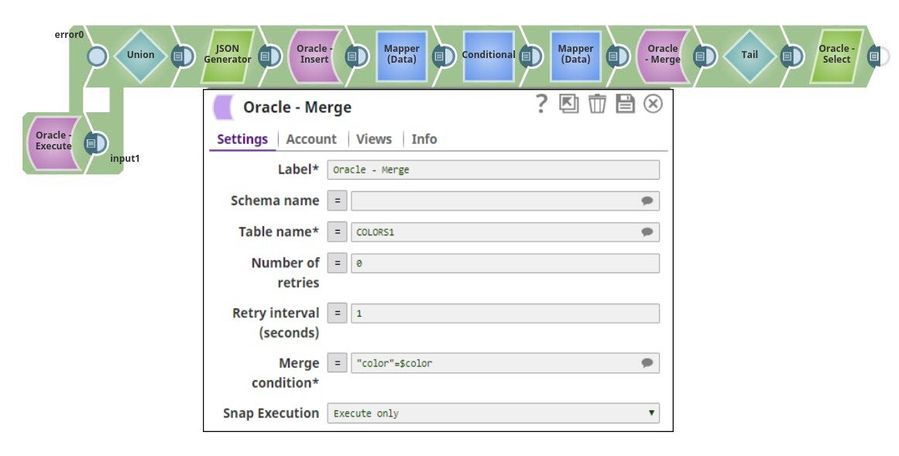
The first Oracle Execute Snap will drop the existing table. We use an error view to handle the case where the table does not exist yet. Both the error and the output view then are funneled into a Union Snap which triggers the actual insertion data provided by a JSON Generator Snap.
Then we use a Mapper Snap to map back the original input data and use a Conditional Snap to update the value of the color black with #0000.
Next, we merge the updated value back into the table using the Oracle Merge Snap. There we define the merge condition as "color"=$color.
Hint: The table COLOR1 was created on the fly, and the color column is created lowercase. We quote the color column in the merge condition since it is defined as a lower case column on the table.
Hint: Multiple columns can be used in an expression such as "color"=$color and "value"=$value
Finally, we execute a select to verify the color black was updated was updated.
In the second example, we use an error view on the Oracle Merge Snap.
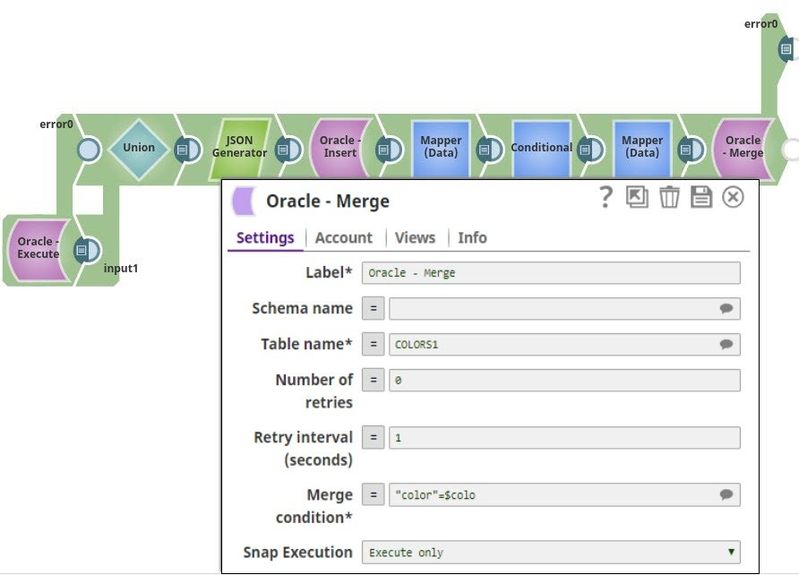
Here we miss-typed the variable in the condition, which will trigger an error. The error will be written to the error view of the Snap, which then can be used for debugging purpose or further processing.
An example of the error view is shown below.
- Error is the message provided by SnapLogic.
- Reason is defined as the message provided by the Oracle Database, which includes the database error code.
- Original is defined as the data from the input view.
error: "SQL operation failed"
reason: "ORA-38104: Columns referenced in the ON Clause cannot be updated: "color"\n, error code: 38104, SQL state: 99999"
original:  {color:red, value:#f00}
   color: "red"
   value: "#f00"
resolution: "Please check for valid Snap properties and input data."
stacktrace: "com.Snaplogic.Snap.api.SnapDataException: SQL operation failed\n at com.Snaplogic.Snap.api.sql.DatabaseUtils.handleUpdateResult(DatabaseUtils.java:449)\n at com.
Snap Pack History
| Release | Snap Pack Version | Date | Type | Updates |
|---|---|---|---|---|
| February 2025 | main29887 | Stable | Updated and certified against the current SnapLogic Platform release. | |
| November 2024 | 439patches29008 | Latest | Fixed an issue with Oracle Execute, Select, and Stored Procedure Snaps where the data was displayed in an unexpected structure and without the actual row address value when querying table columns of | |
| November 2024 | main29029 | Stable | Updated and certified against the current SnapLogic Platform release. | |
| August 2024 | 438patches27870 | Latest | Fixed an issue with the Oracle - Merge Snap that caused a date format error when the merge condition was used with the TO_DATE() function. | |
| August 2024 | main27765 | Stable |
| |
| May 2024 | 437patches26651 | Latest |
| |
| May 2024 | 437patches26346 | Latest | Fixed an issue with the Oracle - Execute Snap that displayed an error when handling | |
| May 2024 | main26341 | Stable | Updated the Delete Condition (Truncates a Table if empty) field in the Oracle - Delete Snap to Delete condition (deletes all records from a table if left blank) to indicate that all entries will be deleted from the table when this field is blank, but no truncate operation is performed. | |
| February 2024 | 436patches26208 | Latest | Fixed an issue with Oracle - Bulk Load Snap that intermittently displayed a | |
| February 2024 | 436patches25696 | Latest |
Behavior Change: As part of | |
| February 2024 | main25112 | Stable | Updated and certified against the current SnapLogic Platform release. | |
| November 2023 | 435patches24769 | Latest | Fixed an issue with the Oracle Snap Pack that required the i18n extensions to be present when the Oracle database instance was in a specific language. | |
| November 2023 | 435patches24445 | Latest |
| |
| November 2023 | 435patches23823 | Latest |
| |
| November 2023 | main23721 |
| Stable | Updated and certified against the current SnapLogic Platform release. |
| August 2023 | 434patches23000 | Latest | The JDBC driver for the Oracle Snap Pack is upgraded from OJDBC6 JAR (v11.2.0.4) to OJDBC10 JAR (v19.20.0.0) in the latest distribution in October 2023 and will be deployed to the stable distribution in the November 2023 release (after the Snaplex upgrade). This upgrade changes specific error codes and status messages. The latest JDBC driver upgrade is backward-compatible. Learn more: Upgrading from Oracle JDBC 11.2.0.4 Driver to 19.20.0.0 Driver. | |
| August 2023 | 434patches22787 | Latest | Fixed an issue with the Oracle-Bulk Load Snap that was not resilient to the errors previously when trying to auto-discover the existing SQLLDR utility paths in the node. The Snap is now robust to those errors. | |
August 2023 | main22460 | | Stable | The Oracle - Execute Snap now includes a new Query type field. When Auto is selected, the Snap tries to determine the query type automatically. |
May 2023 | main21015 | Stable | Upgraded with the latest SnapLogic Platform release. | |
| February 2023 | main19844 | Stable | Upgraded with the latest SnapLogic Platform release. | |
November 2022 | 431patches19781 | Latest | The Oracle-Stored Procedure Snap works as expected and does not fail with the error | |
November 2022 | 431patches19275 | Latest | The Oracle - Stored Procedure Snap now supports stored functions with OUT and INOUT parameters and displays these parameter values in the output along with the | |
| November 2022 | main18944 | Stable | The Oracle Insert Snap now creates the target table only from the table metadata of the second input view when the following conditions are met:
| |
| September 2022 | 430patches17894 | Latest | The Oracle Select Snap now work as expected when the table name is dependent on an upstream input. | |
| August 2022 | 430patches17658 | Latest | The Oracle - Stored Procedure Snap now takes lesser time to execute when calling a stored procedure, because the Snap queries the metadata as required, thereby optimizing the Snap's performance. | |
| August 2022 | main17386 | Stable |
| |
| 4.29 Patch | 429patches16603 | Latest |
| |
4.29 | main15993 |
| Stable | Upgraded with the latest SnapLogic Platform release. |
| 4.28 | main14627 | Stable |
| |
| 4.27 | main12833 | Stable |
| |
| 4.26 | main11181 | Stable | Upgraded with the latest SnapLogic Platform release. | |
| 4.25 | 425patches11008 | Latest |
| |
| 4.25 | main9554 | Stable | Upgraded with the latest SnapLogic Platform release. | |
| 4.24 | main8556 | Stable |
| |
| 4.23 | main7430 | Stable | Upgraded with the latest SnapLogic Platform release. | |
| 4.22 | main6403 | Stable | Upgraded with the latest SnapLogic Platform release. | |
| 4.21 Patch | 421patches6272 | Latest | Fixes the issue where Snowflake SCD2 Snap generates two output documents despite no changes to Cause-historization fields with DATE, TIME and TIMESTAMP Snowflake data types, and with Ignore unchanged rows field selected. | |
| 4.21 Patch | 421patches6144 | Latest | Fixes the following issues with DB Snaps:
| |
| 4.21 Patch | MULTIPLE8841 | Latest | Fixes the connection issue in Database Snaps by detecting and closing open connections after the Snap execution ends. | |
| 4.21 | snapsmrc542 |
| Stable | Updated the Oracle Thin Account and Oracle Thin Dynamic Account, enabling them to connect via Oracle Active Data Guard (ADG). |
4.20 Patch | db/oracle8812 | Latest | Enhances the Oracle Snap Pack to support connections to the Oracle ADG (Active Data Guard) URL. | |
4.20 Patch | db/oracle8803 | Latest | Support for Oracle Database 19c. | |
| 4.20 | snapsmrc535 | Stable | Upgraded with the latest SnapLogic Platform release. | |
| 4.19 Patch | db/oracle8408 | Latest | Fixes an issue with the Oracle - Update Snap wherein the Snap is unable to perform operations when:
| |
| 4.19 | snaprsmrc528 | Stable | Upgraded with the latest SnapLogic Platform release. | |
| 4.18 Patch | oracle7786 | Latest | Fixes an issue using the NVARCHAR2 datatype in Oracle databases when the character set is not AL32UTF8. However, a known issue is that special characters display as | |
| 4.18 | snapsmrc523 | Stable | Upgraded with the latest SnapLogic Platform release. | |
| 4.17 Patch | db/oracle7459 | Latest | Fixed an issue with the Oracle Stored Procedure Snap wherein the Pipeline execution fails with an error when the input data type is CLOB. | |
| 4.17 | ALL7402 | Latest | Pushed automatic rebuild of the latest version of each Snap Pack to SnapLogic UAT and Elastic servers. | |
| 4.17 | snapsmrc515 | Latest |
| |
4.16 Patch | db/oracle6919 | Latest | Added a new property, Session parameters, in the Oracle Insert Snap to enable the use of National Language Support (NLS) parameters. | |
4.16 Patch | db/oracle6824 | Latest | Fixed an issue with the Lookup Snap passing data simultaneously to output and error views when some values contained spaces at the end. | |
| 4.16 | snapsmrc508 | Stable | Upgraded with the latest SnapLogic Platform release. | |
| 4.15 Patch | db/oracle6534 | Latest | Improved performance in Pipelines that contain child Pipelines. | |
| 4.15 Patch | db/oracle6417 | Latest | Fixed an issue with data types conversion. All fields with byte, short, int, or long data types will be converted to BigInteger after fetching. | |
| 4.15 Patch | db/oracle6284 | Latest | Replaced the existing Max idle time and Idle connection test period properties with Max life time and Idle Timeout properties respectively, in the Account configuration. The new properties fix the connection release issues that were occurring due to default/restricted DB Account settings. | |
| 4.15 | snapsmrc500 | Stable | Upgraded with the latest SnapLogic Platform release. | |
| 4.14 | snapsmrc490 | Stable | Upgraded with the latest SnapLogic Platform release. | |
4.13 Patch | db/oracle5192 | Latest |
| |
| 4.13 | snapsmrc486 | Stable | Upgraded with the latest SnapLogic Platform release. | |
| 4.12 Patch | oracle4862 | Latest | Fixed an issue in the Oracle Bulk Load Snap that fails to execute the SQLLDR (SQL Loader) command, while also enhancing the support for the TCPS protocol. | |
| 4.12 Patch | db/oracle4721 | Latest | Added a property, "SSL/TCPS" for Oracle Account. | |
| 4.12 Patch | MULTIPLE4744 | Latest | Enabled expression for Delete Condition in Oracle Delete Snap. | |
| 4.12 | snapsmrc480 | Stable | Upgraded with the latest SnapLogic Platform release. | |
4.11 Patch | db/oracle4369 | Latest | Enhanced the Oracle Bulk Load Snap to accept date-type values in the format "yyyy-mm-dd". | |
| 4.11 | snapsmrc465 | Stable | Upgraded with the latest SnapLogic Platform release. | |
| 4.10 Patch | oracle3633 | Latest | Fixed BULK LOAD so it adds the thread name to the name of the temporary directory. This allows multiple BULK LOAD Snaps within a single pipeline. | |
| 4.10 | snapsmrc414 | Stable | Added Auto commit property to the Select and Execute Snaps at the Snap level to support overriding of the Auto commit property at the Account level. | |
4.9.0 Patch | oracle3188 | Latest | Fixed the issue that "NaN" check was done to unexpected data types like varchar. | |
4.9.0 Patch | oracle3096 | Latest | Fixed a class casting issue for custom data types(BLOB, CLOB, NCLOB, etc) when custom Oracle JDBC driver is used. | |
4.9.0 Patch | oracle3071 | Latest | Fixed an issue regarding connection not closed after login failure; Expose autocommit for "Select into" statement in PostgreSQL Execute Snap and Redshift Execute Snap. | |
| 4.9 | snapsmrc405 | Stable | Upgraded with the latest SnapLogic Platform release. | |
4.8.0 Patch | oracle2905 |
| Latest | Fix for SQL*Loader interpreting white-space only data as null values. |
4.8.0 Patch | oracle2756 | Latest | Potential fix for JDBC deadlock issue. | |
4.8.0 Patch | oracle2711 | Latest | Fixed Oracle Snap Pack rendering dates that are one hour off from the date returned by database query for non-UTC Snaplexes. | |
| 4.8 | snapsmrc398 | Stable | Database accounts now invalidate connection pools if account properties are modified and login attempts fail. | |
4.7.0 Patch | oracle2190 | Latest | Fixed an issue with the Oracle Select Snap regarding Limit rows not supporting an empty string from a pipeline parameter. | |
| 4.7 | snapsmrc382 | Stable |
| |
| 4.6 | snapsmrc362 | Stable |
| |
| 4.5.1 | oracle1583 | Stable |
| |
| 4.4.1 | NA | Stable |
| |
| 4.4 | NA | Stable |
| |
| 4.3.2 | NA | Stable |
| |
| NA | NA | Stable |
| |
| NA | NA | Stable |
| |
| NA | NA | Stable |
|
 .
.Have feedback? Email documentation@snaplogic.com | Ask a question in the SnapLogic Community
© 2017-2025 SnapLogic, Inc.