February 2020, 4.20 Release Notes
- Ankur Parekh
- Anand Vedam
- Mohammed Iqbal
In this article:
Important
About SnapLogic Releases
- Per the SnapLogic Release Process, all remaining Snaplex instances across customer Orgs are upgraded to the 4.20 build (master-6950-4.20 Patch 3) at 9 pm PT on March 21, 2020.
- This 4.20 GA release includes the patches deployed to SnapLogic after the 4.19 GA release, as listed in the 4.19 Dot Releases page.
- We recommend that you upgrade to the latest Chrome or Firefox browser version and clear your browser cache before logging into the SnapLogic Intelligent Integration Platform (IIP).
Java 11 Support
Starting from the 4.18 August release, SnapLogic supports Java 11 for Groundplex instances. We recommend all customers to migrate to Java 11, since Oracle no longer releases security updates for Java 8. For details, see Upgrading Your Groundplex to Java 11.
Java 11 support highlights
- The 4.20 Snaplex installer uses Java 11 by default. Java 8 is also supported as a rollback option.
- Current Groundplex installations will continue to work with Java 8 until the Snaplex is reinstalled using the new installer.
- You are required to upgrade their Groundplex instances to Java 11 using the new installer. Support for Java 8 will cease from the August 2020 release.
New IP Whitelisting Requirements Reminder
We remind all customers of the new IP Whitelisting requirements that have been in effect since the 4.18 August 2019 release. Ensure that your network administrators review the following:
Platform
New Features and Enhancements
- Asset Palette: Introduces a new opt-in feature, providing a dynamic display of the Catalog for Snaps, Pipelines, and Pattern Pipelines. You can enable this new display through the User Settings dialog in Designer. In addition to freeing up more space on the Designer Canvas for you to build your Pipelines, the redesigned Asset Palette offers Pipeline Recommendation capabilities by using Convolutional Neural Networks that improve the quality of suggested Snap, Pipeline Pattern, and Pipeline through personalization. Iris recommends these Pipelines based on the Snaps you use.
You can take advantage of the following new capabilities when you use the opt-in Asset Palette:- Snap Search
- Pipeline Search
- Pattern Pipeline Search
- Documentation Search in SnapLogic Designer

- Expression Recommendation: Enhances the suggestion capabilities of Iris to include Expression Recommendation. In Snaps that use expressions (for example, Mapper Snap), the Iris Expression Catalog enables you to receive expression recommendations based on the input schema, and expressions in the Pipelines from projects where you have read access.
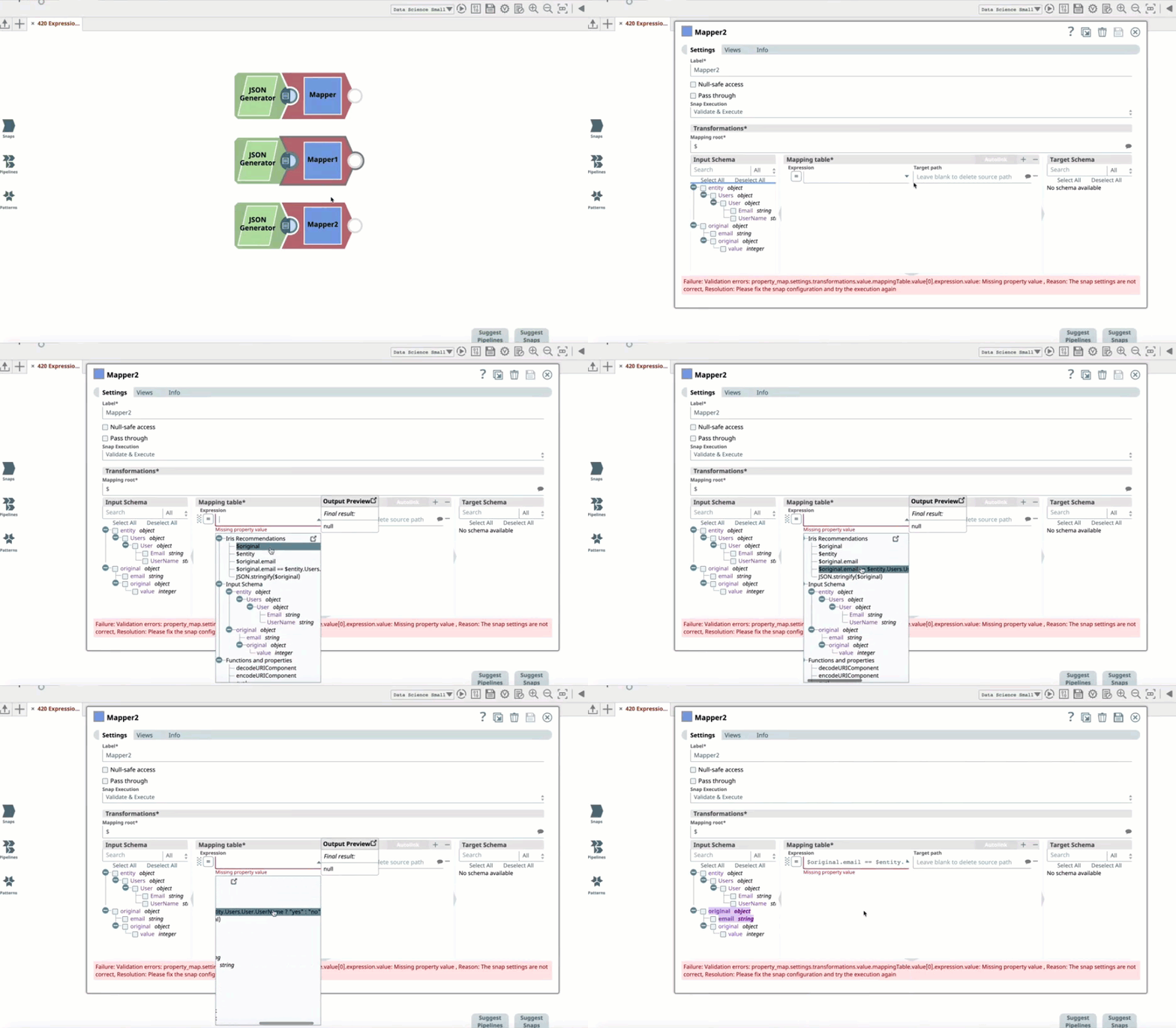
- Enhancing the UI icons for the Expression Toggle to better distinguish between On and Off modes:
Expression Toggle Off–Enter a value as a string..png?version=1&modificationDate=1580677938952&cacheVersion=1&api=v2&width=250&height=64)
Expression Toggle On–Enter a value as an expression.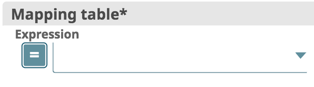
When you click  , you can enter an expression in the adjacent field by clicking (
 ) to display a drop-down list of available expressions.
- Additions to the SnapLogic Expression Language:
- toLocaleString: When formatting a date, you can now pass a locale language-tag in the options object.
- Array Functions: The following array functions are now available for Uint8 arrays.
- Uint8Array.Of: Creates a new Uint8 array from a variable number of arguments.
- Uint8Array.subarray(): Returns a new subarray from an Uint8 array, where the arguments are the indexes begin and end offsets.
- Uint8Array.indexOf(): Returns the first index at which a given element is present.
- Uint8Array.lastindex.Of(): Returns the last index at which a given element is present.
- concat: Returns a new array that concatenates the initial array with the arrays or values provided as arguments.
- Node Alerts: You can now view Snaplex node alerts on the Dashboard, where other information about your Pipeline executions is displayed. This change centralizes the location of monitoring information, enhancing the usability of this reporting functionality. Accordingly, these alerts no longer appear in the Activity Log in Manager.
- New Pipeline Parameter: You can now capture the start and end times of Tasks with task.start and task.end, which you can pass as an expression in a Mapper Snap. This capability is particularly useful for Scheduled Tasks, where you view the last execution window.
- Size Limitation on Pipeline Parameters: In this release (February 2020, 4.20), an additional limit is added which caps the total size of the Pipeline parameter values for one Pipeline execution (including parameters that are not captured) to 8MB. If the Pipeline parameter values exceed 8MB in size, then the Pipeline does not execute.
Known Issues
When you create or update a Task, the dialog displays a checkbox labeled Anomaly Notifications in preparation to enable a future functionality. Selecting the checkbox does not actually trigger any notifications.
Standard-mode Snaps
New Features and Enhancements
Reverting to the Old UI
You can revert to the old UI form by deselecting the New Form UI check box in the User Settings dialog. We will cease supporting the old UI form in a future release.
- If you have built custom Snaps, then we strongly recommend you to recompile your custom Snaps using our latest SDK, so that your Snaps can take advantage of the latest performance optimizations and security updates.
New Snaps
- Flow Snap Pack: Introducing the Gate Snap, which relies on all upstream Snaps successfully executing before you send their consolidated contents as a single document to the downstream Snaps.
- Salesforce Snap Pack: Introducing the Salesforce Bulk Query Snap, which enables you to perform bulk SOQL queries on Salesforce.
Introduces the SuccessFactors Snap Pack, which enables you to work with the human capital management (HCM) system, covering everything from payroll to employee engagement. This Snap Pack includes the following Snaps:
- SuccessFactors Create: Creates data objects in the SuccessFactors Data Center server.
- SuccessFactors Delete: Deletes data objects from the SuccessFactors Data Center server.
- SuccessFactors Read: Retrieves data objects from your SuccessFactors instance.
- SuccessFactors Update: Updates data objects from the SuccessFactors Data Center server to a selected item.
- SuccessFactors Upsert: Updates or inserts data objects from the SuccessFactors Data Center server to a selected item.
Updated Snap Packs
- Active Directory Snap Pack
- View all elements of array fields in Search and List Users Snaps: Fixes the Search Snap and the List Users Snap wherein the Snaps displayed only the first element of an array field. Now, the Snaps display all the elements of an array field.
- View all elements of array fields in Search and List Users Snaps: Fixes the Search Snap and the List Users Snap wherein the Snaps displayed only the first element of an array field. Now, the Snaps display all the elements of an array field.
- Flow Snap Pack: The Pipeline Execute Snap now provides the following capabilities:
- Specify the Snaplex on which to run child Pipelines. You can now select the Snaplex on which to run the child Pipelines through the Execute On and Snaplex Path fields. The default option is executing the child Pipeline on the same Snaplex node as the Parent, but you can also specify a different Snaplex through the drop-down list, which includes the option to manually enter a Snaplex name.
- Configure retry logic for child Pipeline executions. You can now configure retry logic for child Pipeline executions though the following fields: Number of Retries, Retry Interval, and Timeout fields.
- Specify the Snaplex on which to run child Pipelines. You can now select the Snaplex on which to run the child Pipelines through the Execute On and Snaplex Path fields. The default option is executing the child Pipeline on the same Snaplex node as the Parent, but you can also specify a different Snaplex through the drop-down list, which includes the option to manually enter a Snaplex name.
- REST Snap Pack
- Retain original file names when posting to Google Drive: The new Multipart related option in the Upload body type property in the REST Post [Not Recommended] Snap enables you to post files to the Google Drive API and retain the original names.
- Obtain access tokens from REST endpoints automatically: The REST Account now has a new Grant Type option called Client Credentials. This enables the Snap to obtain an access token to the client ID and client secret through the token endpoint URL.
- ServiceNow Snap Pack
- Query both autogenerated and custom fields in ServiceNow: The ServiceNow Query Snap enhances its scope to include both autogenerated and custom fields.
- Query both autogenerated and custom fields in ServiceNow: The ServiceNow Query Snap enhances its scope to include both autogenerated and custom fields.
- Workday Prism Analytics Snap Pack
- Specify bucket completion timeout values: The Workday Prism Analytics Bulk Load Snap now has a new field, Bucket Completion Timeout, which enables you to specify the maximum number of minutes for which you want the Snap to wait for the Workday Prism bucket to complete the bulk upload.
- Work with Workday Prism API v1 and v2: The Workday Prism Analytics Bulk Load Snap and the Workday Prism Analytics Account now support both v1 and v2 versions of the Workday Prism API.
- Specify bucket completion timeout values: The Workday Prism Analytics Bulk Load Snap now has a new field, Bucket Completion Timeout, which enables you to specify the maximum number of minutes for which you want the Snap to wait for the Workday Prism bucket to complete the bulk upload.
Deprecated Snaps
- LinkedIn Snap Pack: In this release, we retire the LinkedIn Snap Pack from the SnapLogic Snaps Catalog. Pipelines having the LinkedIn Snaps will no longer work.
Known Issues
- Excel Parser Snap: Does not read password-protected Excel files and fails with the error:
"Failure: Failed to parse input data." - PostgreSQL-Execute Snap: Does not support
$$as an escape character for enclosing string input, as$is a reserved character for variable substitution in SnapLogic. - Cassandra-Execute Snap: The Cassandra-Execute Snap using Apache Cassandra V3 does not support
$$as an escape character for enclosing string input, as$is a reserved character for variable substitution in SnapLogic. Generic JDBC-Execute Snap: If a
SELECTquery in the SQL statement field in the Snap Settings contains duplicate column names, then the query result displays the column name twice, with the latter mention prefixed with the table name. If the column name occurs more than twice, the second entry is still prefixed with the table name but it displays the value of the last mention of the column in the query. The example below illustrates this behavior.Example
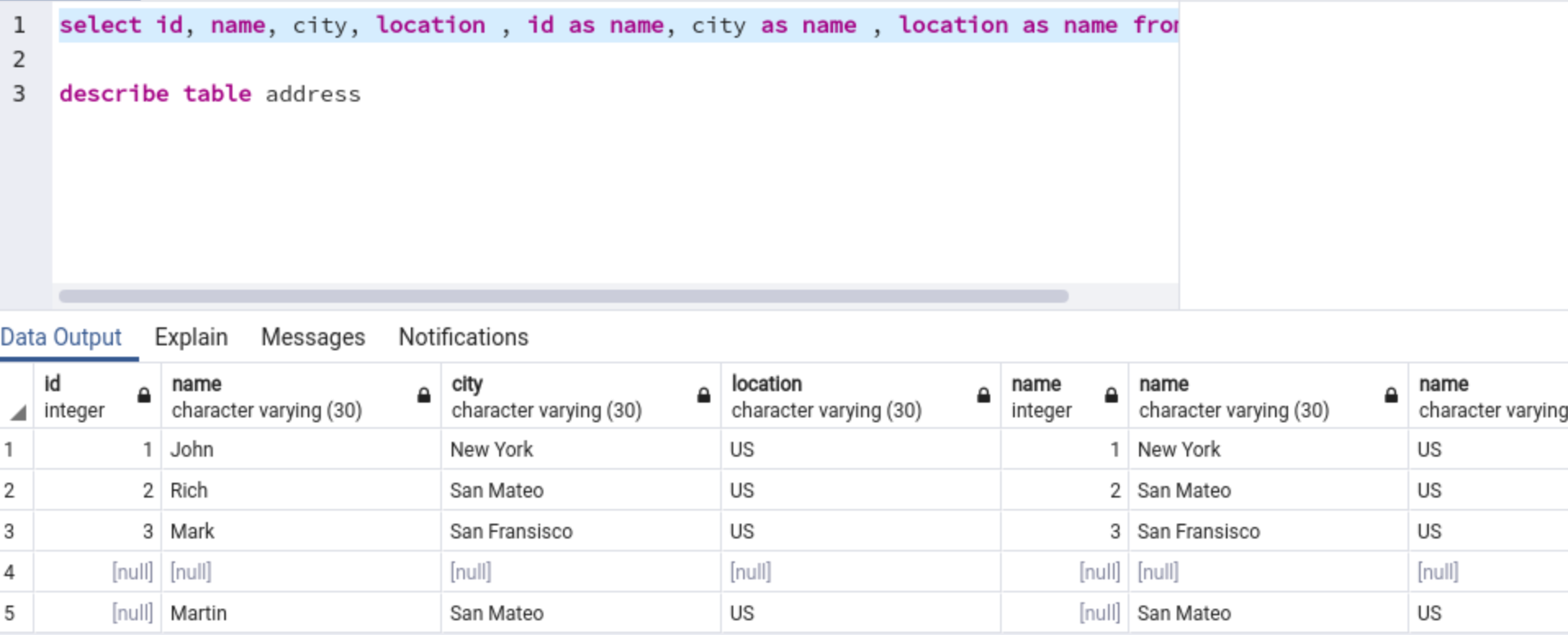
Consider the following query, where the column name "
name" is repeated three times:select id, name, city, location, id as name, city as name, location as name from addressExpected output:
The Generic JDBC - Execute Snap's output should reflect the correct query result containing all the seven fields, as shown in the image below:
Actual output:
The Snap's output displays the repeat occurrence of the column "
name"only once, prefixed with the table name "address" as shown in the image below. Further, it holds the value of the table column "location", which was mentioned last in theSELECTquery.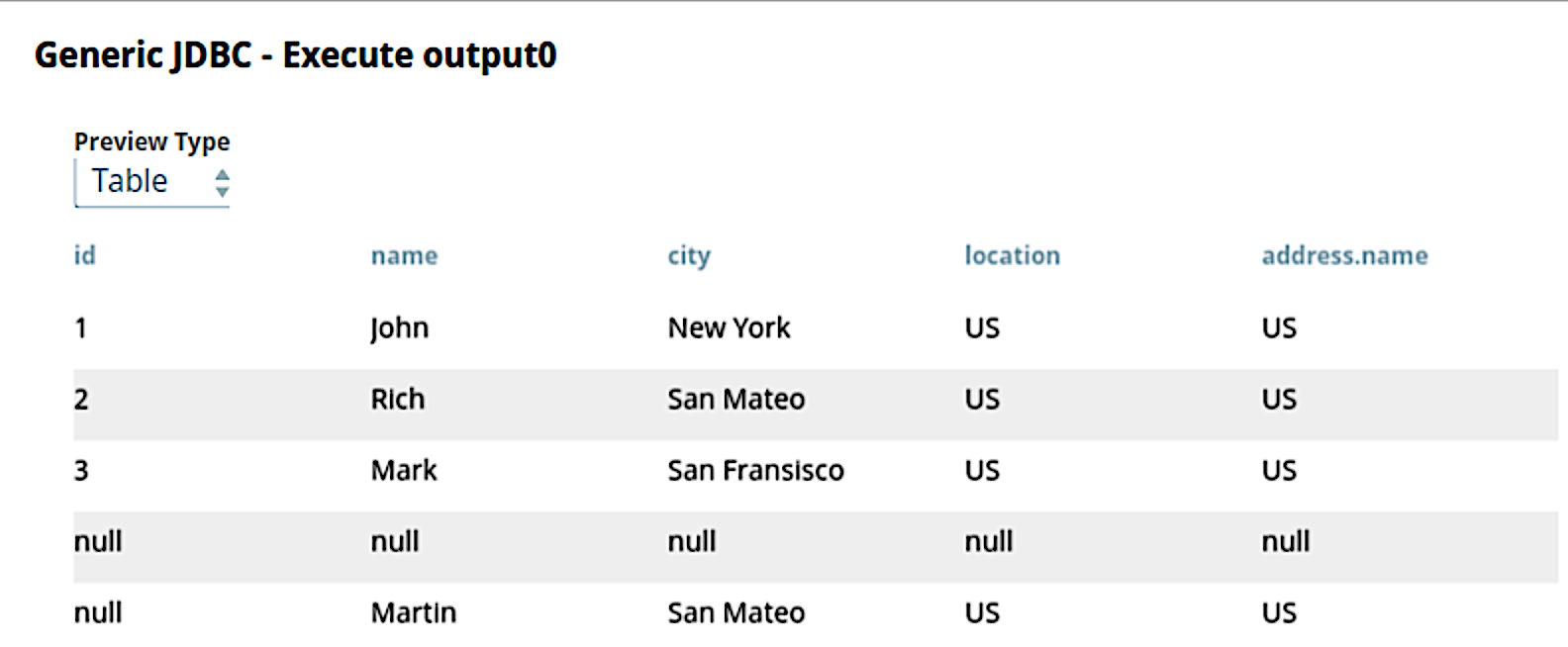
To avoid this issue, we recommend that you give unique column names in the query.
- SOAP Execute Snap: After upgrading your Snaplex to 4.20 GA version, Pipelines with SOAP Execute Snap that uses the Apache CXF library might hang without executing. The Snap using HTTPComponents library executes successfully.
- All Database Write (Insert/Update/Upsert) Snaps: When you set Auto commit to True in a database Snap Settings and Number of retries to more than 0 the retry functionality inserts duplicate records if the Snap tries reconnecting to the database. To avoid this error, we recommend you to do one of the following depending upon your use case:
- Set Auto commit to false, or
- Set Number of retries to 0 to avoid duplicate records passing downstream while executing a Pipeline, or
- Use a primary key in your database that does not allow duplicate records to be inserted into the database, or
Use an Upsert Snap instead of Insert Snap that overwrites any duplicate records.
Before setting Number of retries to more than 0, contact support@snaplogic.com for guidance.
- NetSuite SOAP Snap Pack: The following NetSuite Snaps currently do not support custom records: NetSuite Get, NetSuite Get List, NetSuite Async Get, and NetSuite Delete.
- Reltio Snap Pack: You cannot roll back the productized Reltio Snap Pack to a prior version due to an upgrade to the platform-provided AWS SDK version that it leverages.
- Transform Snap Pack: If you are using OpenJDK 11 in the Snaplex on which you want to execute Excel Formatter Snaps, you must install Fontconfig on the Snaplex. Otherwise, the Snap displays an error.
- Hadoop Snap Pack:
- After upgrading your Snaplex to 4.20 GA version, Pipelines with HDFS Reader Snap that use Kerberos authentication might remain in the start state.
- ORC Writer/Reader Snaps fail on S3 when using the 4.20 Snaplex with the previous Snap Pack version (hadoop8270 and snapsmrc528) displaying this error –
Unable to read input stream, Reason: For input string: "100M" error - ORC Reader/Writer and Parquet Reader/Writer Snaps fail when executing a Pipeline on S3 with this error –
org.apache.hadoop.fs.StorageStatistics
- Diff Snap (Standard mode): When using the new UI form to create new or editing existing Pipelines with Diff Snap, Output view name values go missing in Snap Settings after switching to Views or Info tab. The workaround is to switch back to the old UI form (disable New UI Form in User Settings) and then create the new Pipelines or edit existing Pipelines.
- Workday Read Snap:
- Using the old UI form, the Snap does not find existing Workday accounts.
- Using the new UI form, the Snap crashes when validating a Pipeline displaying a null pointer exception error.
- A Null Pointer Exception error displays when updating Snaps that contain empty property values in the new UI form. The existing Pipelines are not impacted unless a change is made on the Snap and saved. A workaround is to switch to the old UI form (disable New UI Form in User Settings).
Prior 4.19 Snap Dot Releases in 4.20 GA
The prior 4.19 Snap Dot Release updates are now a part of the current 4.20 GA release.
eXtreme-mode Snaps (Big Data)
New Features and Enhancements
Data Preview Enhancement: Displays Snap output data as pie, bar, line, and scatter charts. You can see the entire dataset while navigating through your data records in the paginated tabular view. Apart from offering better controls for navigating through your previewed data per Snap, the enhanced Data Preview form provides multiple options for plotting the various categories of data.
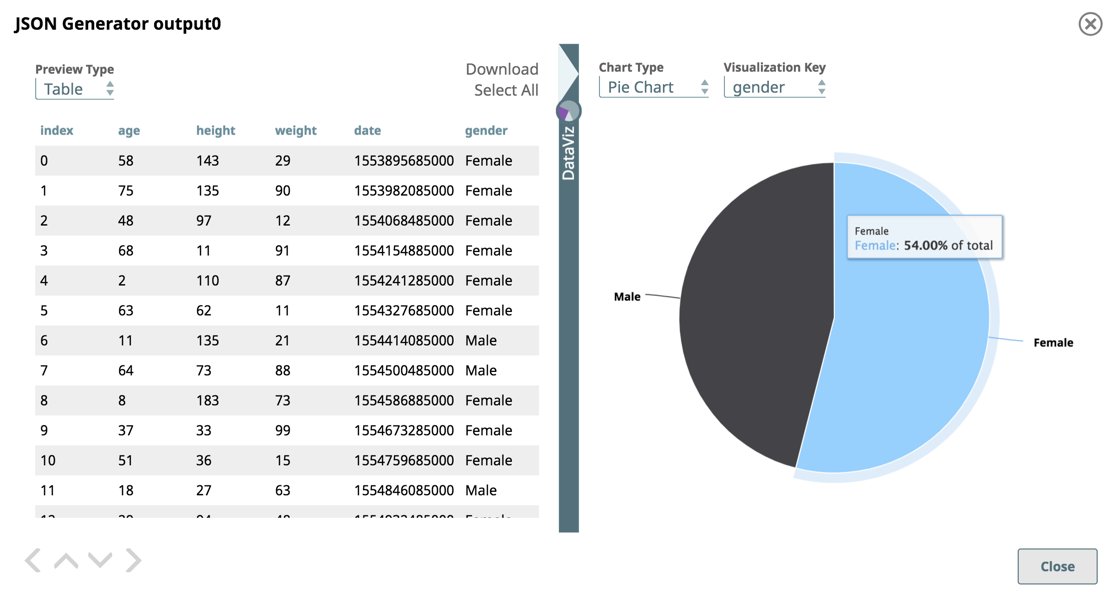
You can also select the number of records (up to 2000) that you want to preview through the settings menu in SnapLogic Designer. Go to SnapLogic Designer > User Settings > Preview doc count. The default is 50 records.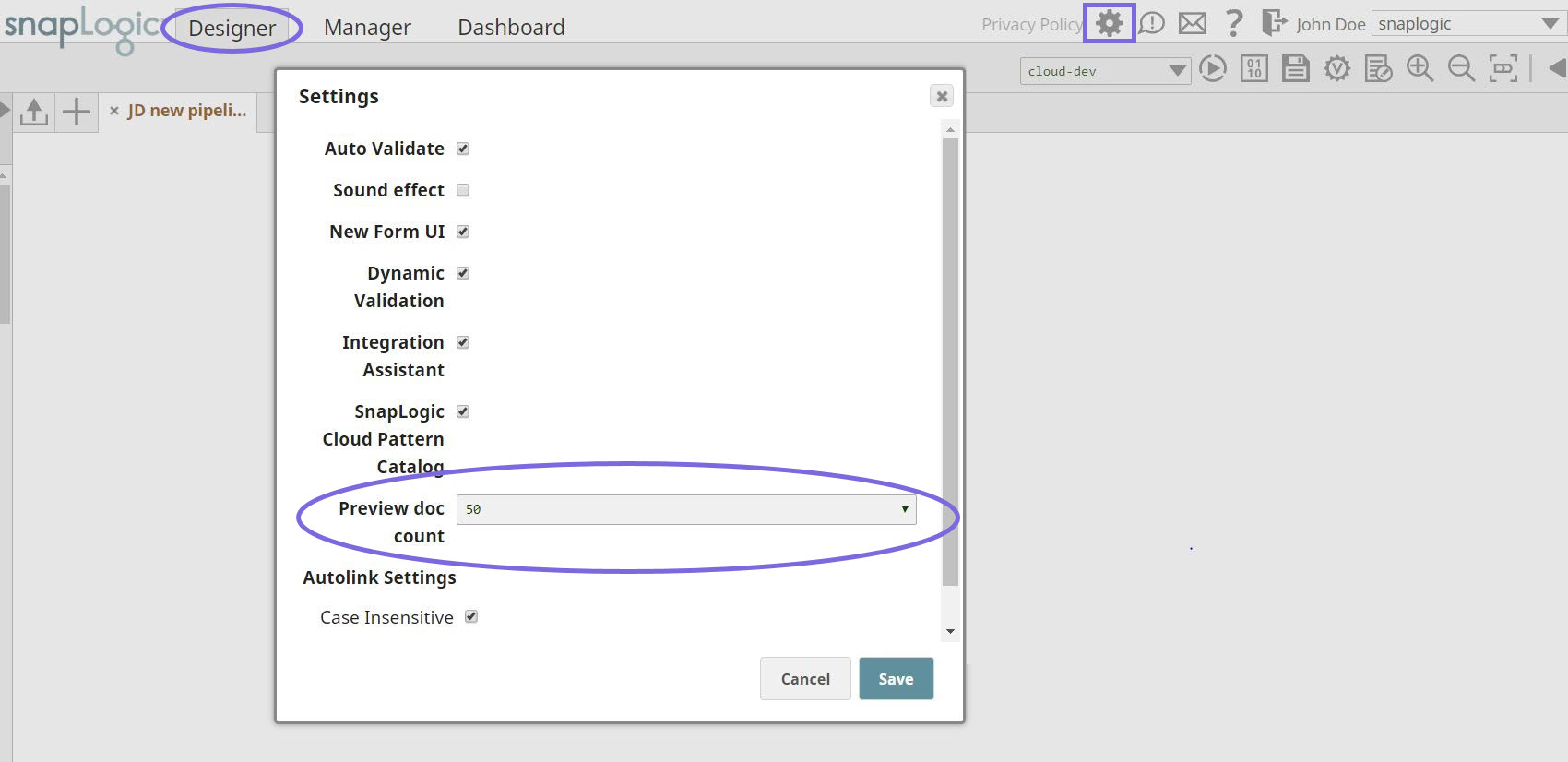
eXtreme Execute Snap Pack: Introducing a new account type, /wiki/spaces/AP/pages/891289679. This enhancement makes account configuration mandatory for the PySpark Script and JAR Submit Snaps.
Breaking Change
Spark 2.x PySpark Script and JAR Submit Snaps now require an account to be configured for the Pipelines to successfully execute. Hence, all existing and new eXtreme Pipelines having either of these Snaps will need either an AWS or Azure account configured.
Spark SQL 2.x Snap Pack: Introducing a new account type, Amazon Web Services (AWS) Account, to support object encryption using AWS Key Management Service (KMS). This enhancement makes account configuration mandatory for the Spark 2.x File Writer and File Reader Snaps.
Breaking Change
Spark 2.x File Writer and File Reader Snaps now require an account to be configured for the Pipelines to successfully execute. Hence, all existing and new eXtreme Pipelines having either of these Snaps will need either an AWS or Azure account configured.
New Snaps
Spark SQL 2.x Snap Pack: Introducing the Sample Snap, which enables you to generate a sample dataset from the main dataset. You can use the sample dataset to test Pipelines, thereby saving resources while designing Pipelines.
Updated Snap Packs
- Delta Lake Snap Pack: Renames the Table Action field in the Delta Lake Insert Snap to Table Insert Policy.
- eXtreme Execute Snap Pack: Enhances the PySpark Script Snap to display the Pipeline Execution Statistics after a Pipeline with the Snap executes successfully.
- eXtreme Snowflake Snap Pack: Adds a new field, Table Insert Policy, in the Snowflake Insert Snap to handle duplicate records in the insert statement.
Deprecated Features
We have ceased support for Hadooplex and Spark 1.6 Snaps with this release.
Known Issues
- eXtreme Pipelines configured with Azure Databricks Accounts having Snowflake Select and Snowflake Insert Snaps need at least one additional eXtreme Snap in between them for the Pipelines to successfully execute.
- Data visualization for eXtreme Pipelines on AWS EMR gives an
Internal Server Errorin DataViz in the following conditions:- when you have null and nested structure in preview data, or
- when previewing complex objects (such as pie charts).
- eXtreme Pipelines on Azure Databricks with Jar Submit Snap fail with the job canceled as the SparkContext shuts down.
Prior 4.19 eXtreme Dot Releases in 4.20 GA
The following 4.19 eXtreme (Big Data) Dot Release update is now a part of the 4.20 GA release.
4.20 UAT Delta
This section tracks the changes made during the iterative pushes to the UAT server and the GA release. The schedule is:
- UAT #1: Friday, January 24, 2020 (Release updates are published above)
- UAT #2: Friday, January 31, 2020
- GA: Saturday, February 08, 2020 (9 p.m. PT)
UAT #2 Fixes
Platform/UI
- Fixes an issue where creating, deleting, or importing an Ultra task is delayed when using the previous Snaplex version (4.19 GA).
4.20 Dot Releases
Platform
Always upgrade to the Snaplex version that is labeled Recommended.
| Update Date | Snaplex Build | Updates |
|---|---|---|
| master-6950-4.20 Patch 3 (Recommended) |
| |
| master-6851-4.20 Patch 2 |
| |
| master-6758-4.20 Patch 1 |
|
UI
Updates to the UI happen automatically and do not require a Snaplex upgrade. However, you may have to clear the cache in your browser.
| Update Date | Updates |
|---|---|
| |
| |
| Fixes an issue where some custom Snaps were not displaying the Expression Toggle even though the Expression Toggle had been enabled previously. |
Standard-mode Snaps
| Snap Pack | Update Date | Build | Updates | ||||||
|---|---|---|---|---|---|---|---|---|---|
| JMS | jms8824 | Fixes an issue in the JMS Consumer Snap due to which the Snap does not release the memory even after Pipeline termination, leading to huge memory spikes. | |||||||
| Workday | workday8817 | Fixes the Workday Write Snap that ignores the Import Synchronized check box selection while importing object data. The Snap now:
Existing Pipelines using this Snap may experience longer execution times due to the synchronous behavior. However, you no longer need to use an additional Snap to capture and pass on the request status to downstream Snaps. | |||||||
| SOAP | soap8816 | Enhances the SOAP Execute Snap to allow user-specified empty fields in the SOAP request. | |||||||
| MySQL | db/mysql8815 | Fixes the MySQL Stored Procedure Snap to resolve compatibility issues with the Amazon Aurora database. | |||||||
| Oracle | db/oracle8812 | Enhances the Oracle Snap Pack to support connection to the Oracle ADG (Active Data Guard) URL. | |||||||
| email8813 | Fixes an issue with the Email Sender Snap that caused the Snap to fail while uploading attachments to SMB locations when the attachment password contained a forward slash "/". | ||||||||
| Salesforce | salesforce8814 | Fixes the Salesforce Create, Update, Bulk Create, Bulk Update, and Bulk Upsert Snaps, enabling you to upload files containing duplicate values across multiple fields. | |||||||
| SAP | sap8811 | Updates the SAP IDoc Write Snap with the following:
| |||||||
| JMS | jms8810 | Fixes the connection leak issue in the JMS Producer Snap. | |||||||
| SAP HANA | snapsmrc535 | Reverts the SAP/HANA Snap Pack to the stable version snapsmrc535. | |||||||
| SAP S/4HANA | saps4hana8804 | Introduces the SAP S/4HANA Snap Pack to support the SAP S/4 HANA Cloud and SAP S/4 HANA On-premise environments. The Snap Pack includes the following Snaps: | |||||||
| Oracle | db/oracle8803 | Support for Oracle Database 19c. | |||||||
| Binary | binary8801 |
| |||||||
| Snowflake | db/snowflake8800 | Certifies the Snowflake Snap Pack against JDBC Driver version 3.12.3. Snowflake Execute and Multi-Execute Snaps may break existing Pipelines if the JDBC Driver is updated to a newer version. With the updated JDBC driver (version 3.12.3), the Snowflake Execute and Multi-Execute Snaps' output displays a Status of "-1" instead of "0" without the Message field upon successfully executing DDL statements. If your Pipelines use these Snaps and downstream Snaps use the Status field's value from these, you must modify the downstream Snaps to proceed on a status value of -1 instead of 0. This change in the Snap behavior follows from the change introduced in the Snowflake JDBC driver in version 3.8.1: | |||||||
| REST | rest8798 | Fixes the REST POST Snap that fails when a single file is uploaded in multi-part form using the Single file upload Snap settings. | |||||||
| NetSuite | netsuite8799 | Updates the NetSuite Create, Update, Upsert, and Async Upsert Snaps to use the Classification type instead of Class, to resolve schema generation issues. While the Class type remains available in the NetSuite Search and Async Search Snaps for backwards compatibility, use of the Classification type is recommended. | |||||||
| Salesforce | salesforce8797 | Fixes the Salesforce Subscriber Snap wherein the Salesforce Subscriber and Mapper Snap combination generates Null output for Array object type. | |||||||
| SQL Server | db/sqlserver8793 | Fixes an issue in the SQL Server - Insert Snap due to which the Snap failed to load values of data type INT. | |||||||
| SQL Server | db/sqlserver8796 | Fixes the SQL Server - Bulk Load Snap to mask the password in the logged exception messages. | |||||||
| Transform | transform8792 | Resolves the NoClassDefFoundError in the Join Snap on Windows Snaplex instances. | |||||||
| Binary | binary8791 | Fixes the ZipFile Write Snap wherein the Snap fails to execute if it finds different zip file paths when processing multiple input binary data. | |||||||
| Active Directory | activedirectory8789 | Fixes the Active Directory Snaps to successfully read special characters in the Existing distinguished name and Distinguished name Snap settings without requiring escape characters. | |||||||
| Transform | transform8788 | Resolves the NullPointerException in the Join Snap on Windows Snaplex instances. | |||||||
| Binary | binary8785 |
| |||||||
| MySQL | db/mysql8786 | Fixes the MySQL - Bulk Load Snap to use the UTF-8 character set for writing temporary files in order to successfully handle special characters, irrespective of the value specified in the Character set field in the Snap settings. | |||||||
| Hadoop | hadoop8776 | Updates the Hadoop Snap Pack to use the latest version of org.xerial.snappy:snappy-java for compression type Snappy, in order to resolve the java.lang.UnsatisfiedLinkError: org.xerial.snappy.SnappyNative.maxCompressedLength(I)I error. | |||||||
| JDBC | jdbc8783 | Fixes the Generic JDBC Execute Snap that adds the value of the previous column's field to a NULL field when SELECT queries having duplicate column names are run on the PostgreSQL database. | |||||||
| Binary | binary8775 | Fixes the File Writer Snap to allow the deletion of temporary Google Storage files from the /tmp directory of the Groundplex if Pipeline execution stops before completion. | |||||||
| Redshift | db/redshift8774 | Fixes the Redshift - Execute Snap that hangs if the SQL statement field contains only a comment ("-- comment"). | |||||||
| Google BigQuery | google/bigquery8773 | Fixes the NPE issue with stored procedures and DROP TABLE queries in the Google BigQuery Execute Snap. | |||||||
| /wiki/spaces/AP/pages/615317532 | mlcore8770 | Adds the log4j dependency to the ML Core Snaps to resolve the "Could not initialize class org.apache.log4j.LogManager" error. | |||||||
| ML Analytics | mlanalytics8769 | Removes the unused jcc-optional dependency from the ML Analytics Snap Pack. | |||||||
| /wiki/spaces/AP/pages/615383041 | mldatapreparation8771 | Removes the unused jcc-optional dependency from the ML Data Preparation Snap Pack. | |||||||
| ML Natural Language Processing | mlnlp8772 | Removes the unused jcc-optional dependency from the ML Natural Language Processing Snap Pack. | |||||||
| JMS | jms8765 | Fixes an issues with the JMS Consumer Snap that fails to successfully create durable subscribers when run in asynchronous mode. | |||||||
| SOAP | soap8762 | Fixes the SOAP Execute Snap to:
| |||||||
| Microsoft Dynamics AX | msdynamicsax8763 | Fixes the Microsoft Dynamics AX Execute Snap to use the correct headers list for returning the HTTP response code. | |||||||
| Workday Snap Pack | workday8761 | Fixes the Workday Read Snap that fails to validate when configured in the new form UI. | |||||||
| Transform | transform8760 |
JSON Formatter Snap behavior might break existing Pipelines The JSON Formatter Snap output now includes only those fields from the input file that are specified in the Content field under Settings. If your Pipelines use the JSON Formatter Snap with the JSON lines field selected, they may fail to execute correctly if the Content field mentions a specific object or field but the downstream Snap is expecting the entire data. Hence, for backward compatibility, you must review the entries in the Content field based on the desired output, as follows:
The behavior of the Snap when the JSON lines field is not selected is correct and remains unchanged. The Example: Filtering Output Data Using the JSON Formatter Snap's Content Setting further illustrates the corrected vs the old behavior.
XML Generator Snap behavior might break existing Pipelines The XML Generator Snap now gives precedence to any custom XML data that is provided over data coming from upstream Snaps, to generate the output. Existing Pipelines using the XML Generator Snap may fail in the following scenarios. Use the resolution provided to update the Snap settings based on the XML data you want to pass to downstream Snaps.
| |||||||
| Snowflake | db/snowflake8758 | Re-release of fixes from db/snowflake8687 for 4.20: Fixes the Snowflake Bulk Load Snap wherein the Snap fails to load documents containing single quotes when the Load empty strings checkbox is not selected. | |||||||
| Confluent Kafka | confluentkafka8747 | Updates the Confluent Kafka SSL Account settings to make the Truststore filepath and Truststore password properties optional. | |||||||
| Box | box8743 | Fixes an issue with the Box Snap Pack wherein the OAuth2 token auto-refresh fails for Box accounts. The fix includes a patch released by Box to restore functionality to the "https://www.box.com/api/oauth2/token" URL of the deprecated version 1 of the Box API. Box recommends users to start using the endpoint in version 2 of the Box API: "https://api.box.com/oauth2/token". For more information, see the Box blogpost. | |||||||
| Binary | binary8741 |
| |||||||
| Transform | transform8738 |
| |||||||
| email8734 | Fixes the Email Sender Snap wherein the Snap fails to read attachments from the SMB3 server. | ||||||||
| soap8712 | Fixes the SOAP Execute Snap where the Snap throws an NPE error when generating a SOAP request template. | ||||||||
| Azure Active Directory | azureactivedirectory8713 | Fixes Azure Active Directory Snaps where the Snaps fail after running approximately an hour when the access token times out, and the Snap fails to detect the updated token. | |||||||
| Binary | binary8710 |
| |||||||
| email8711 | Fixes the Email Sender Snap where the Snap:
| ||||||||
| DynamoDB | dynamodb8709 | Fixes the DynamoDB Scan Snap and the DynamoDB Update Snap where:
|
eXtreme-mode Snaps
| Update Date | Build | Update |
|---|---|---|
| N/A | Fixes an issue with eXtreme Pipelines where clicking Data Visualization in Snaps in which null values are being passed can produce internal server errors. |
Have feedback? Email documentation@snaplogic.com | Ask a question in the SnapLogic Community
© 2017-2025 SnapLogic, Inc.